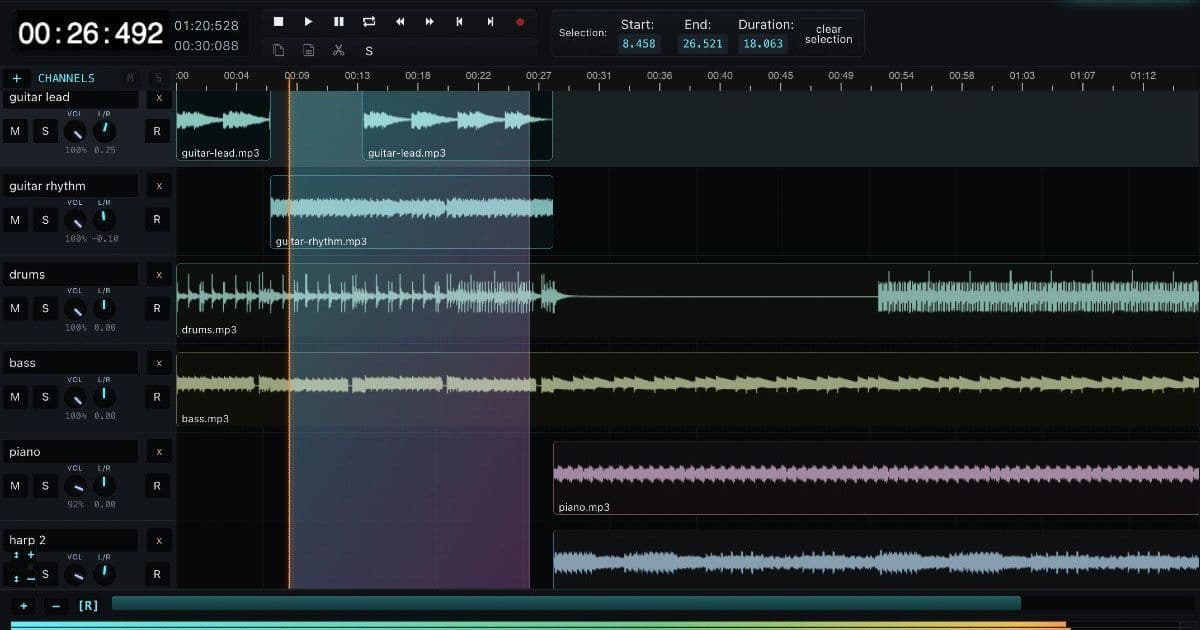
AudioMass is a free, open-source web audio editor that runs entirely in the browser without plugins or installations. It offers multi-track editing, waveform visualization, and various effects directly in the browser, representing a significant step forward in web-based audio production.
AudioMass: Full-Featured Audio Editing in Your Browser
The barrier to audio editing has traditionally been high. Professional tools like Audacity, Adobe Audition, or Logic Pro require software installation, significant disk space, and often come with price tags that make casual users hesitate. AudioMass, a free web-based audio editor, challenges this assumption by delivering a surprisingly capable editing environment that runs entirely in your browser.
What AudioMass Offers
At its core, AudioMass provides the essential features you'd expect from a desktop audio editor:
- Waveform visualization with zoomable timeline
- Multi-track support (currently in beta)
- Selection tools for precise editing
- Effects processing
- Import/export capabilities
The interface will feel familiar to anyone who has used desktop audio software. You get transport controls, a timeline ruler, channel meters showing audio levels, and a clear visual representation of your audio waveform.
Technical Implementation
What makes AudioMass interesting from a technical standpoint is its reliance on the Web Audio API. This browser API provides a powerful audio processing infrastructure that JavaScript can interact with directly. The Web Audio API supports:
- Real-time audio processing
- Audio routing and mixing
- Effects and filters
- Precise timing control
AudioMass leverages these capabilities to perform operations that previously required native code. The entire editing workflow happens client-side, meaning your audio files never leave your computer during editing.
Why This Matters
The significance of browser-based audio tools extends beyond convenience. Several use cases make this approach valuable:
Quick edits without commitment. Need to trim a podcast clip, remove a section from an interview, or normalize audio levels for a quick project? AudioMass handles these tasks without requiring you to launch a heavier application.
Cross-platform compatibility. Since it runs in any modern browser, you can use AudioMass on Windows, macOS, Linux, or even a Chromebook without worrying about software compatibility.
No installation required. For users who work on computers where they cannot install software, browser-based tools provide an alternative.
Privacy-conscious editing. Because processing happens locally, sensitive audio content never travels to a server.
Limitations to Consider
Browser-based audio editing does come with constraints. Performance can vary depending on your browser and computer capabilities, especially with longer recordings or complex projects. The Web Audio API, while powerful, doesn't match the raw performance of native audio processing. Features like VST plugin support, which desktop DAWs offer, aren't available here.
For professional workflows involving music production with many tracks, software instruments, or complex mixing, desktop applications remain the better choice.
The Bigger Picture
AudioMass represents a broader trend of capable web applications challenging the assumption that serious work requires desktop software. Just as web-based image editors have matured and code editors like VS Code have emerged, audio production tools are following a similar trajectory.
The tool is entirely free and open source, available at audiomass.co. You can drop in an audio file or use the built-in sample to start experimenting immediately.
For occasional audio editing tasks, the convenience of opening a browser tab instead of launching installed software is compelling. While AudioMass won't replace a full digital audio workstation for serious music production, it demonstrates that web browsers have become capable enough to handle meaningful audio work.
Comments
Please log in or register to join the discussion