Apple's iOS 26 Passwords app introduces a hidden but crucial feature that saves generated passwords for 30 days, preventing the frustrating password reset loop when websites crash or don't properly save new credentials.
Apple's Passwords app has become my full-time password manager thanks to several iOS 26 changes. And there's one welcome new feature I recently discovered that can prevent the headache of a forgotten password loop.
The problem iOS 26 solves
Have you ever had Apple Passwords generate a new password that didn't end up being saved correctly? Sometimes a website crashes at the wrong moment, or uses protocols that don't exactly play nice with Apple Passwords. I've had this happen several times since Apple Passwords first launched. And it always causes a bit of a headache.
Why? Because the new password that was generated ends up being lost. Thus, I have to go through the hassle of a "Forgot your password?" loop—waiting for the password reset email, setting a new password, and hoping it saves properly the second time.
The hidden solution in iOS 26
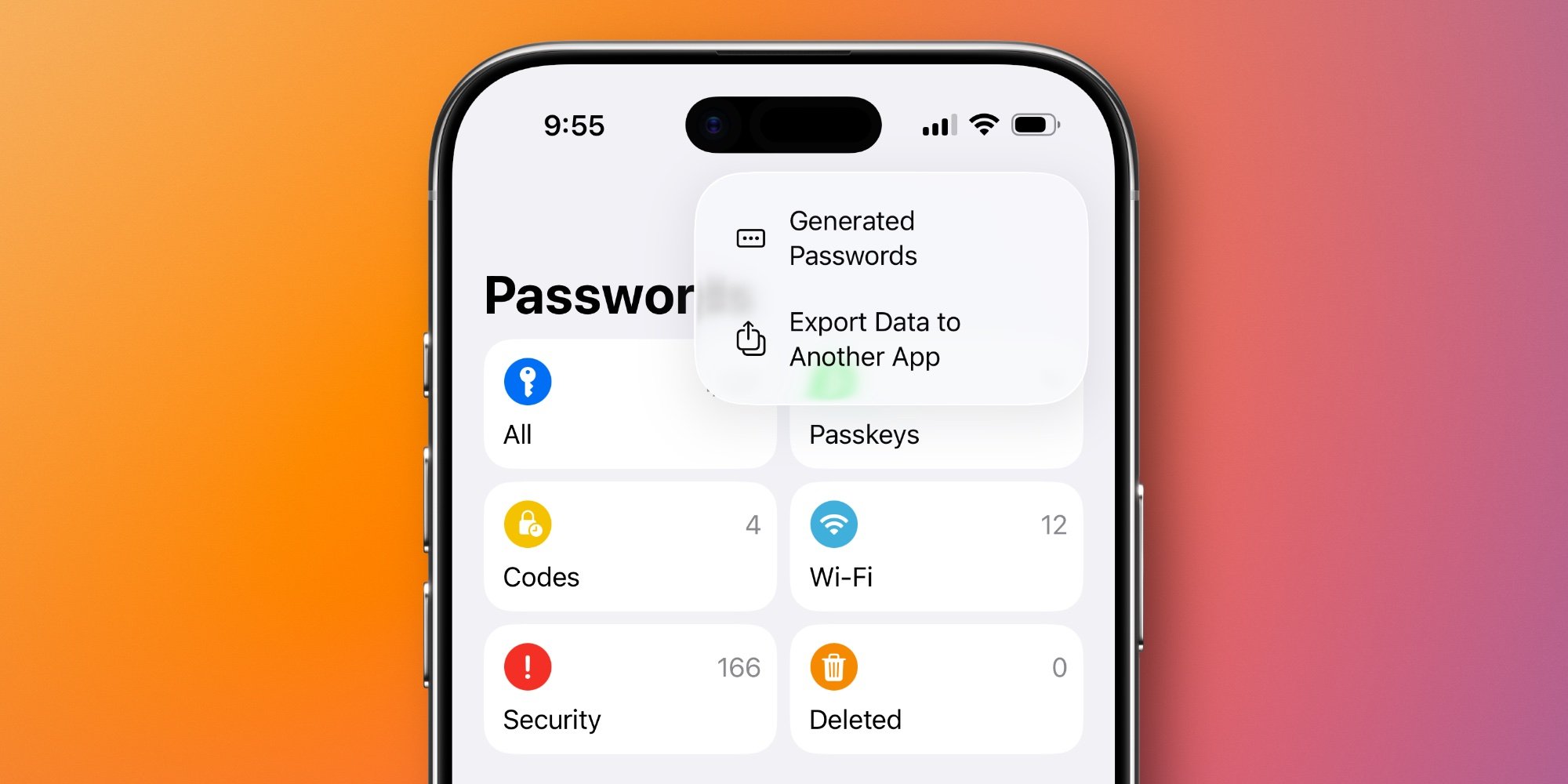
But in iOS 26, Apple Passwords added a new feature that can help. Unfortunately, it's a bit hidden. Now, when new passwords have been generated in iOS, but aren't fully saved inside the Passwords app, a new menu option appears.
Available behind the three-dot icon in Passwords' top-right corner, you'll see a 'Generated Passwords' option. The reason I say it's hidden is that this option only appears when a new password has been generated recently. Otherwise, it disappears entirely. This means most of the time, you might never come across it.
How the 'Generated Passwords' menu works
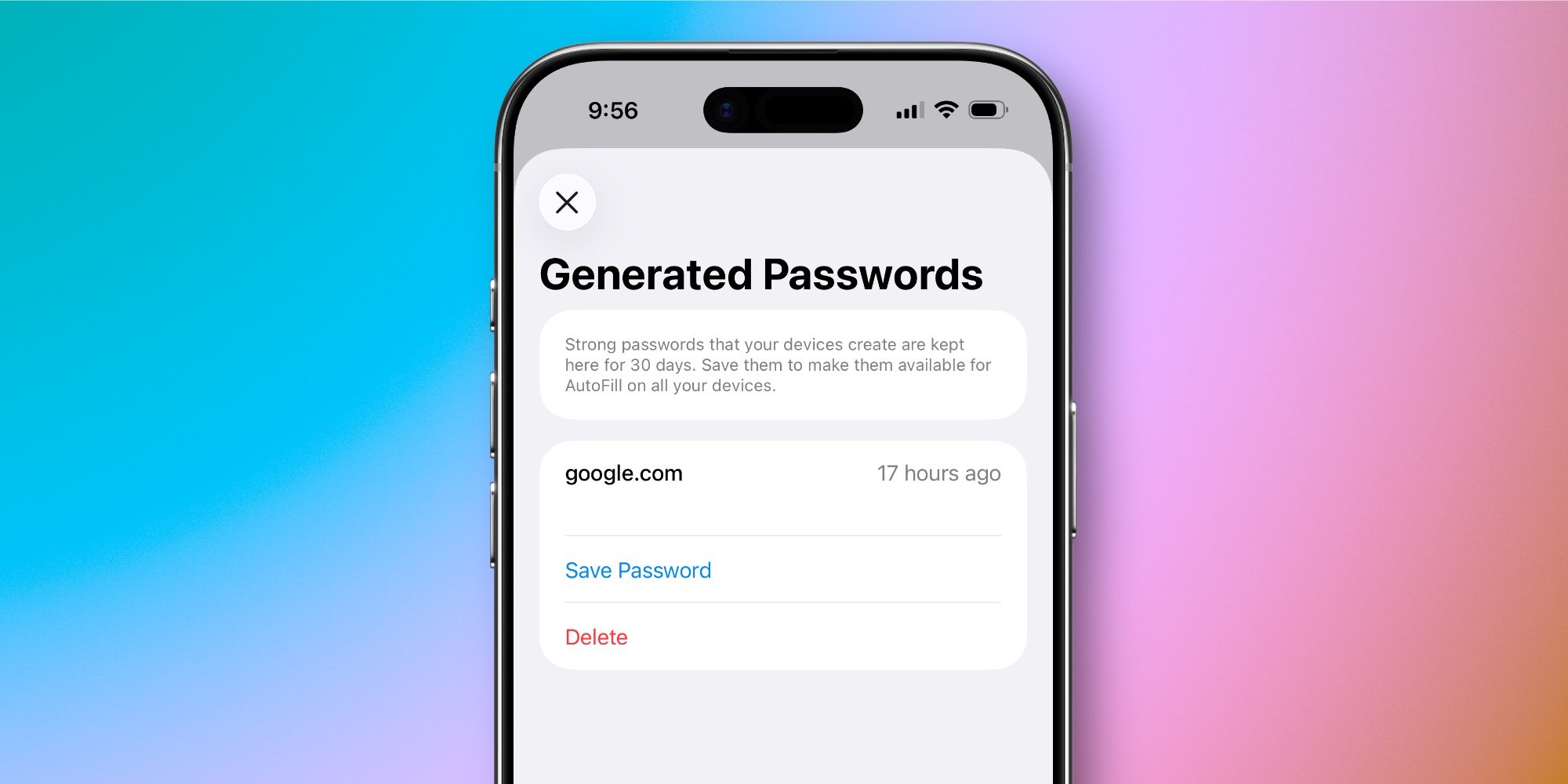
When the 'Generated Passwords' menu does appear though, here's what it does. If you have recently generated a password, opening the menu shows the website that password was created for, how long ago it was created, and options to Save or Delete it.
From the in-app description: Strong passwords that your devices create are kept here for 30 days. Save them to make them available for AutoFill on all your devices.
If you choose to save the password, you'll be asked to enter a user name and other optional details to create a proper login entry in the app.
Why this matters for everyday users
This feature addresses a real pain point that has plagued password managers since their inception. When a website fails to properly save a generated password, users are left in a frustrating situation where they have no way to retrieve the credentials they just created.
The 30-day retention period is particularly clever—it gives users ample time to realize something went wrong and recover their password before it's permanently lost. This is especially useful for accounts you don't access frequently, where you might not immediately notice that the password wasn't saved correctly.
A missed opportunity for discoverability
I wish Apple made the Generated Passwords menu more visually prominent for users. For example, a little in-app badge on the top-right menu might be nice to indicate a new password hasn't been properly saved.
In any case though, once you know about the feature, it can be a life-saver the next time you go looking for a new password inside the app.
The bigger picture for iOS 26
This small but significant improvement demonstrates Apple's continued refinement of built-in security features. While third-party password managers have offered similar functionality for years, having it natively integrated into iOS makes it accessible to the millions of users who rely on Apple's default password management.
The feature also highlights a broader trend in iOS 26 toward more robust security and privacy controls, with Apple continuing to enhance its built-in apps to reduce reliance on third-party solutions.
Have you used iOS 26's new Generated Passwords feature before? Let us know in the comments.
Comments
Please log in or register to join the discussion