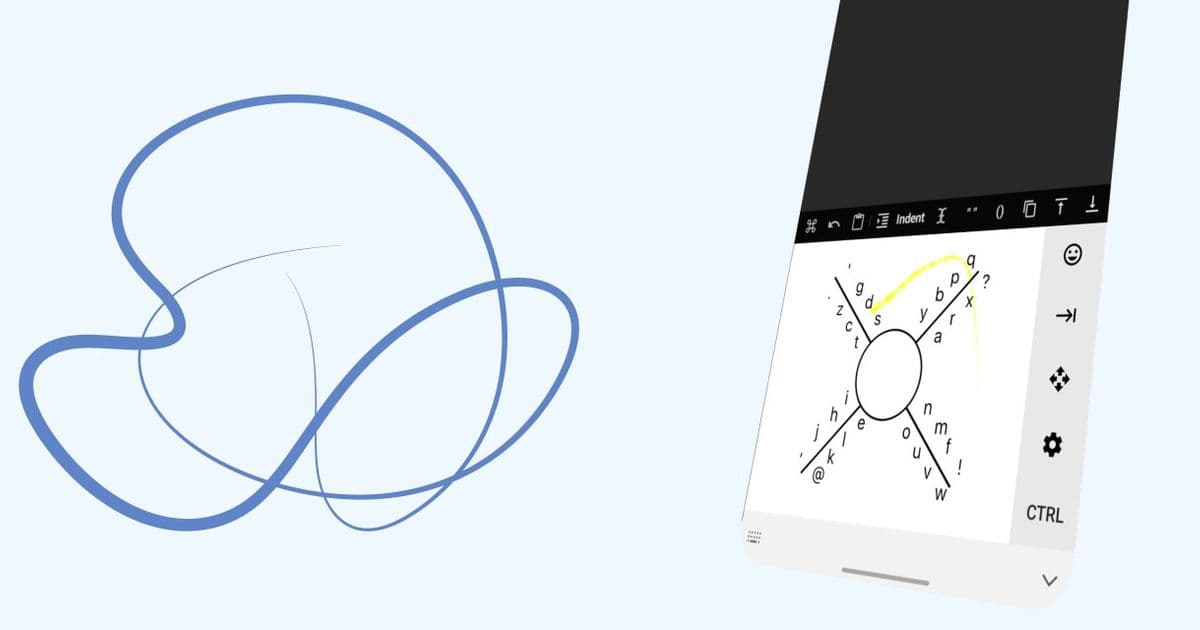
8VIM reimagines mobile text input by combining 8pen's gesture-based approach with Vim's modal editing, creating a keyboard that doubles as a full-featured text editor for Android devices.
The evolution of mobile text input has long been constrained by the limitations of physical screen real estate and the awkwardness of traditional QWERTY layouts on touch devices. While swipe keyboards and predictive text have made incremental improvements, a new open-source project called 8VIM takes a radically different approach by embedding a full text editor directly into an Android keyboard, drawing inspiration from both the innovative 8pen keyboard and the venerable Vim editor.
The Problem 8VIM Solves
Traditional mobile keyboards force users into a constant context switch between typing and editing. Need to move the cursor? Tap the screen precisely. Want to select text? Tap and hold, then adjust those frustratingly small handles. Need to delete multiple characters? Tap that tiny backspace button repeatedly. This fragmented workflow breaks concentration and slows productivity, especially for users who frequently edit text on their mobile devices.
8VIM addresses this by creating a unified input environment where typing and editing become seamless extensions of the same interface. The project emerged from frustration with 8pen, a gesture-based keyboard that the creator could no longer access despite having paid for it. Rather than simply recreating 8pen, the developer expanded the concept into something more powerful and flexible.
How It Works: The 8pen Foundation
The core interaction model borrows from 8pen's innovative approach. Instead of individual keys, 8VIM uses a central starting point from which users draw gestures in different directions and patterns. This radial design maximizes the use of limited screen space while allowing for a much larger effective "key" area than traditional keyboards provide.
The gesture system is intuitive: users start from a central point and draw lines outward in specific patterns to represent different characters or commands. This approach reduces the precision required compared to tapping tiny keys and can be performed with larger, more comfortable motions.
The Vim Influence: Modal Editing on Mobile
Where 8VIM truly distinguishes itself is in its integration of Vim's modal editing philosophy. Vim users know the power of modes—switching between insert mode for typing and normal mode for navigation and manipulation. 8VIM brings this paradigm to mobile, allowing users to:
- Navigate text efficiently using gesture-based commands instead of tapping the screen
- Delete words or lines with single gestures rather than holding backspace
- Select and manipulate text through intuitive motion patterns
- Switch contexts without lifting fingers from the screen
This modal approach means that once users learn the gesture vocabulary, they can perform complex text operations with minimal effort. The learning curve exists, but for power users, the efficiency gains are substantial.
Technical Implementation and Open Source Philosophy
Built entirely in Kotlin, 8VIM demonstrates modern Android development practices. The project maintains an impressive 100% Kotlin codebase and has attracted contributions from 31 developers, with 17 additional contributors helping shape its evolution. With 552 stars and 72 forks on GitHub, the project has garnered significant community interest.
The open-source nature serves multiple purposes:
- Transparency: Users can verify the keyboard isn't collecting sensitive data
- Extensibility: Developers can modify or extend the gesture system
- Community improvement: Bug fixes and features come from diverse perspectives
- Trust: Security-conscious users can audit the code themselves
Practical Applications and Use Cases
8VIM shines in several scenarios:
For developers and writers who spend significant time editing code or prose on mobile devices, the efficient navigation and manipulation commands can dramatically reduce editing time. The ability to quickly move by words, delete lines, or select text without precise tapping is particularly valuable.
For accessibility users who may struggle with fine motor control required for traditional keyboards, the larger gesture areas and reduced need for precision tapping can make text input more manageable.
For productivity-focused users who want to minimize context switching, having editing commands integrated into the keyboard eliminates the need to constantly switch between keyboard and selection tools.
Getting Started and Community
The project maintains active development with regular releases—82 releases to date, with the latest being v0.17.5. Users can download APKs from the release page or become beta testers for early access to new features. The comprehensive usability guide available on the project website helps new users learn the gesture system.
The 8VIM community extends beyond just the Android app. The project maintains documentation, a wiki for user-contributed guides, and an active presence on GitHub where users can report issues, suggest features, or contribute code.
The Future of Mobile Text Input?
8VIM represents an intriguing alternative vision for mobile text input—one that doesn't simply accept the limitations of touch screens but reimagines how we interact with text on mobile devices. By combining the spatial efficiency of gesture-based input with the power of modal editing, it offers a compelling option for users who prioritize efficiency and are willing to invest time in learning a new system.
As mobile devices continue to replace traditional computers for many tasks, innovations like 8VIM that bridge the gap between consumption and creation become increasingly valuable. Whether it becomes mainstream or remains a niche tool for power users, 8VIM demonstrates that there's still room for fundamental innovation in how we interact with our devices.
For those interested in exploring this new approach to mobile text input, the project is available on GitHub at 8VIM/8VIM, with the website at 8vim.github.io providing additional resources and documentation.
Comments
Please log in or register to join the discussion