

Microsoft Defender Experts tracked two distinct ACR Stealer campaigns from late April through mid-June 2026, both using ClickFix social engineering to steal browser credentials and sensitive data from enterprise environments.

Microsoft Defender Experts identified a surge in ACR Stealer activity targeting enterprise environments between late April and mid-June 2026. The campaigns rely on ClickFix social engineering to trick users into running malicious commands, then diverge into two distinct intrusion chains designed to steal browser credentials, session tokens, and sensitive documents.
ACR Stealer operates under a malware-as-a-service model and represents a rebranding of Amatera Stealer. Both campaigns observed during this period share the same initial access method but differ in how they deliver payloads, establish persistence, and evade detection.
Campaign 1: WebDAV-Based Delivery with Blockchain C2
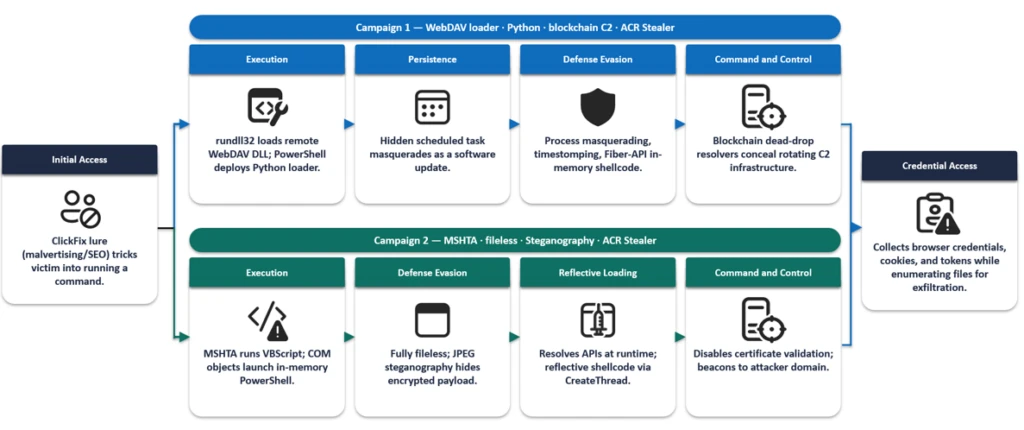
The first campaign begins with a ClickFix prompt, typically delivered through malvertising or SEO-poisoned search results. The prompt instructs the victim to run a command that launches cmd.exe, which then invokes rundll32.exe to load a DLL from a remote WebDAV share over HTTPS.
The WebDAV path uses GUID-based directory structures and filenames designed to resemble legitimate resources, such as "google.ct," allowing the activity to blend with expected network traffic.
Researchers observed three variants of the initial execution command:

Variant 1 uses a direct rundll32 invocation. Variant 2 employs pushd to mount the remote WebDAV share as a temporary local drive before execution. Variant 3 adds stealth by launching commands through conhost.exe with the headless flag and using environment variable obfuscation with delayed variable expansion to conceal critical execution components.
Once rundll32.exe loads the DLL, the malware communicates with threat actor infrastructure and executes an obfuscated PowerShell script. The script uses arithmetic no-ops, dead loops, fake control flow, and randomized variable names to hinder analysis.

The PowerShell stage deploys a payload that functions as both an installer and persistence mechanism. It downloads a ZIP-packaged payload from a remote server, extracts it into a deceptive directory under %LocalAppData%\Temp (such as LogiOptionsPlus), and launches it using a bundled pythonw.exe instance to avoid displaying a console window.
The installer establishes persistence through a hidden scheduled task disguised as a legitimate software update. It copies timestamps from notepad.exe to deployed files and clears PowerShell command history to reduce forensic visibility.
The Python component serves as a heavily obfuscated loader. It employs dynamic API resolution, encoded string reconstruction, junk-data removal, character shifting, string reversal, Base64 decoding, and zlib decompression. These techniques keep the embedded payload unreadable in its static form.
Once decoded, the payload functions as an in-memory shellcode loader. It allocates executable memory using VirtualAlloc, copies the payload into the allocated region, and transfers execution through the Windows Fiber API.
The malware then harvests browser-stored credentials by invoking Windows Data Protection API routines to decrypt locally stored passwords, cookies, and authentication tokens. It enumerates files across the system, targeting PDFs, Microsoft 365 documents, and data in OneDrive and SharePoint.
A subset of intrusions uses blockchain services for command-and-control resolution through a technique called EtherHiding. The secondary Python loader queries public blockchain RPC endpoints to retrieve follow-up payloads or C2 addresses, allowing operators to update infrastructure without modifying the malware.
Campaign 2: Fileless Execution with Steganography

The second campaign takes a fileless approach, achieving its objectives almost entirely through in-memory execution. The execution chain begins when a ClickFix prompt triggers a command that spawns MSHTA to fetch remote HTA content from an attacker-controlled domain.
The embedded VBScript loader abuses COM objects to decode and execute encoded PowerShell content. The PowerShell stage uses obfuscation techniques similar to Campaign 1, including randomized variable names, arithmetic no-ops, dead loops, and custom encryption routines.
A notable technique in this campaign is steganography. The malware retrieves a JPEG image from a public image-hosting service and extracts an embedded payload from image pixels using custom routines. The payload is then decrypted, decompressed, and executed entirely in memory.
The payload dynamically resolves APIs such as LoadLibrary, GetProcAddress, VirtualAlloc, CreateThread, and WaitForSingleObject at runtime to perform reflective shellcode execution. By combining steganography with in-memory execution, the malware minimizes on-disk artifacts.
Following execution, the malware accesses credential stores belonging to Chromium-based browsers, including Google Chrome and Microsoft Edge. It targets the Login Data and Web Data databases alongside Windows DPAPI decryption activity to recover stored credentials, session cookies, and authentication tokens.
The malware also enumerates high-value PDF documents across Desktop and Downloads locations, suggesting targeted collection of sensitive files for exfiltration.
Detection and Mitigation
Microsoft recommends several defenses against these campaigns:
- User education: Train users to recognize ClickFix-style prompts, fake verification checks, and paste-and-run instructions as malicious.
- Web filtering: Enforce web filtering to reduce exposure to malvertising and SEO poisoning.
- Application control: Use attack surface reduction rules to restrict PowerShell, Python, mshta.exe, and rundll32.exe from launching untrusted content.
- Persistence monitoring: Watch for scheduled tasks masquerading as software updates, timestomping, and PowerShell history clearing.
- Credential store monitoring: Investigate abnormal access to browser databases, DPAPI activity, and staged document collection.
Organizations that suspect compromise should isolate affected devices, rotate exposed credentials, revoke potentially compromised tokens, and investigate outbound connections to remote shares or image-hosting services.
Indicators of Compromise
Campaign 1 C2 domains:
- looksta[.]icu
- contrite.quirksturdy[.]icu
- ux.strainedeasily[.]icu
- cpppemwjewjoiwejow[.]sale
- breaksd.wifihot[.]icu
- walter.filloco[.]icu
- fast.raidher[.]icu
- apigrokcloud[.]icu
Campaign 2 infrastructure:
- enhanceblabber[.]cc
- deep-harborio[.]com
- auramatrixa[.]com
- zealpraxis[.]com
- prism-vertex[.]com
- prism-matrixs[.]com
- proton-network[.]com
- creativecommunityinfo[.]art
Microsoft Defender for Endpoint provides behavioral coverage for both campaigns through detection of living-off-the-land execution, suspicious WebDAV and MSHTA activity, obfuscated PowerShell, scheduled-task persistence, in-memory payload execution, and browser credential theft.
Comments
Please log in or register to join the discussion