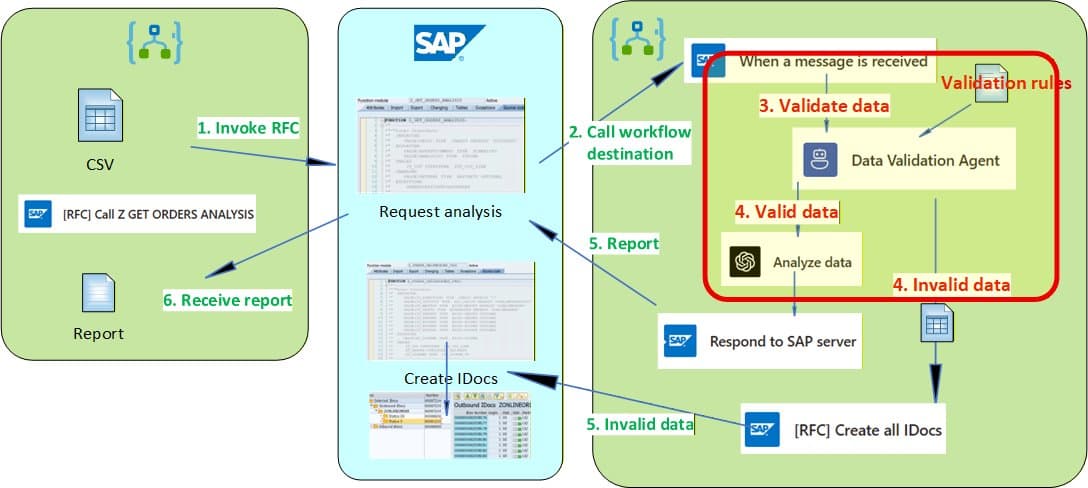
Part 2 of the SAP-Logic Apps integration series focuses on the AI agent layer, showing how structured validation outputs drive deterministic workflow actions like email notifications, optional IDoc persistence, and analysis results that return to SAP.
Part 2 of the SAP-Logic Apps integration series dives deep into the AI agent layer that transforms unstructured validation into deterministic workflow artifacts. While Part 1 established the plumbing—SAP Gateway connections, RFC contracts, and error propagation—this installment focuses on the agent outputs, tool schemas, and constraints that make AI results usable within workflows rather than just "generated text."
The Validation Agent Loop: Tools, Messages, and Output Schemas
The core innovation here is treating the AI agent not as a black box but as a constrained tool that produces typed, workflow-friendly artifacts. The Data Validation Agent runs after inbound SAP payload normalization and is configured with three explicit tools:
Tool 1: Get validation rules - Retrieves business validation rules from SharePoint at runtime, making them configurable without redeploying the Logic App. The rules document uses a simple FieldName: condition format (e.g., "PaymentMethod: value cannot be 'Cash'") that the agent applies consistently.
Tool 2: Get CSV payload - Explicitly defines what dataset the agent should validate by binding to the workflow's generated CSV string. This creates a stable boundary between workflow state and agent input.
Tool 3: Summarize CSV payload review - The most critical tool, producing three structured outputs:
- Validation summary (HTML format) for human-readable email notifications
- InvalidOrderIds (CSV format) for machine-friendly downstream processing
- Invalid CSV payload (one row per line) for remediation actions
What makes this design powerful is the parameter descriptions that act as contracts. For example, "The format is CSV" for InvalidOrderIds tells the model exactly what to emit, making parsing trivial with split(). The descriptions combine output format constraints, selection rules, and operational guidance that anticipates downstream usage.
From Agent Outputs to Operational Actions
The workflow immediately converts each agent parameter into first-class workflow outputs via Compose actions. This direct mapping ensures the email summary isn't constructed by "re-prompting" but assembled from already-structured outputs. The only normalization step converts InvalidOrderIds from CSV string to array for filtering and analysis.
Sample verification emails show the three-part structure: an HTML validation summary table, the raw invalid order ID list, and the extracted invalid CSV rows. These artifacts drive downstream actions like optional IDoc persistence for failed rows.
Analysis Phase: From Validated Dataset to HTML Output
After validation, a second AI phase focuses purely on insight from the remaining valid dataset. The Azure OpenAI "Analyze data" call uses three messages:
- System instruction defining the task and constraints
- User message with the CSV dataset
- User message enumerating OrderIDs to exclude (derived from validation output)
This separation avoids ambiguity—the dataset is one message, exclusions another. The workflow extracts the model's text content from the stable response path (choices[0].message.content) and converts markdown to HTML for email rendering and SAP response embedding.
Closing the Loop: Persisting Invalid Rows as IDocs
The integration completes its circle by showing how invalid rows become durable SAP artifacts. The workflow calls Z_CREATE_ONLINEORDER_IDOC, SAP converts rows to custom IDocs, and Destination workflow #2 receives them asynchronously (one workflow per IDoc).
Destination workflow #2 demonstrates the same agent principles with minimal changes: it reconstructs CSV from IDoc payload and runs validation logic, producing a single "audit line" with DOCNUM, OrderId, and failed rules. The key difference is the output contract optimized for logging rather than email.
Concurrency-Safe Blob Storage Logging
Since multiple workflow instances can write simultaneously to the same daily "ValidationErrorsYYYYMMDD.txt" append blob, the solution implements a lease-based write pattern. Each instance:
- Attempts to acquire a blob lease with retry logic
- Appends its verification line under the lease
- Releases the lease for the next writer
This ensures safe concurrent writes while maintaining a consolidated audit trail.
Design Principles That Scale
The reusable patterns that emerge from this implementation:
Tool-driven validation: The agent is constrained by tools and parameter schemas, producing artifacts immediately consumable by workflows
Separation of concerns: Validation decides what not to trust; analysis focuses on insights from valid data
Contract-first design: Parameter descriptions act as API contracts, making outputs predictable and parsing trivial
Minimal changes for reuse: The same agent tooling structure works across workflows with different output contracts
Deterministic integration layer: Part 1's stable contracts (payload shapes, RFC names, error semantics) evolve slowly, while the AI layer iterates on prompts and tool design
The complete solution demonstrates how to layer AI capabilities onto existing SAP integrations without destabilizing core contracts. By forcing agents to produce structured outputs with explicit formats and clear intent, the workflow can reliably consume AI results for operational actions rather than treating them as unstructured prose that requires interpretation.
For the full implementation details, schemas, and sample files, see the companion GitHub repository referenced in the original post.
Comments
Please log in or register to join the discussion