
In a remarkable demonstration of AI-assisted development, a developer used Claude to build a custom status line for Claude Code itself, showcasing how AI can now automate the entire software creation and documentation process in minutes.
In the rapidly evolving landscape of AI-assisted development, a recent experiment has demonstrated just how far the technology has come. A developer successfully used an AI tool to build a custom feature for the same AI tool itself—a feat that highlights the growing sophistication of AI development assistants and their potential to revolutionize how we create software.
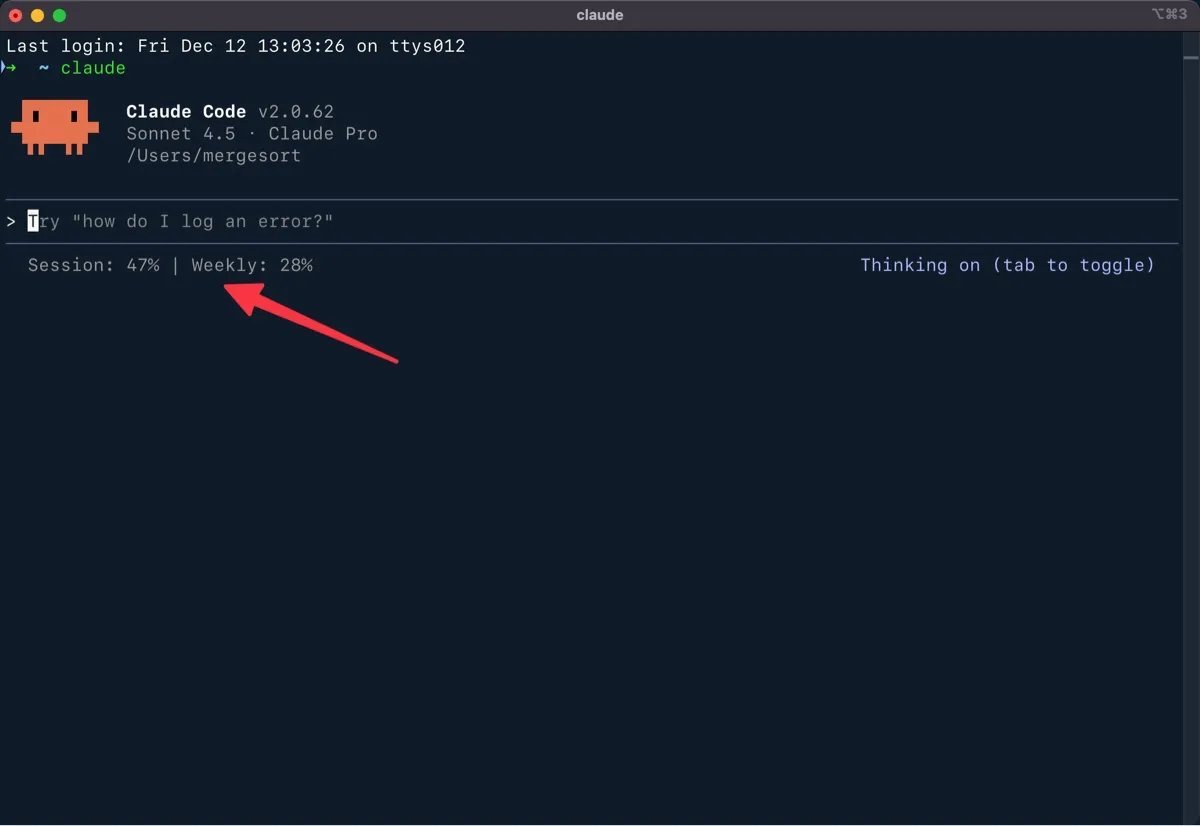
The journey began with a simple frustration. After downgrading from Claude Max to Claude Pro, the developer found themselves constantly monitoring their usage quotas. "I've developed a tic—typing /usage as often as I used to press Ctrl + S in Microsoft Word," they explained. This common pain point for AI tool users became the catalyst for an experiment that would showcase the power of modern AI development assistants.
The Birth of an Idea
While browsing Anthropic's documentation, the developer stumbled upon a revelation: Claude Code's status line was completely customizable. "At first I thought the status line would just display some preconfigured information, but it turns out the status line is fully customizable—you can make it show whatever you want." This discovery sparked an immediate idea: what if they could build a status line that displayed their usage quotas at a glance?
What makes this story particularly compelling is not just the solution, but how it was built. The entire process—from concept to working code to comprehensive documentation—was accomplished with minimal human intervention, thanks to strategic prompting of the AI assistant.
One Prompt to Solution
nThe developer's approach was remarkably simple yet effective. They provided Claude with a single, well-crafted prompt that pointed to existing documentation and clearly stated the desired outcome:
I would like to build a status line that shows the usage quotas for my current and weekly session limits. This blog post contains all of the information you'll need—including a write up, prompts, and links to Anthropic's documentation. More importantly, it contains a script you can use as your foundation.
The result was a functional status line script that pulls OAuth credentials from the macOS Keychain, pings Anthropic's usage API, and formats the results for display—all generated in about 10 minutes.
Technical Implementation
nThe solution involves a sophisticated bash script that handles authentication, API calls, and error processing. The script demonstrates several important technical considerations:
#!/bin/bash

# Status line script for Claude Code
# Displays: Session quota, Weekly quota
# With comprehensive error handling for authentication issues

# Read JSON input from stdin
input=$(cat)

# Initialize variables
session_pct=""
weekly_pct=""

# Fetch credentials from macOS Keychain
CREDS=$(security find-generic-password -s "Claude Code-credentials" -w 2>/dev/null)

# Validate credentials exist
if [ -z "$CREDS" ] || [ "$CREDS" = "null" ]; then
    echo "OAuth token not found — run /login to authenticate"
    exit 0
fi

# Extract access token from JSON
ACCESS_TOKEN=$(echo "$CREDS" | jq -r '.claudeAiOauth.accessToken' 2>/dev/null)

# Validate token extraction succeeded
if [ -z "$ACCESS_TOKEN" ] || [ "$ACCESS_TOKEN" = "null" ]; then
    echo "Invalid token format — run /login to re-authenticate"
    exit 0
fi

# Pre-check: Verify token has required OAuth scope
SCOPES=$(echo "$CREDS" | jq -r '.claudeAiOauth.scopes[]' 2>/dev/null)
if [[ ! "$SCOPES" =~ "user:profile" ]]; then
    echo "Token missing required user:profile scope — run /login to update permissions"
    exit 0
fi

# Fetch usage data from Anthropic OAuth API
# Note: We omit Accept-Encoding to avoid compression issues with curl
USAGE_DATA=$(curl -s "https://api.anthropic.com/api/oauth/usage" \
    -H "Accept: application/json, text/plain, */*" \
    -H "Authorization: Bearer $ACCESS_TOKEN" \
    -H "anthropic-beta: oauth-2025-04-20" 2>/dev/null)

# Validate API response exists
if [ -z "$USAGE_DATA" ]; then
    echo "Failed to fetch usage data — check connection"
    exit 0
fi

# Check for API errors in response
error_type=$(echo "$USAGE_DATA" | jq -r '.error.type // empty' 2>/dev/null)

if [ -n "$error_type" ]; then
    # Handle specific error types
    if [ "$error_type" = "permission_error" ]; then
        error_msg=$(echo "$USAGE_DATA" | jq -r '.error.message // empty' 2>/dev/null)
        if [[ "$error_msg" == *"user:profile"* ]]; then
            echo "Token missing user:profile scope — run /login"
            exit 0
        fi
        echo "Permission error — run /login to re-authenticate"
        exit 0
    else
        echo "API error: $error_type — run /login if issue persists"
        exit 0
    fi
fi

# Extract usage percentages
session_pct=$(echo "$USAGE_DATA" | jq -r '.five_hour.utilization // empty' 2>/dev/null)
weekly_pct=$(echo "$USAGE_DATA" | jq -r '.seven_day.utilization // empty' 2>/dev/null)

# Check if seven_day field is actually null (not just 0)
seven_day_raw=$(echo "$USAGE_DATA" | jq -r '.seven_day' 2>/dev/null)

# Helper function to format percentage
format_percentage() {
    local pct=$1
    if [ -z "$pct" ] || [ "$pct" = "null" ]; then
        echo "0%"
    else
        printf "%.0f%%" "$pct" 2>/dev/null || echo "${pct}%"
    fi
}

# Format the output components
session_display="Session: $(format_percentage $session_pct)"

# Handle weekly display - only show if weekly tracking is enabled
if [ "$seven_day_raw" = "null" ]; then
    # No weekly tracking - show session only
    echo "${session_display}"
else
    # Weekly tracking enabled - show both
    weekly_display="Weekly: $(format_percentage $weekly_pct)"
    echo "${session_display} | ${weekly_display}"
fi
The Power of AI-Assisted Development
What makes this story particularly significant is not just the technical solution, but the methodology behind it. The developer didn't just build the tool—they then asked Claude to document the entire process comprehensively, creating installation instructions, troubleshooting guides, and technical explanations suitable for sharing with colleagues.
This approach represents a fundamental shift in how we think about software development:
- Problem Definition: Clearly articulate what you want to build
- Resource Pointing: Direct the AI to relevant documentation and resources
- Iterative Refinement: Use follow-up prompts to customize and improve the solution
- Documentation Generation: Have the AI create comprehensive documentation
The entire process—from initial idea to documented, shareable solution—took approximately 10 minutes. This efficiency would have been unthinkable just a few years ago and demonstrates how AI is transforming the development landscape.
Implications for the Industry
This case study illustrates several important trends in AI-assisted development:
- Automation of the Development Lifecycle: AI can now handle everything from initial coding to documentation and troubleshooting
- Democratization of Development: Complex tools can be built by non-programmers who can effectively communicate with AI
- Rapid Prototyping: Ideas can be tested and implemented in minutes rather than days or weeks
- Knowledge Transfer: AI can generate comprehensive documentation that makes solutions easily shareable
The developer noted this approach works not just with Claude, but with other AI assistants as well. "If there's something you want Claude, Codex, or Gemini to do—you can point them to blog posts or documentation and let them do the research. Have AI do the research for you, and then it will know how to do the work for you."
Looking Ahead
As AI development assistants continue to evolve, we can expect this pattern to become increasingly common. The ability to describe a problem, point to resources, and have an AI generate a complete solution—including documentation and troubleshooting—represents a paradigm shift in how we approach software development.
The future of knowledge work may not be about writing code, but about effectively communicating what needs to be built. As this developer demonstrated, the ultimate trick to being successful with AI is being a good communicator—able to clearly articulate problems and guide the AI toward effective solutions.

In an industry where the pace of change continues to accelerate, this story serves as both a practical tutorial and a glimpse into the future of development. It shows that with the right approach, AI can not just assist in building software, but can handle the entire development lifecycle—from concept to documentation to deployment—in a fraction of the time traditionally required.
Comments
Please log in or register to join the discussion