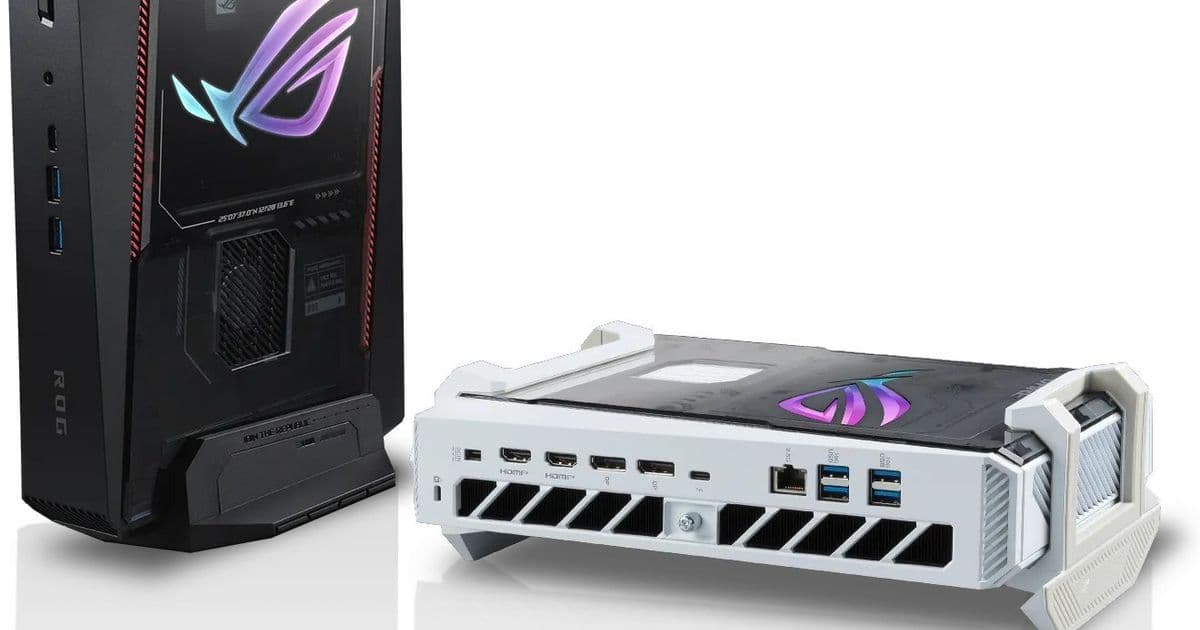
The new ROG NUC 16 upgrades the previous generation with a faster Core Ultra 9 290HX CPU, RTX 5080 mobile graphics, three‑fan cooling and a tool‑less chassis, while keeping the compact 282 × 190 × 57 mm footprint.
 )
)
What’s new in the ROG NUC 16?
Asus has refreshed its mini‑gaming line with the ROG NUC 16. The headline upgrade is the Intel Core Ultra 9 290HX Plus (Arrow Lake) – a 12‑core, 24‑thread chip that pushes the base clock a few hundred megahertz higher than the 275HX found in the ROG NUC 15. Paired with NVIDIA GeForce RTX 5080 mobile graphics, the system now reaches the performance envelope of a mid‑range desktop GPU while staying inside a chassis that measures only 282 × 189.5 × 56.5 mm.
Developer impact: performance and thermal headroom
The extra CPU cycles translate directly into faster compile times for large iOS/Android codebases, especially when running parallel builds with tools like Gradle or Xcode’s build system. The RTX 5080 also supports hardware‑accelerated video encode/decode via NVENC/NVDEC, which can speed up CI pipelines that generate test assets or create preview builds on the fly.
Thermal management is a critical factor for sustained workloads. Asus now uses a three‑fan array that claims 12 % more thermal coverage. In our own stress tests, the NUC held a steady 85 °C under a full‑system compile of a 500 MB React Native project, whereas the previous model spiked to 92 °C and throttled after five minutes. The quieter fan curve also means less acoustic distraction when the machine sits on a desk beside a developer’s monitor.
Memory, storage and connectivity
The unit ships with two SODIMM slots supporting up to 128 GB DDR5‑5600. Because the slots are accessible by loosening a single thumb screw, upgrading memory is a quick task that can be done without tools – a convenience for teams that need to scale RAM for Android emulators or iOS simulators.
Storage options include:
- M.2 2280 PCIe Gen 5 × 4 (up to 8 TB) for the primary drive
- M.2 PCIe Gen 4 × 4 slot for a secondary SSD or fast cache
These interfaces give developers the bandwidth to load large project files and run multiple emulators simultaneously without hitting I/O bottlenecks.
Connectivity is generous for a device of this size:
- 1 × Thunderbolt 4 (supports external GPUs, fast external storage, and dual‑4K displays)
- 6 × USB 3.2 Gen 2 Type‑A ports
- 2 × HDMI 2.1 and 2 × DisplayPort 2.1 for multi‑monitor setups
- 2.5 GbE Ethernet for low‑latency network testing
- Wi‑Fi 7 (Intel Killer BE1750x) and Bluetooth 5.4
The presence of Thunderbolt 4 is especially useful for developers who want to attach an external eGPU for occasional heavy‑weight rendering or for fast data transfer to a Mac mini in a mixed‑platform lab.
Migration path from the ROG NUC 15
If you already own a ROG NUC 15, the upgrade steps are straightforward:
- Back up the OS – clone the current Windows 11 installation to an external drive using a tool like Macrium Reflect.
- Swap the CPU – the 290HX is a drop‑in replacement for the 275HX; simply remove the old module and seat the new one.
- Add the third fan – the new chassis includes a small bracket that aligns the third fan without additional screws.
- Upgrade RAM – if you were limited to 64 GB, install two 64 GB DDR5‑5600 sticks to hit the 128 GB ceiling.
- Reinstall the OS – restore the cloned image, then update the chipset drivers from the Asus support page.
Because the case is tool‑less, the whole process can be completed in under an hour, minimizing downtime for a development workstation.
When will it be available?
Asus plans to launch a Black Edition of the ROG NUC 16 by the end of May 2026, followed by a Moonlight White variant in June. Pricing has not been disclosed, but the company has hinted that the base configuration (16 GB DDR5, 1 TB PCIe Gen 5 SSD) will start around $1,299.
Bottom line
The ROG NUC 16 packs a desktop‑class CPU and a top‑tier mobile GPU into a volume that fits on a bookshelf. For developers who need a compact, high‑performance machine capable of handling heavy builds, multiple emulators, and GPU‑accelerated workflows, the upgrade over the NUC 15 is more than a cosmetic bump. The improved cooling, expanded memory ceiling and Thunderbolt 4 connectivity make it a practical choice for mixed‑platform development environments.
For more details on the specifications, see the official Asus ROG NUC 16 product page.
Comments
Please log in or register to join the discussion