Disney+ and Hulu get three immediate feature upgrades—profile linking, a unified MyDisney login for Hulu streaming, and themed avatars—while a Live Guide hub is slated for testing. The moves tighten the two services’ user experience and signal further convergence, with implications for iOS and Android developers maintaining separate codebases.
New features debut today
Disney announced that three concrete pieces of functionality are being pushed to the Disney+ app on both iOS and Android right now:
- Profile Linking – Hulu subscribers can attach their Hulu profile to a Disney+ account. Once linked, the watch history, watchlist, and recommendation engine from Hulu appear inside Disney+.
- Unified MyDisney login – Users who only have a Hulu subscription can now open the Disney+ app, sign in with their existing MyDisney credentials, and stream the full Hulu library without needing a separate Disney+ subscription.
- New avatars – The avatar picker inside Disney+ now includes the full set of Hulu‑themed icons, joining the Disney, Marvel and Star Wars collections.
These changes are being rolled out through the standard app‑store updates. The iOS build ships as version 15.2.0 (minimum iOS 15.0) and the Android build as 15.2.0 (minimum Android 8.0 Oreo). Both binaries reference the latest MyDisney SDK 3.4, which adds the cross‑service authentication endpoints required for the unified login.
Why the integration matters for developers
Shared authentication flow
The new unified login replaces the previous pattern where the Disney+ app had to launch a separate Hulu web view for authentication. With the MyDisney SDK 3.4, the OAuth token exchange now happens in‑app, reducing friction and improving launch times. For developers maintaining both iOS and Android codebases, the SDK provides a single Swift package (MyDisneyAuth) and a corresponding Maven artifact (com.disney.myDisney:auth:3.4). This means you can write one authentication wrapper and reuse it across platforms, cutting down on duplicated logic.
Profile data synchronization
When a profile is linked, Disney+ pulls the user’s Hulu watch history via the /v2/profile/{id}/history endpoint. The response is cached for 15 minutes on the device, using the new Cache‑Control: max‑age=900 header. On iOS, the SDK stores this data in the app’s App Group container, making it accessible to any extension (e.g., a widget). Android uses the Jetpack DataStore for the same purpose. Understanding these storage locations is crucial if you are building custom UI components that surface a combined watchlist.
Avatar assets and theming
The avatar set is delivered as an Asset Catalog on iOS (Assets.xcassets/Avatars/Hulu) and as a Vector Drawable bundle on Android (res/drawable-hulu). Because the assets are now part of the main Disney+ bundle, you no longer need to ship a separate Hulu‑only APK. This simplifies versioning and reduces the overall app size by roughly 2 MB.
Migration checklist for existing apps
| Step | Action | iOS specifics | Android specifics |
|---|---|---|---|
| 1 | Update to MyDisney SDK 3.4 | pod 'MyDisneyAuth', '~> 3.4' or Swift Package Manager URL https://github.com/disney/myDisney-sdk |
Add implementation 'com.disney.myDisney:auth:3.4' to build.gradle |
| 2 | Enable profile linking UI | Add LinkHuluProfileButton from the SDK to your settings screen; it handles the deep‑link to Hulu’s OAuth flow. |
Use HuluLinkFragment provided by the SDK. |
| 3 | Switch to unified login | Replace calls to DisneyLoginManager with MyDisneyAuth.loginUnified(completion:). |
Call MyDisneyAuth.loginUnified(callback). |
| 4 | Refresh avatar picker | Include HuluAvatarProvider in your avatar data source. |
Register HuluAvatarProvider in AvatarRegistry. |
| 5 | Test Live Guide (beta) | The feature is gated behind a remote config flag live_guide_enabled. Enable it in your dev console to see the new hub. |
Same remote config key; use Firebase Remote Config to toggle. |
Tip: Because the Live Guide will later pull live‑TV metadata from Hulu’s Live TV API, start mocking that endpoint now to avoid future integration surprises.
Looking ahead: Live Guide and the “super‑app” rumor
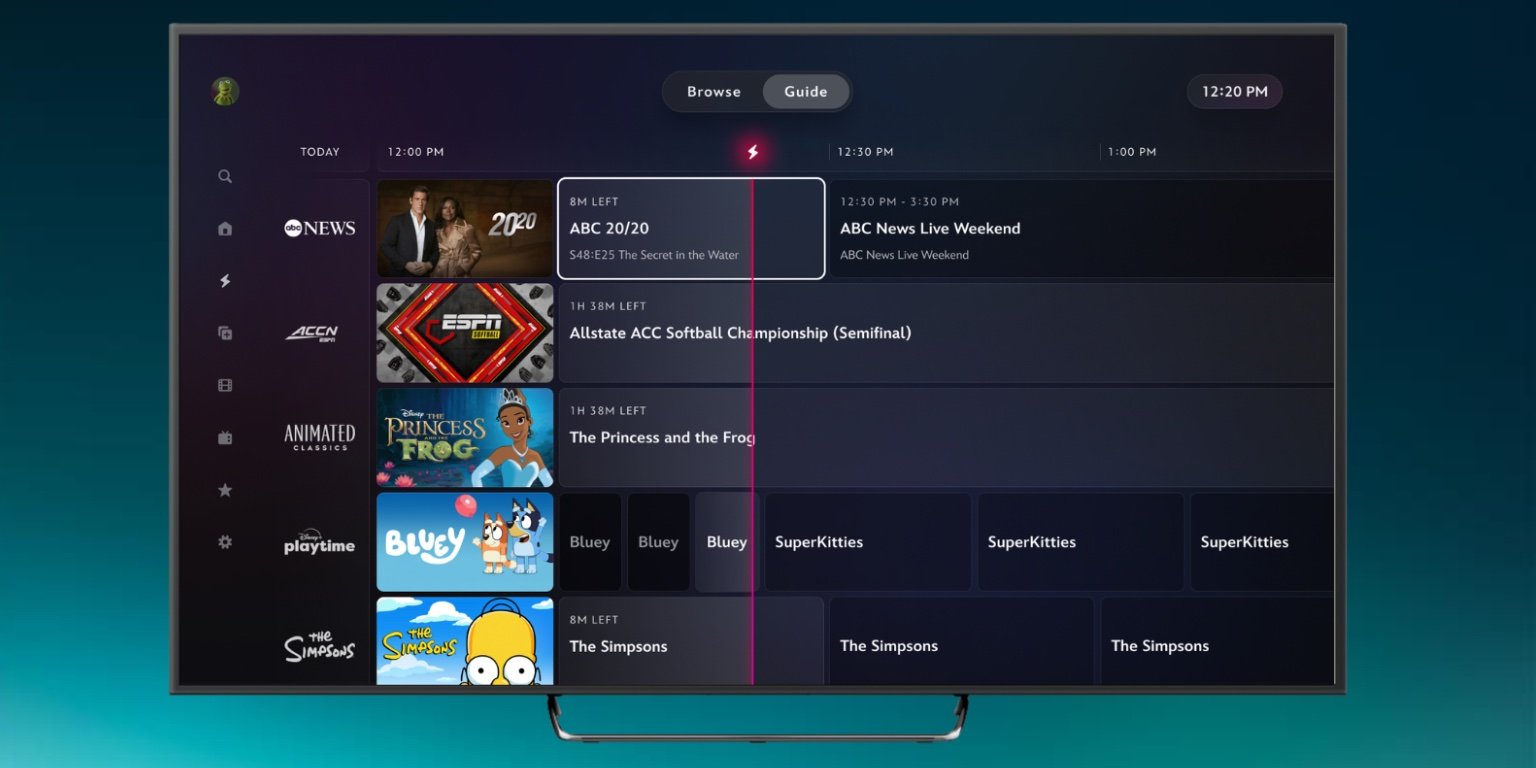
Disney disclosed that a Live Guide hub is entering limited testing. The guide aggregates live streams from ABC News, Disney+ Playtime, and ESPN Unlimited for eligible users. Technically, it is a thin overlay that consumes the Hulu Live TV API and presents the schedule via a React Native view embedded in the native shell. If you are already using React Native for any part of your app, the upcoming changes will be a straightforward addition; otherwise, you may need to add the React Native bridge to keep the UI consistent across platforms.
The broader industry chatter about a “Disney+ super‑app” suggests that more Hulu‑only features—Live TV, add‑on bundles, and possibly the ad‑supported tier—will eventually surface inside Disney+. From a development standpoint, this convergence means fewer separate codebases to maintain, but it also raises the bar for testing: you’ll need to validate both subscription states (Disney+‑only, Hulu‑only, and combined) across every screen.
Resources
- Official Disney+ & Hulu integration announcement: https://www.disneyplus.com/news/integration-update
- MyDisney SDK documentation: https://docs.myDisney.com/sdk/v3.4
- GitHub repo for the Swift package: https://github.com/disney/myDisney-sdk
- Android Maven artifact details: https://mvnrepository.com/artifact/com.disney.myDisney/auth/3.4
- Remote config dashboard (requires internal access): https://config.myDisney.com
The rollout begins today on the App Store and Google Play. Keep an eye on the version notes for any platform‑specific quirks, especially around background fetch of profile data on Android 13 and iOS 17.
Comments
Please log in or register to join the discussion