
A new wave of Facebook phishing attacks is using a technique called Browser-in-the-Browser (BitB) to create fake login windows that are nearly indistinguishable from real ones. Attackers are also abusing legitimate cloud platforms like Netlify and Vercel to host these scams, making them harder for security filters to detect.
Hackers have significantly upgraded their Facebook phishing tactics over the past six months, relying increasingly on the Browser-in-the-Browser (BitB) method to steal credentials. This technique, originally developed by security researcher mr.d0x in 2022, has been rapidly adopted by cybercriminals targeting major platforms including Facebook and Steam.

According to researchers at Trellix, who have been monitoring this malicious activity, threat actors are stealing Facebook accounts primarily to spread scams, harvest personal data, and commit identity fraud. With Facebook still boasting over three billion active users, it remains a prime target for fraudsters.
How the Browser-in-the-Browser Attack Works
The BitB technique is particularly insidious because it doesn't rely on traditional pop-up blockers or obvious visual cues. In a typical BitB attack, users who visit attacker-controlled webpages are presented with a fake browser pop-up containing a login form. This pop-up is actually implemented using an iframe that perfectly mimics the authentication interface of legitimate platforms.
What makes this technique especially dangerous is the level of customization available to attackers. The fake pop-up can be configured with a window title and URL that match legitimate login prompts, making the deception extremely difficult to spot. The iframe creates a window that appears to exist independently within the browser, complete with what looks like an address bar and window controls.
Current Attack Campaigns
Recent phishing campaigns targeting Facebook users have been particularly creative in their initial approach. According to Trellix, attackers are impersonating law firms and sending emails claiming copyright infringement, threatening imminent account suspension. Other campaigns use fake Meta security notifications about unauthorized logins.
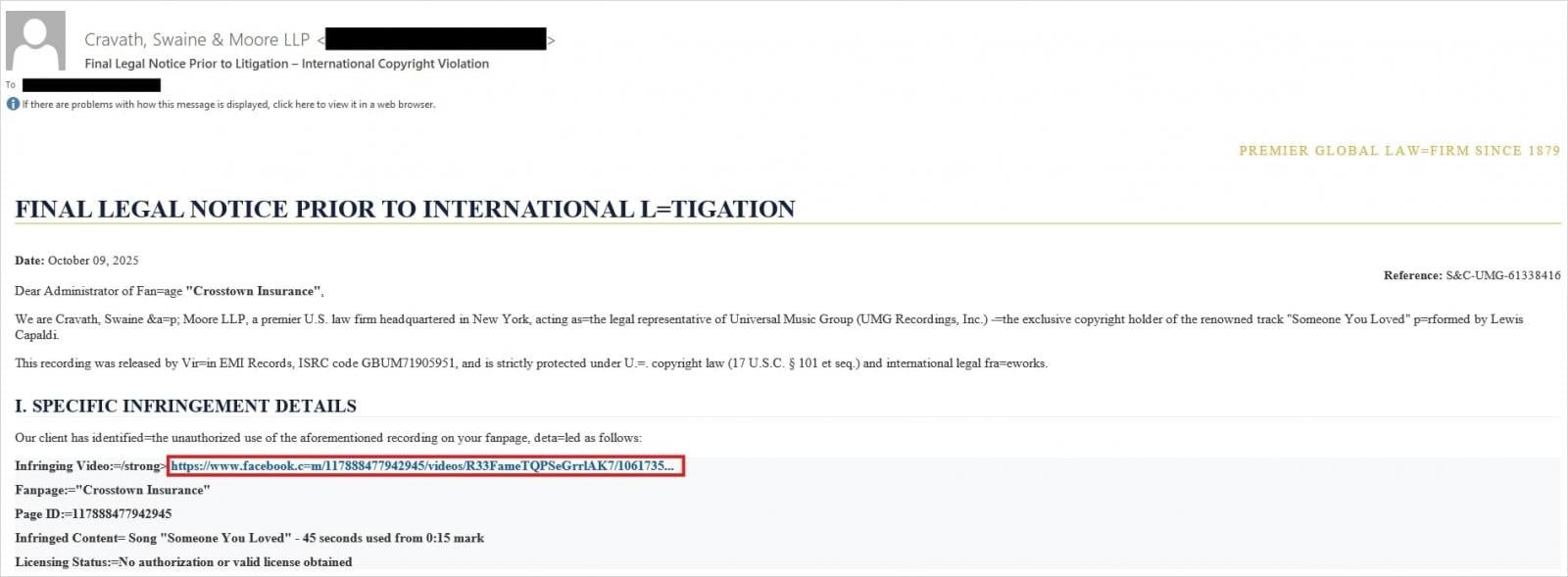
To increase the sense of legitimacy, cybercriminals are adding shortened URLs and even creating fake Meta CAPTCHA pages. This multi-stage approach helps build trust before the final credential theft step.
In the final stage of the attack, victims are prompted to log in by entering their Facebook credentials in what appears to be a standard login pop-up window. The malicious iframe mimicking these pages is nearly identical to Facebook's actual authentication interface.
Abuse of Trusted Infrastructure
Beyond the BitB technique, Trellix also discovered a high number of phishing pages hosted on legitimate cloud platforms like Netlify and Vercel. These pages mimic Meta's Privacy Center portal and redirect users to pages disguised as appeal forms that collect personal information.
This represents a significant evolution from standard Facebook phishing campaigns. As the Trellix report explains: "The key shift lies in the abuse of trusted infrastructure, utilizing legitimate cloud hosting services like Netlify and Vercel, and URL shorteners to bypass traditional security filters and lend a false sense of security to phishing pages."
The report continues: "Most critically, the emergence of the Browser-in-the-Browser (BitB) technique represents a major escalation. By creating a custom-built, fake login pop-up window within the victim's browser, this method capitalizes on user familiarity with authentication flows, making credential theft nearly impossible to detect visually."
How to Protect Yourself
Verify URLs Independently
When you receive account-related security alerts or infringement notifications, always navigate to the official URL in a separate tab instead of following embedded links or buttons in the email. For Facebook, manually type facebook.com or use a bookmark you created previously.
Test the Pop-Up Window One key indicator of a BitB attack is the behavior of the login window. When prompted to enter credentials in what appears to be a pop-up, try clicking and dragging the window outside the main browser area. Legitimate browser pop-ups can be moved outside the browser window, but iframes (which are essential for the BitB trick) are connected to the underlying window and cannot be pulled outside it.
Enable Two-Factor Authentication The general recommendation for protecting access to your online accounts is to enable two-factor authentication (2FA). While not infallible, this adds an extra layer of security against account takeover attempts even if your credentials have been compromised. Facebook offers several 2FA options including authentication apps and hardware security keys.
Check the Source Be suspicious of any unexpected emails claiming to be from law firms, copyright agencies, or even Meta itself. Legitimate companies rarely use email as the primary method for serious legal notifications or account security warnings.
Look for HTTPS and Certificate Details While the phishing pages may use HTTPS (especially when hosted on legitimate cloud platforms), you can still check certificate details. Click the lock icon in your browser's address bar to verify who the certificate is issued to. However, note that sophisticated attackers may use valid certificates for their domains.
The Bigger Picture
This evolution in phishing techniques represents a broader trend in cybercrime: the increasing sophistication of social engineering attacks that exploit user trust and familiarity with legitimate interfaces. As security filters become better at detecting traditional phishing attempts, attackers are moving toward techniques that are visually and technically more convincing.
The abuse of legitimate cloud hosting platforms like Netlify and Vercel creates additional challenges for security teams. These platforms are designed to be easy to use and deploy quickly, which attackers exploit. While these platforms do have abuse detection and takedown procedures, the window between deployment and detection can be enough for attackers to harvest credentials.
For Facebook users specifically, the stakes are high. Compromised accounts can be used to spread scams to friends and family, access private messages and photos, and even be used for more sophisticated social engineering attacks against the victim's contacts.
The security community continues to monitor these developments and work on detection methods, but the most effective defense remains user awareness and cautious online behavior. As these techniques become more widespread, understanding how to identify and avoid them becomes increasingly critical for anyone who uses online services.
Related Resources
For more information about phishing protection and account security, users can refer to:
- Facebook's official security center
- The Anti-Phishing Working Group for current threat trends
- Have I Been Pwned to check if your credentials have been compromised in previous breaches
Comments
Please log in or register to join the discussion