
Microsoft has added a zoom feature to Access, allowing users to magnify forms, tables, and queries in Form View or Datasheet View, improving data visibility and workflow efficiency.
Microsoft has enhanced Microsoft Access with a new zoom functionality that allows users to zoom in and out when working with forms, tables, and queries in Form View or Datasheet View. This update represents a significant quality-of-life improvement for Access users who regularly work with detailed datasets or need to get a broader view of their data structures.
The new zoom feature provides flexibility for different working scenarios. Users can zoom in for a closer examination of complex data, such as when reviewing detailed information in a form or analyzing intricate relationships in a datasheet. Conversely, zooming out allows users to see more of their data on screen at once, which is particularly useful when working with wide tables or when needing to get an overview of data relationships.
This functionality is accessible through multiple interfaces to accommodate different user preferences:
- The Zoom button on the ribbon, offering preset magnification levels (50%, 75%, 125%, 150%, 175%, 200%, or 500%)
- The zoom slider on the status bar for gradual adjustments
- Keyboard shortcuts for quick access (Ctrl + Alt + Plus to zoom in, Ctrl + Alt + Minus to zoom out, Ctrl + Alt + 0 for 100% zoom)
- Mouse wheel support when combined with the Ctrl key
Additionally, the zoom feature is available in Print Preview for reports, providing consistent functionality across different views. However, it's not supported in Report View or Design View.
One limitation to note is that content within ActiveX controls doesn't resize when zoomed. Microsoft recommends replacing ActiveX controls with native Access controls to ensure proper scaling with the rest of the form. This consideration is important for developers maintaining complex Access applications.
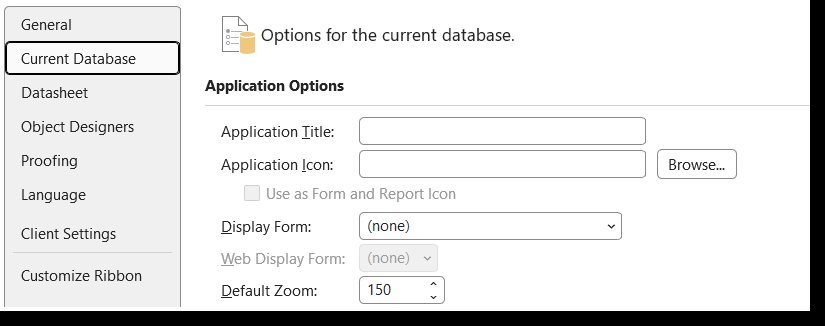
The zoom feature is available in Microsoft Access for Microsoft 365, version 2605 and later. While Access doesn't save zoom settings between sessions, users can set their default zoom percentage through File > Options > Current Database > Application Options.
This enhancement aligns with Microsoft's broader efforts to improve accessibility and usability across its Office suite. By providing more flexible ways to interact with data, Microsoft is making Access more approachable for users with varying visual needs while also accommodating different working preferences.
The update is particularly valuable for:
- Users with visual impairments who need magnification options
- Database administrators working with complex data relationships
- Business analysts who need to toggle between detailed and overview perspectives
- Developers testing form layouts at different zoom levels
This feature addition demonstrates Microsoft's continued investment in improving its desktop applications, even as the company emphasizes its cloud-first strategy. For organizations that maintain legacy Access databases or continue to rely on Access for specific business needs, this enhancement represents a meaningful improvement to the user experience.
For more information about Microsoft Access and other Microsoft 365 features, visit the Microsoft Access documentation or the Microsoft 365 blog.
Comments
Please log in or register to join the discussion