
Microsoft introduces a new self-service tool to validate third-party connector prerequisites for Microsoft 365 Copilot, starting with ServiceNow Knowledge Base support.
Microsoft has unveiled the Copilot Connector Checker, a new self-service tool designed to simplify the deployment of Copilot connectors for enterprise systems. The tool provides fast, guided validation of third-party prerequisites before configuring connectors, eliminating the need to dig through logs or guess about misconfigurations.

Copilot connectors play a crucial role in extending Microsoft 365 Copilot and Copilot Search capabilities to external business systems. By bringing line-of-business content from platforms like ServiceNow and Confluence into Microsoft Graph, these connectors enable safe discovery of external data within M365 Copilot experiences while maintaining existing permission structures. The ingested content gains semantic understanding, allowing users to query their external systems through natural language prompts in Microsoft 365 Copilot.
Beyond Microsoft 365 Copilot, connector content powers other intelligent Microsoft 365 experiences including Microsoft Search, Context IQ, and Agents. This broad applicability makes proper connector configuration essential for organizations looking to maximize their Microsoft 365 investment.
The Copilot Connector Checker addresses a common pain point in enterprise integration: validating that all required permissions and settings are correctly configured before deployment. The tool offers clear, actionable diagnostics and step-by-step guidance through the validation process.
How the Tool Works
The validation process is straightforward and requires minimal technical expertise:
- Access the Tool: Navigate to https://aka.ms/CopilotConnectorChecker
- Select Authentication Type: Choose between Basic authentication or OAuth (recommended for enhanced security)
- Enter Parameters: Input the required connection details as shown in the tool's examples
- Perform Test: The tool automatically validates connectivity, verifies credentials, and checks table-level permissions
- Review Results: Receive a clear summary of validation results with recommended next steps if issues are found
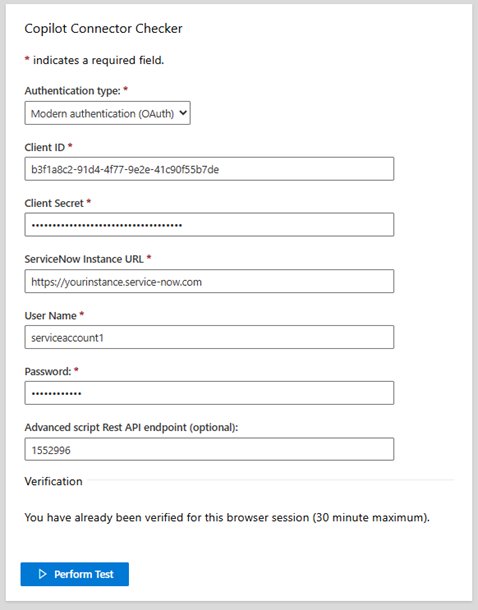
The first release focuses specifically on the ServiceNow Knowledge Base connector, addressing one of the most commonly requested enterprise integrations. Microsoft has indicated that support for additional connectors will be added in future releases, suggesting a roadmap that will expand the tool's utility across various enterprise platforms.
Business Impact
For IT administrators and business leaders, the Copilot Connector Checker represents a significant time-saver in the deployment process. Rather than troubleshooting connector issues after deployment, organizations can identify and resolve configuration problems during the planning phase. This proactive approach reduces deployment time, minimizes user frustration, and ensures a smoother rollout of Copilot capabilities across the organization.
The tool's self-service nature also democratizes the connector validation process, allowing business analysts and power users to verify configurations without requiring deep technical expertise or constant IT intervention.
Getting Started
Organizations interested in validating their ServiceNow Knowledge Base connector configuration can access the tool immediately at https://aka.ms/CopilotConnectorChecker. Microsoft encourages users to provide feedback through the link at the bottom of the tool page, suggesting that the company plans to iterate on the tool based on real-world usage patterns.
As Microsoft continues to expand its Copilot ecosystem and enterprise integration capabilities, tools like the Copilot Connector Checker will become increasingly valuable for organizations navigating the complexities of AI-powered workplace transformation.
Comments
Please log in or register to join the discussion