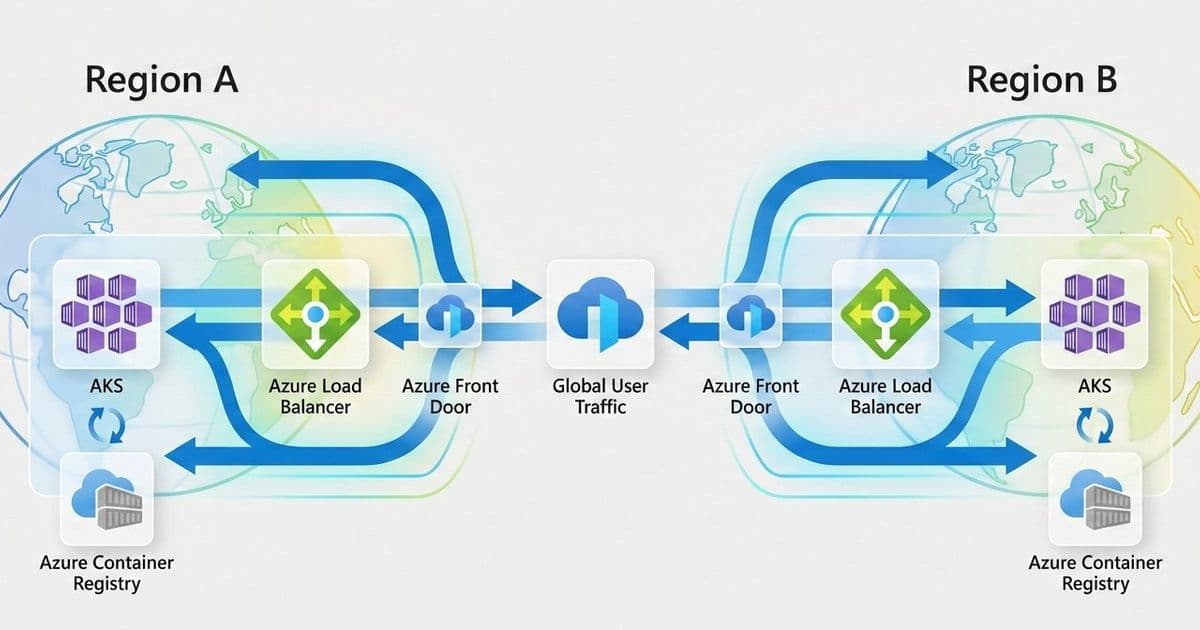
This comprehensive guide explores multi-region AKS deployment patterns, covering active/active and active/passive models, global traffic routing with Azure Front Door, data replication strategies, and operational considerations for building resilient cloud-native platforms.
This article walks through a reference architecture for running Azure Kubernetes Service (AKS) across multiple regions with high availability in mind. It focuses on practical design choices, explains where complexity comes from, and highlights the trade-offs architects need to consider when building resilient Kubernetes platforms on Azure.
Introduction
Cloud-native applications often support critical business functions and are expected to stay available even when parts of the platform fail. Azure Kubernetes Service (AKS) already provides strong availability features within a single region, such as availability zones and a managed control plane. However, a regional outage is still a scenario that architects must plan for when running important workloads.
This article walks through a reference architecture for running AKS across multiple Azure regions. The focus is on availability and resilience, using practical patterns that help applications continue to operate during regional failures. It covers common design choices such as traffic routing, data replication, and operational setup, and explains the trade-offs that come with each approach.
This content is intended for cloud architects, platform engineers, and Site Reliability Engineers (SREs) who design and operate Kubernetes platforms on Azure and need to make informed decisions about multi-region deployments.
Resilience Requirements and Design Principles
Before designing a multi-region Kubernetes platform, it is essential to define resilience objectives aligned with business requirements:
- Recovery Time Objective (RTO): Maximum acceptable downtime during a regional failure.
- Recovery Point Objective (RPO): Maximum acceptable data loss.
- Service-Level Objectives (SLOs): Availability targets for applications and platform services.
The architecture described in this article aligns with the Azure Well-Architected Framework Reliability pillar, emphasizing fault isolation, redundancy, and automated recovery.
Multi-Region AKS Architecture Overview
The reference architecture uses two independent AKS clusters deployed in separate Azure regions, such as West Europe and North Europe. Each region is treated as a separate deployment stamp, with its own networking, compute, and data resources. This regional isolation helps reduce blast radius and allows each environment to be operated and scaled independently.
Traffic is routed at a global level using Azure Front Door together with DNS. This setup provides a single public entry point for clients and enables traffic steering based on health checks, latency, or routing rules. If one region becomes unavailable, traffic can be automatically redirected to the healthy region.
Each region exposes applications through a regional ingress layer, such as Azure Application Gateway for Containers or an NGINX Ingress Controller. This keeps traffic management close to the workload and allows regional-specific configuration when needed.
Data services are deployed with geo-replication enabled to support multi-region access and recovery scenarios. Centralized monitoring and security tooling provides visibility across regions and helps operators detect, troubleshoot, and respond to failures consistently.
The main building blocks of the architecture are:
- Azure Front Door as the global entry point
- Azure DNS for name resolution
- An AKS cluster deployed in each region
- A regional ingress layer (Application Gateway for Containers or NGINX Ingress)
- Geo-replicated data services
- Centralized monitoring and security services
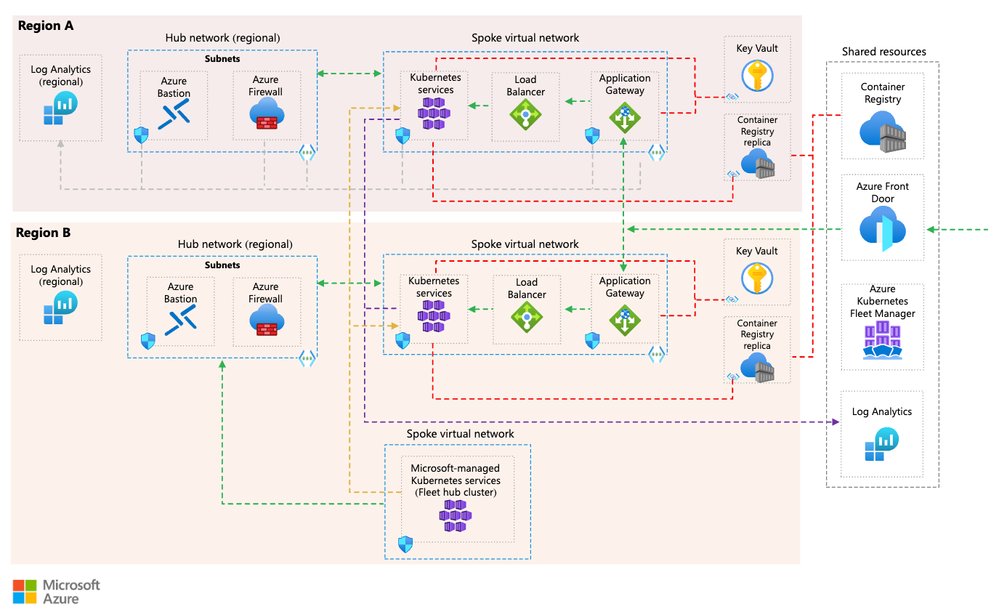
Sample Architecture of a multi-region AKS installation
Deployment Patterns for Multi-Region AKS
There is no single “best” way to run AKS across multiple regions. The right deployment pattern depends on availability requirements, recovery objectives, operational maturity, and cost constraints. This section describes three common patterns used in multi-region AKS architectures and highlights the trade-offs associated with each one.
Active/Active Deployment Model
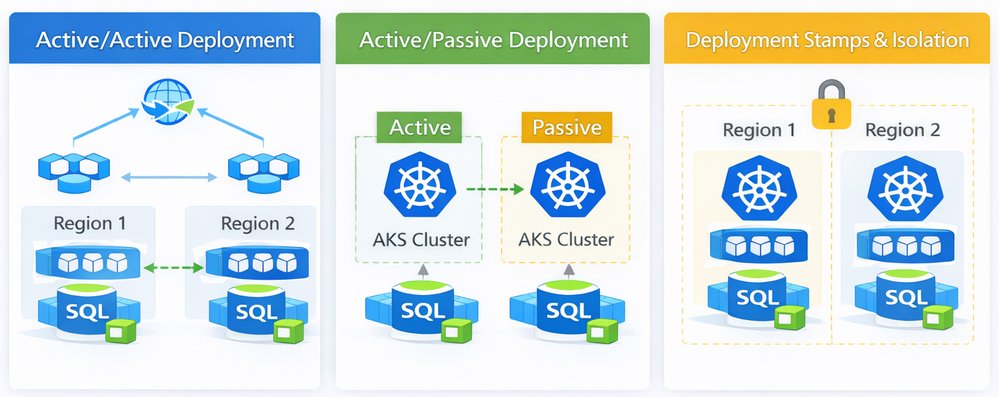
In an active/active deployment model, AKS clusters in multiple regions serve production traffic at the same time. Global traffic routing distributes requests across regions based on health checks, latency, or weighted rules. If one region becomes unavailable, traffic is automatically shifted to the remaining healthy region.
This model provides the highest level of availability and the lowest recovery time, but it requires careful handling of data consistency, state management, and operational coordination across regions.
| Capability | Pros | Cons |
|---|---|---|
| Availability | Very high availability with no single active region | Requires all regions to be production-ready at all times |
| Failover behavior | Near-zero downtime when a region fails | More complex to test and validate failover scenarios |
| Data consistency | Supports read/write traffic in multiple regions | Requires strong data replication and conflict handling |
| Operational complexity | Enables full regional redundancy | Higher operational overhead and coordination |
| Cost | Maximizes resource utilization | Highest cost due to duplicated active resources |
Active/Passive Deployment Model
In an active/passive deployment model, one region serves all production traffic, while a second region remains on standby. The passive region is kept in sync but does not receive user traffic until a failover occurs. When the primary region becomes unavailable, traffic is redirected to the secondary region.
This model reduces operational complexity compared to active/active and is often easier to operate, but it comes with longer recovery times and underutilized resources.
| Capability | Pros | Cons |
|---|---|---|
| Availability | Protects against regional outages | Downtime during failover is likely |
| Failover behavior | Simpler failover logic | Higher RTO compared to active/active |
| Data consistency | Easier to manage single write region | Requires careful promotion of the passive region |
| Operational complexity | Easier to operate and test | Manual or semi-automated failover processes |
| Cost | Lower cost than active/active | Standby resources are mostly idle |
Deployment Stamps and Isolation
Deployment stamps are a design approach rather than a traffic pattern. Each region is deployed as a fully isolated unit, or stamp, with its own AKS cluster, networking, and supporting services. Stamps can be used with both active/active and active/passive models. The goal of deployment stamps is to limit blast radius, enable independent lifecycle management, and reduce the risk of cross-region dependencies.
| Capability | Pros | Cons |
|---|---|---|
| Availability | Limits impact of regional or platform failures | Requires duplication of platform components |
| Failover behavior | Enables clean and predictable failover | Failover logic must be implemented at higher layers |
| Data consistency | Encourages clear data ownership boundaries | Data replication can be more complex |
| Operational complexity | Simplifies troubleshooting and isolation | More environments to manage |
| Cost | Supports targeted scaling per region | Increased cost due to duplicated infrastructure |
Global Traffic Routing and Failover
In a multi-region setup, global traffic routing is responsible for sending users to the right region and keeping the application reachable when a region becomes unavailable. In this architecture, Azure Front Door acts as the global entry point for all incoming traffic.
Azure Front Door provides a single public endpoint that uses Anycast routing to direct users to the closest available region. TLS termination and Web Application Firewall (WAF) capabilities are handled at the edge, reducing latency and protecting regional ingress components from unwanted traffic. Front Door also performs health checks against regional endpoints and automatically stops sending traffic to a region that is unhealthy.
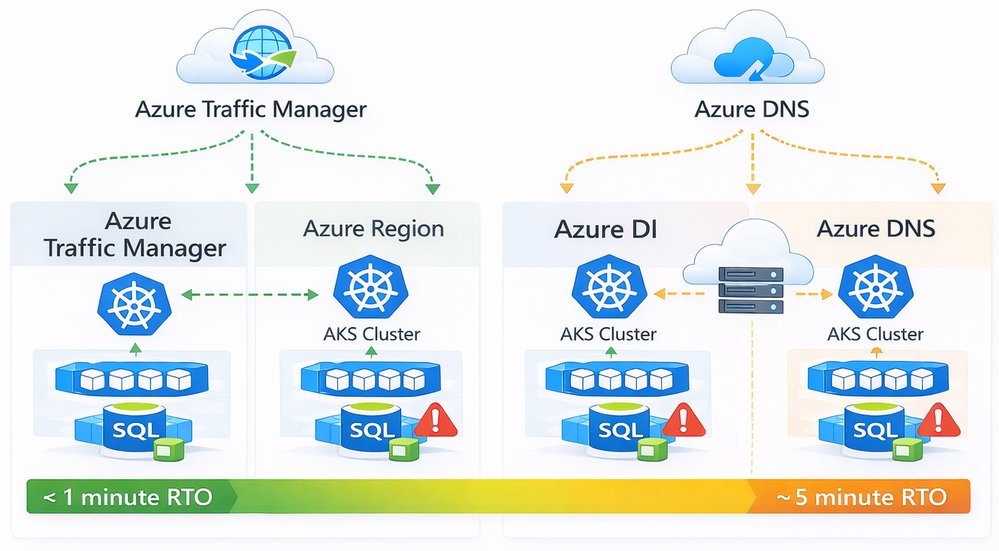
DNS plays a supporting role in this design. Azure DNS or Traffic Manager can be used to define geo-based or priority-based routing policies and to control how traffic is initially directed to Front Door. Health probes continuously monitor regional endpoints, and routing decisions are updated when failures are detected.
When a regional outage occurs, unhealthy endpoints are removed from rotation. Traffic is then routed to the remaining healthy region without requiring application changes or manual intervention. This allows the platform to recover quickly from regional failures and minimizes impact to users.
RTO comparison between Azure Traffic manager and Azure DNS
Choosing Between Azure Traffic Manager and Azure DNS
Both Azure Traffic Manager and Azure DNS can be used for global traffic routing, but they solve slightly different problems. The choice depends mainly on how fast you need to react to failures and how much control you want over traffic behavior.
| Capability | Azure Traffic Manager | Azure DNS |
|---|---|---|
| Routing mechanism | DNS-based with built-in health probes | DNS-based only |
| Health checks | Native endpoint health probing | No native health checks |
| Failover speed (RTO) | Low RTO (typically seconds to < 1 minute) | Higher RTO (depends on DNS TTL, often minutes) |
| Traffic steering options | Priority, weighted, performance, geographic | Basic DNS records |
| Control during outages | Automatic endpoint removal | Relies on DNS cache expiration |
| Operational complexity | Slightly higher | Very low |
| Typical use cases | Mission-critical workloads | Simpler or cost-sensitive scenarios |
Data and State Management Across Regions
Kubernetes platforms are usually designed to be stateless, which makes scaling and recovery much easier. In practice, most enterprise applications still depend on stateful services such as databases, caches, and file storage. When running across multiple regions, handling this state correctly becomes one of the hardest parts of the architecture.
The general approach is to keep application components stateless inside the AKS clusters and rely on Azure managed services for data persistence and replication. These services handle most of the complexity involved in synchronizing data across regions and provide well-defined recovery behaviors during failures.
Common patterns include using Azure SQL Database with active geo-replication or failover groups for relational workloads. This allows a secondary region to take over when the primary region becomes unavailable, with controlled failover and predictable recovery behavior.
For globally distributed applications, Azure Cosmos DB provides built-in multi-region replication with configurable consistency levels. This makes it easier to support active/active scenarios, but it also requires careful thought around how the application handles concurrent writes and potential conflicts.
Caching layers such as Azure Cache for Redis can be geo-replicated to reduce latency and improve availability. These caches should be treated as disposable and rebuilt when needed, rather than relied on as a source of truth.
For object and file storage, Azure Blob Storage and Azure Files support geo-redundant options such as GRS and RA-GRS. These options provide data durability across regions and allow read access from secondary regions, which is often sufficient for backup, content distribution, and disaster recovery scenarios.
When designing data replication across regions, architects should be clear about trade-offs. Strong consistency across regions usually increases latency and limits scalability, while eventual consistency improves availability but may expose temporary data mismatches. Replication lag, failover behavior, and conflict resolution should be understood and tested before going to production.
| Data Type | Recommended Approach | Notes |
|---|---|---|
| Relational data | Azure SQL with geo-replication | Clear primary/secondary roles |
| Globally distributed data | Cosmos DB multi-region | Consistency must be chosen carefully |
| Caching | Azure Cache for Redis | Treat as disposable |
| Object and file storage | Blob / Files with GRS or RA-GRS | Good for DR and read scenarios |
Security and Governance Considerations
In a multi-region setup, security and governance should look the same in every region. The goal is to avoid special cases and reduce the risk of configuration drift as the platform grows. Consistency is more important than introducing region-specific controls.
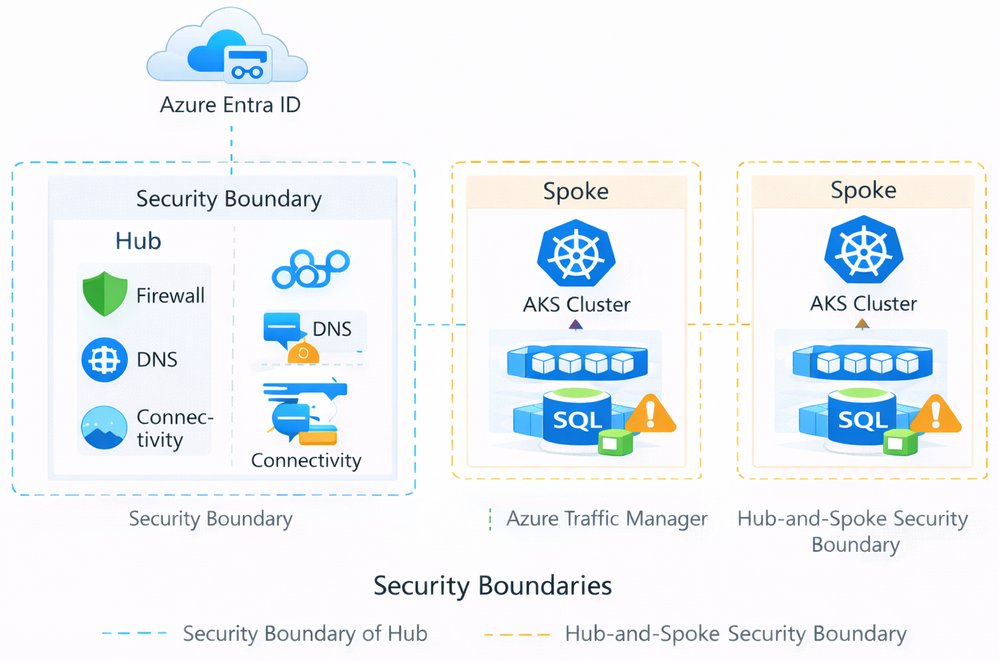
Identity and access management is typically centralized using Azure Entra ID. Access to AKS clusters is controlled through a combination of Azure RBAC and Kubernetes RBAC, allowing teams to manage permissions in a way that aligns with existing Azure roles while still supporting Kubernetes-native access patterns.
Network security is enforced through segmentation. A hub-and-spoke topology is commonly used, with shared services such as firewalls, DNS, and connectivity hosted in a central hub and application workloads deployed in regional spokes. This approach helps control traffic flows, limits blast radius, and simplifies auditing.
Policy and threat protection are applied at the platform level. Azure Policy for Kubernetes is used to enforce baseline configurations, such as allowed images, pod security settings, and resource limits. Microsoft Defender for Containers provides visibility into runtime threats and misconfigurations across all clusters.
Landing zones play a key role in this design. By integrating AKS clusters into a standardized landing zone setup, governance controls such as policies, role assignments, logging, and network rules are applied consistently across subscriptions and regions. This makes the platform easier to operate and reduces the risk of gaps as new regions are added.
Security boundaries of a multi-region AKS
Observability and Resilience Testing
Running AKS across multiple regions only works if you can clearly see what is happening across the entire platform. Observability should be centralized so operators don't need to switch between regions or tools when troubleshooting issues.
Azure Monitor and Log Analytics are typically used as the main aggregation point for logs and metrics from all clusters. This makes it easier to correlate signals across regions and quickly understand whether an issue is local to one cluster or affecting the platform as a whole.
Distributed tracing adds another important layer of visibility. By using OpenTelemetry, requests can be traced end to end as they move through services and across regions. This is especially useful in active/active setups, where traffic may shift between regions based on health or latency.
Synthetic probes and health checks should be treated as first-class signals. These checks continuously test application endpoints from outside the platform and help validate that routing, failover, and recovery mechanisms behave as expected.
Observability alone is not enough. Resilience assumptions must be tested regularly. Chaos engineering and planned failover exercises help teams understand how the system behaves under failure conditions and whether operational runbooks are realistic. These tests should be performed in a controlled way and repeated over time, especially after platform changes.
The goal is not to eliminate failures, but to make failures predictable, visible, and recoverable.
Global monitoring on a multi-region setup
Conclusion and Next Steps
Building a highly available, multi-region AKS platform is mostly about making clear decisions and understanding their impact. Traffic routing, data replication, security, and operations all play a role, and there are always trade-offs between availability, complexity, and cost.
The reference architecture described in this article provides a solid starting point for running AKS across regions on Azure. It focuses on proven patterns that work well in real environments and scale as requirements grow. The most important takeaway is that multi-region is not a single feature you turn on. It is a set of design choices that must work together and be tested regularly.
| Deployment Models | Area | Active/Active | Active/Passive | Deployment Stamps |
|---|---|---|---|---|
| Availability | Highest | High | Depends on routing model | |
| Failover time | Very low | Medium | Depends on implementation | |
| Operational complexity | High | Medium | Medium to high | |
| Cost | Highest | Lower | Medium | |
| Typical use case | Mission-critical workloads | Business-critical workloads | Large or regulated platforms |
| Traffic Routing and Failover | Aspect | Azure Front Door + Traffic Manager | Azure DNS |
|---|---|---|---|
| Health-based routing | Yes | No | |
| Failover speed (RTO) | Seconds to < 1 minute | Minutes (TTL-based) | |
| Traffic steering | Advanced | Basic | |
| Recommended for | Production and critical workloads | Simple or non-critical workloads |
| Data and State management | Data Type | Recommended Approach | Notes |
|---|---|---|---|
| Relational data | Azure SQL with geo-replication | Clear primary/secondary roles | |
| Globally distributed data | Cosmos DB multi-region | Consistency must be chosen carefully | |
| Caching | Azure Cache for Redis | Treat as disposable | |
| Object and file storage | Blob / Files with GRS or RA-GRS | Good for DR and read scenarios |
| Security and Governance | Area | Recommendation |
|---|---|---|
| Identity | Centralize with Azure Entra ID | |
| Access control | Combine Azure RBAC and Kubernetes RBAC | |
| Network security | Hub-and-spoke topology | |
| Policy enforcement | Azure Policy for Kubernetes | |
| Threat protection | Defender for Containers | |
| Governance | Use landing zones for consistency |
| Observability and Testing | Practice | Why It Matters |
|---|---|---|
| Centralized monitoring | Faster troubleshooting | |
| Metrics, logs, traces | Full visibility across regions | |
| Synthetic probes | Early failure detection | |
| Failover testing | Validate assumptions | |
| Chaos engineering | Build confidence in recovery |
Recommended Next Steps
If you want to move from design to implementation, the following steps usually work well:
- Start with a proof of concept using two regions and a simple workload
- Define RTO and RPO targets and validate them with tests
- Create operational runbooks for failover and recovery
- Automate deployments and configuration using CI/CD and GitOps
- Regularly test failover and recovery, not just once
For deeper guidance, the Azure Well-Architected Framework and the Azure Architecture Center provide additional patterns, checklists, and reference implementations that build on the concepts discussed here.
Comments
Please log in or register to join the discussion