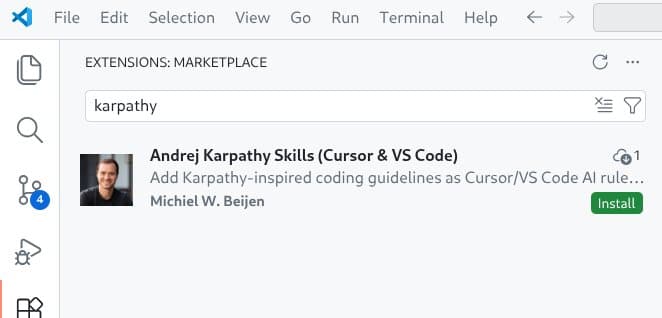
A simple 65-line Markdown file with four coding principles has become a viral sensation in the AI development community, sparking debate about whether lightweight guidelines can meaningfully improve AI coding assistant outputs.
Yesterday my employer organized an AI workshop. My company works a lot with AI supported code editing; using Cursor and VS Code, GitHub Copilot. Plus we do custom stuff using AWS Bedrock, agents using Strands and so on, all the stuff everyone is working with nowadays.
Our facilitator explained how custom rules files can be so very helpful for AI tooling. He linked to this extension with Karpathy-Inspired Claude Code Guidelines as an example. Apparently this plugin is very popular! Yesterday morning the project had 3.5K stars and at the end of the day this already increased to 3.9K. That's a lot of stars.
I went on to investigate what this extension actually does and found that it's just one Markdown file of 65 lines long that lays out four principles; the first one is "Think Before Coding", added with some packaging to make it install in Claude Code.
Publishing it as a Cursor extension
But I don't use Claude Code, so I fired up Codex CLI and turned it into an extension for VS Code and for Cursor, which is a fork of VS Code but uses a plugin registry from the Eclipse Foundation.
Getting the plugins published was the most work. On the 'VS Code Marketplace' I am not a Verified Publisher meaning I do not get a green check mark next to my name, and you will get a warning if you want to install my extension. And apparently the only way to get rid of that is to wait for six months with at least one extension published and then apply for verification. So starting August I can apply for that and any new extensions get automatically trusted.
For Cursor the process felt very cumbersome: I had to create an account on open-vsx.org, create an Eclipse Foundation account, link those accounts, link to my GitHub account, sign an Eclipse agreement, and finally create a GitHub Issue to 'claim' my VS Code Marketplace namespace.
Using the extension
So, what does using the extension actually feel like? Because of the non-deterministic nature of these models, I found it hard to tell. I tried a simple refactoring, and I had the idea that it was very reluctant in making changes. Was the result better? I'm not really sure.
Typically, your Cursor rules would list the constraints for your environment, explaining what coding standards to adhere to, architectural constraints and so on. I get that, it makes sense.
I find it wild to think that a company spends millions and millions of dollars on training a model, with tons of engineers meticulously improving output, and then some guy comes along and writes 60 lines of text including Think before coding in the rules and that would make all the difference.
But the original repository has almost 4,000 stars, and surely, 4,000 developers can't be wrong? Please try for yourself! Install the extension, don't forget to star my repository and see the results.
As Paul Simon wrote: These are the days of miracle and wonder!

The Viral Phenomenon of Lightweight AI Guidelines
The rapid adoption of this 65-line Markdown file raises fascinating questions about how developers are approaching AI-assisted coding. In an era where companies are investing billions in training increasingly sophisticated language models, the fact that a simple set of principles can gain such traction suggests something important about the current state of AI development tools.
What makes this phenomenon particularly interesting is the contrast between the massive computational resources required to train frontier models and the lightweight nature of the intervention. The original guidelines, inspired by Andrej Karpathy's approach to AI-assisted development, focus on fundamental principles rather than technical specifications:
- Think Before Coding
- Be Specific and Concrete
- Prefer Simple Solutions
- Explain Your Reasoning
These principles are deliberately broad, designed to shape the AI's approach to problem-solving rather than constrain it with rigid rules. This approach represents a shift from traditional linting and formatting tools toward what might be called "behavioral guidance" for AI assistants.
The Technical Implementation Challenge
Converting these guidelines into functional extensions for different platforms revealed the fragmented nature of the AI coding assistant ecosystem. Each platform—Claude Code, VS Code, Cursor—has its own extension system, publication requirements, and verification processes.
The verification hurdles are particularly telling. The six-month waiting period for VS Code Marketplace verification and the multi-step process for Eclipse Foundation accounts create significant friction for developers trying to distribute tools. This suggests that while the barrier to creating useful AI tooling might be low (65 lines of Markdown), the barrier to distribution remains substantial.
Does It Actually Work?
The author's experience testing the extension highlights a fundamental challenge with AI tools: their non-deterministic nature makes it difficult to measure improvements objectively. When refactoring code with and without the guidelines, the results felt "very reluctant in making changes," but whether the output was actually better remained unclear.
This uncertainty reflects a broader issue in the AI development community. Without clear benchmarks for "better" AI-assisted code, developers must rely on subjective judgment. The guidelines might produce more thoughtful, considered code, but at the cost of speed and decisiveness.
The Broader Context: AI Development Tooling Evolution
This viral success story fits into a larger pattern of rapid evolution in AI development tools. Just as GitHub Copilot sparked a wave of similar products, the success of these lightweight guidelines has likely inspired other developers to experiment with similar approaches.
The key insight might be that AI coding assistants, despite their sophistication, still benefit from human guidance at a higher level than traditional tools. While linters and formatters operate at the syntax level, these behavioral guidelines operate at the architectural and philosophical level.
This suggests a future where AI development tools have multiple layers of guidance: low-level technical constraints (like current linters), medium-level architectural patterns, and high-level behavioral principles. The 65-line Markdown file represents this highest level of abstraction.
Practical Implications for Developers
For developers considering whether to adopt such guidelines, the decision involves weighing several factors:
- Consistency: Do the guidelines help maintain a consistent approach across different AI-assisted coding sessions?
- Quality: Is the code produced actually better, or just different?
- Speed: Does the additional "thinking" slow down development unacceptably?
- Learning: Do the guidelines help developers learn better practices, or just constrain the AI?
The fact that thousands of developers have adopted these guidelines suggests they find value in them, even if that value is difficult to quantify. The psychological effect of having clear principles might be as important as any technical benefit.
Looking Forward
The success of this simple Markdown file raises questions about what other lightweight interventions might improve AI coding assistants. Could similar principles-based approaches work for other AI applications? The answer seems to be yes, suggesting a broader pattern in human-AI collaboration.
As AI tools become more sophisticated, the role of human guidance may shift from detailed instruction to higher-level principle-setting. This could lead to a new category of "AI behavior management" tools that focus on shaping how AI systems approach problems rather than what specific outputs they produce.
The 65-line phenomenon demonstrates that in the world of AI development tools, sometimes the most impactful innovations aren't the most technically complex. A simple set of well-chosen principles, properly packaged and distributed, can have an outsized effect on how developers work with AI assistants.
The real question isn't whether 4,000 developers can be wrong, but rather what this tells us about the future of human-AI collaboration in software development. The answer appears to be that even in an age of billion-parameter models, human wisdom—distilled into a few key principles—still matters enormously.
Comments
Please log in or register to join the discussion