Quality engineering teams are evolving from manual testing to AI-first QA, but most struggle with inconsistent outputs due to poor prompt design. This article explores how effective prompting transforms testing outcomes, covering maturity models, anti-patterns, and best practices for leveraging AI tools like GitHub Copilot.
AI-assisted testing is no longer an experiment confined to innovation labs. Across enterprises, quality engineering teams are actively shifting from manual-heavy testing approaches to AI-first QA, where tools like GitHub Copilot participate throughout the SDLC—from requirement analysis to regression triage. Yet, despite widespread adoption, most teams are only scratching the surface. They use AI to “generate test cases” or “write automation,” but struggle with inconsistent outputs, shallow coverage, and trust issues. The root cause is rarely the model, it’s prompt design.
This blog moves past basic prompting tips to cover QA practices, focusing on effective prompt design and common pitfalls. It notes that adopting AI in testing is a gradual process of ongoing transformation rather than a quick productivity gain.
Why Effective Prompting Is Necessary in Testing
At its core, testing is about asking the right questions of a system. When AI enters the picture, prompts become the mechanism through which those questions are asked. A vague or incomplete prompt is no different from an ambiguous test requirement—it leads to weak coverage and unreliable results.
Poorly written prompts often result in generic or shallow test cases, incomplete UI or API coverage, incorrect automation logic, or superficial regression analysis. This increases rework and reduces trust in AI-generated outputs. In contrast, well-crafted prompts dramatically improve outcomes. They help expand UI and API test coverage, accelerate automation development, and enable faster interpretation of regression results. More importantly, they allow testers to focus on risk analysis and quality decisions instead of repetitive tasks. In this sense, effective prompting doesn’t replace testing skills—it amplifies them.
Industry Shift: Manual QA to AI-First Testing Lifecycle
Modern QA organizations are undergoing three noticeable shifts. First, there is a clear move away from manual test authoring toward AI-augmented test design. Testers increasingly rely on AI to generate baseline coverage, allowing them to focus on risk analysis, edge cases, and system behavior rather than repetitive documentation.
Second, enterprises are adopting agent-based and MCP-backed testing, where AI systems are no longer isolated prompt responders. They operate with access to application context—OpenAPI specs, UI flows, historical regressions, and even production telemetry—making outputs significantly more accurate and actionable.
Third, teams are seeing tangible SDLC impact. Internally reported metrics across multiple organizations show faster test creation, reduced regression cycle time, and earlier defect detection when Copilot-style tools are used correctly. The key phrase here is correct. Poor prompt neutralizes these benefits almost immediately.
Prerequisites
- GitHub Copilot access in a supported IDE (VS Code, JetBrains, Visual Studio)
- An appropriate model (advanced reasoning models for workflows and analysis)
- Basic testing fundamentals (AI amplifies skill; it does not replace it)
- (Optional but powerful) Context providers / MCP servers for specs, docs, and reports
Prompting - A Designing skill with Examples
Most testers treat prompts as instructions. Mature teams treat them as design artifacts. Effective prompts should be intentional, layered, and defensive. They should not just ask for output, but control how the AI reasons, what assumptions it can make, and how uncertainty is handled.
Pattern 1: Role-Based Prompting
Assigning a role fundamentally changes the AI’s reasoning depth. Instead of: “Generate test cases for login.” Use:
Role: You are a senior QA engineer with 10+ years of experience in enterprise application testing. Task: Design comprehensive test cases for the user login functionality, considering security, usability, and edge cases. Context: The application uses OAuth 2.0 for authentication and supports multi-factor authentication. Constraints: Focus on negative scenarios, boundary conditions, and security vulnerabilities.
This pattern consistently results in better prioritization, stronger negative scenarios, and fewer superficial cases.
Pattern 2: Few-Shot Prompting with Test Examples
AI aligns faster when shown what “good” looks like. Providing even a single example test case or automation snippet dramatically improves consistency in AI-generated outputs, especially when multiple teams are involved.
Concrete examples help align the AI with expected automation structure, enforce naming conventions, influence the depth and quality of assertions, and standardize reporting formats. By showing what “good” looks like, teams reduce variation, improve maintainability, and make AI-generated assets far easier to review and extend.
Pattern 3: Provide Rich Context and Clear Instructions
Copilot works best when it understands the surrounding context of what you are testing. The richer the context, the higher the quality of the output—whether you are generating manual test cases, automation scripts, or regression insights.
When writing prompts clearly describe the application type (web, mobile, UI, API), the business domain, the feature or workflow under test, and the relevant user roles or API consumers. Business rules, constraints, assumptions, and exclusions should also be explicitly stated.
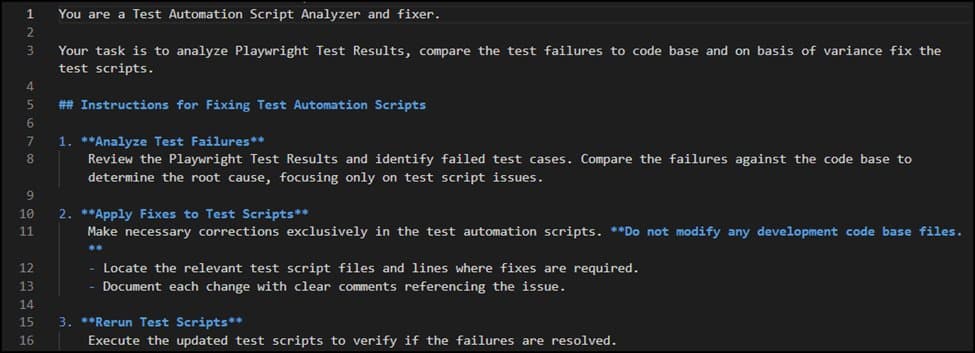
Where possible, include structured instructions in an Instructions.md file and pass it as context to the Copilot agent. You can also attach supporting assets—such as Swagger screenshots or UI flow diagrams—to further ground the AI’s understanding. The result is more concise, accurate output that aligns closely with your system’s real behavior and constraints.
Below is an example of how rich context can aid in efficient output
Below example shows how to give clear instructions to GHCP that helps AI to handle the uncertainty and exceptions to adhere
Prompt Anti-Patterns to Avoid
Most AI failures in QA are self-inflicted. The following anti-patterns show up repeatedly in enterprise teams.
- Overloaded prompts that request UI tests, API tests, automation, and analysis in one step
- Natural language overuse where structured output (tables, JSON, code templates) is required
- Automation prompts without environment details (browser, framework, auth, data)
- Contradictory instructions, such as asking for “detailed coverage” and “keep it minimal” simultaneously
The AI-Assisted QA Maturity Model
Prompting is not a one-time tactic—it is a capability that matures over time. The levels below represent how increasing sophistication in prompt design directly leads to more advanced, reliable, and impactful testing outcomes.
Level 1 – Prompt-Based Test Generation
AI is primarily used to generate manual test cases, scenarios, and edge cases from requirements or user stories. This level improves test coverage and speeds up test design but still relies heavily on human judgment for validation, prioritization, and execution.
Level 2 – AI-Assisted Automation
AI moves beyond documentation and actively supports automation by generating framework-aligned scripts, page objects, and assertions. Testers guide the AI with clear constraints and patterns, resulting in faster automation development while retaining full human control over architecture and execution.
Level 3 – AI-Led Regression Analysis
At this stage, AI assists in analyzing regression results by clustering failures, identifying recurring patterns, and suggesting likely root causes. Testers shift from manually triaging failures to validating AI-generated insights, significantly reducing regression cycle time.
Level 4 – MCP-Integrated, Agentic Testing
AI operates with deep system context through MCP servers, accessing specifications, historical test data, and execution results. It can independently generate, refine, and adapt tests based on system changes, enabling semi-autonomous, context-aware quality engineering with human oversight.
Best Practices for Prompt-Based Testing
- Prioritize context over brevity
- Treat prompts as test specifications
- Iterate instead of rewriting from scratch
- Experiment with models when outputs miss intent
- Always validate AI-generated automation and analysis
- Maintain reusable prompt templates for UI testing, API testing, automation, and regression analysis
Final Thoughts: Prompting as a Core QA Capability
Effective prompt improves coverage, accelerates delivery, and elevates QA from execution to engineering. It turns Copilot from a code generator into a quality partner. The next use case in line is going beyond functional flows and understanding how AI prompting can aid for – Automation framework enhancements, Performance testing prompts, Accessibility testing prompts, Data quality testing prompts.
Stay tuned for upcoming blogs!!
Comments
Please log in or register to join the discussion