Microsoft's new Automatic Agent Upgrade feature for Azure Arc simplifies fleet management by automating agent updates through policy-based controls and CLI options, offering operational advantages over competing hybrid cloud solutions.
Microsoft has introduced Automatic Agent Upgrade for Azure Arc in public preview, addressing a critical operational challenge for organizations managing large hybrid server deployments. This feature enables automatic management of the Azure Connected Machine agent (Arc agent) updates through two implementation methods: a built-in Azure Policy and a new CLI flag during onboarding.
What Changed: Automatic Agent Upgrade Capabilities
The Automatic Agent Upgrade feature eliminates the need for manual intervention in keeping Arc agents current. Once enabled, Microsoft manages all updates, ensuring organizations receive the latest capabilities, security patches, and bug fixes as soon as they're released. This is particularly valuable for enterprises managing extensive server fleets where per-server configuration becomes unmanageable.
The implementation options provide flexibility:
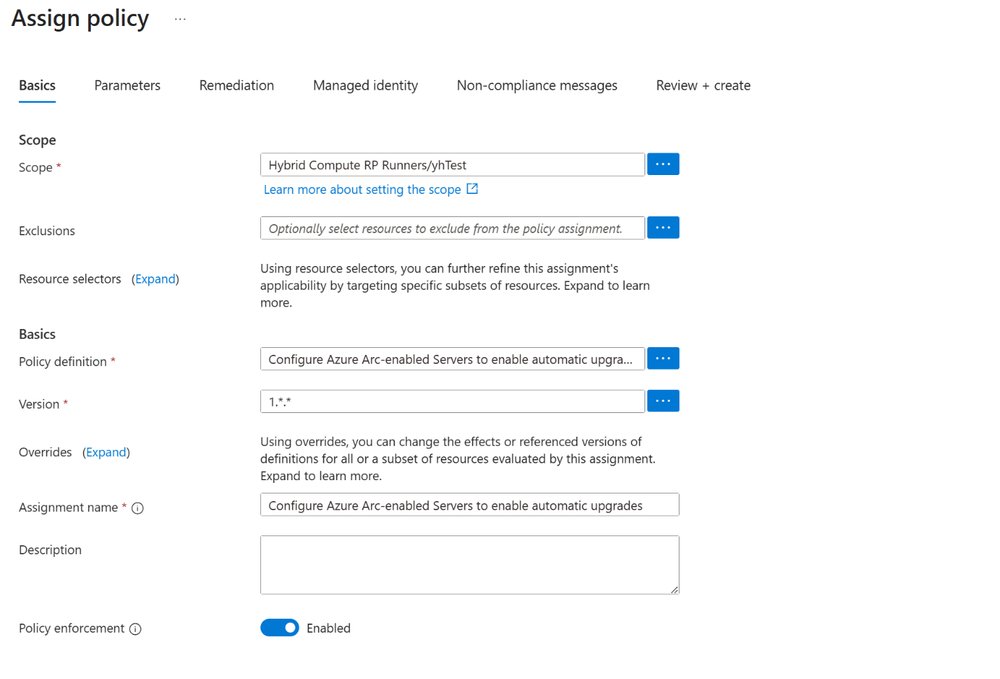
- Azure Policy Approach: Allows administrators to define scopes at subscription and resource group levels, with automatic remediation for non-compliant servers
- CLI Flag Approach: The
--enable-automatic-upgradeflag can be applied during initial onboarding using theazcmagent connectcommand
For organizations already utilizing Azure Arc at scale onboarding methods, the CLI flag can be incorporated into existing automation scripts, maintaining consistency across deployment strategies.
Provider Comparison: Azure Arc vs. Hybrid Management Alternatives
When evaluating automated agent management solutions, Azure Arc's new feature presents several advantages over competing offerings:
AWS Systems Manager:
- AWS provides automated agent updates through SSM Agent, but requires additional configuration for patch management
- Azure Arc's policy-based approach offers more centralized control across hybrid environments
- AWS implementation typically requires additional services like Patch Manager for comprehensive update control
Google Cloud Ops Suite:
- Google's ops agent requires manual version tracking and updates
- Limited native automation capabilities compared to Azure Arc's policy-driven approach
- Google's solution is more cloud-native focused, with less emphasis on hybrid environments
Traditional Configuration Management Tools:
- Solutions like Ansible, Puppet, or Chef require significant investment in maintenance and custom scripting
- Azure Arc's built-in automation reduces operational overhead
- Third-party tools offer broader configuration management but lack Azure Arc's tight integration with cloud services
Business Impact: Operational Efficiency and Strategic Considerations
The introduction of Automatic Agent Upgrade delivers several business benefits:
Operational Efficiency:
- Reduces manual intervention for agent maintenance across large server estates
- Minimizes operational drift by ensuring consistent agent versions
- Frees IT staff from routine update tasks to focus on higher-value activities
Security and Compliance:
- Ensures immediate deployment of security patches as they become available
- Provides consistent security posture across all managed servers
- Simplifies compliance reporting through centralized policy management
Migration Considerations:
- For existing Azure Arc deployments, gradual implementation through policy assignment allows for controlled rollout
- New onboarding can immediately leverage the CLI flag for consistent configuration
- Organizations should evaluate the impact on existing automation scripts that currently manage agent updates
Total Cost of Ownership:
- Reduces the administrative burden associated with manual update management
- Minimizes risks associated with inconsistent agent versions
- Potential cost savings from reduced incident resolution related to outdated agents
Implementation Strategy
Organizations should consider a phased approach to adopting Automatic Agent Upgrade:
- Assessment Phase: Evaluate current agent management practices and identify servers that would benefit most from automation
- Pilot Implementation: Test the feature on a limited server group using both policy and CLI methods
- Rollout Phase: Gradually expand coverage based on pilot results
- Optimization Phase: Fine-tune policy scopes and remediation settings based on operational experience
For detailed implementation guidance, Microsoft provides comprehensive documentation through their Azure Arc documentation and specific articles on managing the Azure Connected Machine agent.
The Automatic Agent Upgrade feature represents Microsoft's continued investment in hybrid cloud management, addressing a fundamental operational challenge while maintaining Azure Arc's position as a comprehensive solution for hybrid infrastructure. As organizations increasingly adopt multi-cloud strategies, capabilities that simplify operational consistency across environments become increasingly valuable differentiators.
Comments
Please log in or register to join the discussion