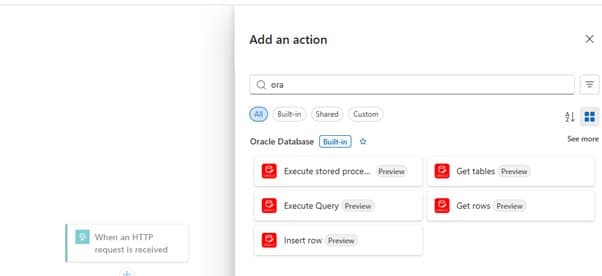
Microsoft's new built-in Oracle Database connector for Azure Logic Apps Standard enables direct, high-performance integration without requiring on-premises gateways, streamlining enterprise workflows.
Azure Logic Apps Standard Now Features Native Oracle Database Connector
Microsoft has announced the public preview of a significant enhancement to Azure Logic Apps Standard: a built-in Oracle Database connector. This development represents a strategic advancement in cloud integration capabilities, particularly for enterprises maintaining hybrid environments with Oracle databases.
What Changed: The New Built-In Connector
The Oracle Database built-in connector represents a fundamental shift in how Azure Logic Apps Standard interacts with Oracle systems. Unlike previous approaches that required generic JDBC connectors or on-premises data gateways, this new solution executes database operations in-process with the Logic Apps runtime.
This in-process execution model delivers several technical advantages:
- Reduced latency: Operations execute directly within the Logic Apps runtime environment
- Simplified architecture: Eliminates the need for an on-premises data gateway when network connectivity exists
- Enhanced security: Network traffic remains within the organization's defined boundaries
- Better performance: Optimized for high-throughput integrations with Oracle-backed systems
Provider Comparison: Azure vs. Alternative Approaches
When evaluating this new offering against existing integration solutions, several differentiators emerge:
Azure Logic Apps Standard vs. Azure Logic Apps (Multi-tenant)
The built-in connector is specifically designed for Logic Apps Standard (single-tenant) environments, offering:
- More predictable performance characteristics
- Greater control over network topology
- Enhanced compliance capabilities for regulated industries
- Better resource isolation for mission-critical workloads
Built-in Connector vs. Generic JDBC Solutions
Previous approaches to Oracle integration often relied on generic JDBC-based connectors, which presented several limitations:
- Limited Oracle-specific functionality: Generic solutions lacked purpose-built features like stored procedure execution
- Performance overhead: Additional abstraction layers increased latency
- Operational complexity: Required more configuration and maintenance
- Reduced reliability: Generic error handling didn't address Oracle-specific nuances
The new connector addresses these gaps with Oracle-focused actions, streamlined connectivity, and purpose-built capabilities.
On-Premises Integration Options
For organizations with hybrid requirements, Microsoft offers multiple pathways:
- With network connectivity: Direct connection without data gateway
- Without network connectivity: Hybrid Logic Apps with on-premises-hosted runtime
- Complex network topologies: Integration through VNET, private endpoints, and network controls
Business Impact: Strategic Advantages for Enterprises
The introduction of this connector carries significant implications for organizations managing Oracle databases in Azure environments:
Migration and Modernization Opportunities
Enterprises evaluating migration from legacy integration platforms like BizTalk now have a more compelling path to modernization:
"The Oracle Database built-in connector provides a crucial bridge for organizations transitioning from traditional integration solutions to cloud-native architectures," notes Azure Integration Services team. "It enables gradual migration rather than requiring wholesale replacement of existing Oracle-dependent workflows."
Operational Efficiency Improvements
The elimination of the data gateway requirement (when network connectivity exists) translates to:
- Reduced infrastructure components to manage
- Lower operational overhead
- Fewer potential points of failure
- Simplified network security policies
Performance and Scalability Benefits
For high-throughput scenarios, the in-process execution model delivers measurable advantages:
- Lower latency for database operations
- Better resource utilization
- Improved scalability characteristics
- More predictable performance under load
Technical Capabilities and Limitations
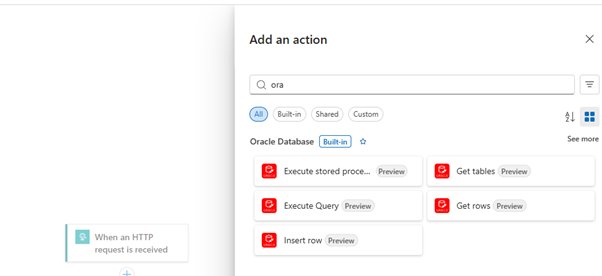
The Oracle Database built-in connector currently supports these actions:
- Get tables: Discover available tables and views
- Get rows: Read data with pagination support
- Insert row: Add new records to tables
- Execute query: Run SQL statements with result handling
- Execute stored procedure: Call Oracle stored procedures for complex operations
However, organizations should note these current limitations:
- Triggers not yet supported: The connector currently provides actions only
- Update/delete operations: Require Execute query or stored procedures
- Authentication limited to username/password: More advanced options may be added in future releases
Getting Started and Implementation Considerations
Organizations interested in implementing this connector should consider these steps:
Prerequisites
- Network connectivity from Logic App Standard runtime to Oracle Database endpoint
- Proper DNS and firewall configuration
- Oracle Database 11 or later compatibility
- Appropriate database permissions for intended operations
Configuration Process
- Create a new Oracle Database connection in the Logic Apps designer
- Provide connection parameters:
- Server address (Easy Connect or TNS descriptor format)
- Username
- Password
- Select desired actions (Get rows, Execute stored procedure, etc.)
- Build and test workflows
Troubleshooting Common Issues
Based on Microsoft's documentation, organizations should be prepared to address these scenarios:
- 401 Authentication errors: Verify credentials and account status
- 502 Connectivity issues: Check network reachability and Oracle listener availability
- 504 Timeouts: Review query complexity and timeout configurations
- 404 Object not found: Verify schema names and permissions
- 429 Resource limits: Evaluate Oracle session limits and workflow concurrency
Future Roadmap and Feedback Opportunities
Microsoft has specifically requested feedback on several areas for potential enhancement:
- Trigger support: The ability to initiate workflows based on Oracle database events
- Advanced authentication: Options beyond username/password
- Additional Oracle operations: Expanded capabilities beyond the current five actions
For organizations implementing this preview, Microsoft encourages sharing experiences and requirements through their feedback channels.
Conclusion
The Oracle Database built-in connector for Azure Logic Apps Standard represents a strategic advancement in cloud integration capabilities. By providing native, high-performance connectivity to Oracle databases, Microsoft has addressed a significant gap in their integration portfolio while maintaining compatibility with existing enterprise network topologies.
For organizations evaluating cloud migration or modernizing integration architectures, this connector offers a compelling combination of performance, security, and operational simplicity. As the preview continues to evolve, we can expect additional features that will further strengthen Azure's position in enterprise integration scenarios.
For more detailed implementation guidance, refer to the official Connect to Oracle Database from Workflows - Azure Logic Apps documentation on Microsoft Learn.
The availability of this built-in connector aligns with Microsoft's broader strategy to enhance Azure Logic Apps Standard as a premier enterprise integration platform, particularly for organizations maintaining hybrid cloud environments with diverse database technologies.
Comments
Please log in or register to join the discussion