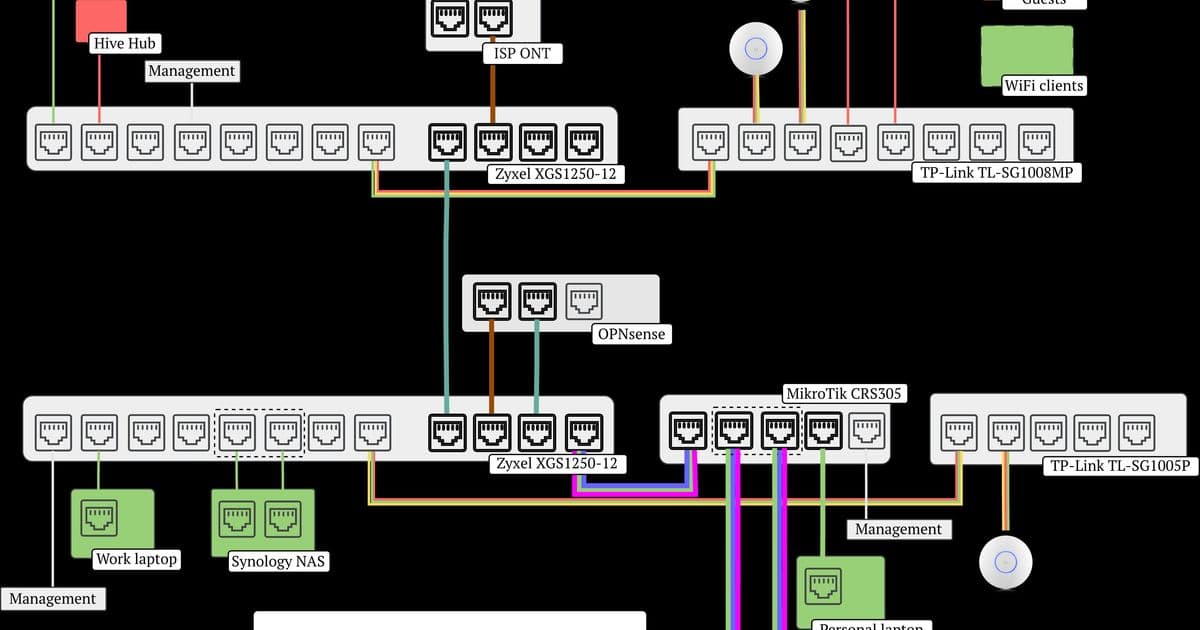
A comprehensive journey through designing and implementing a sophisticated home network with VLAN segmentation, 10Gbps infrastructure, and custom router setup to achieve enterprise-grade security and performance.
When I began rethinking my home network architecture, I quickly realized that modern networking demands extend far beyond simple internet connectivity. What started as a desire to improve Wi-Fi coverage evolved into a complete overhaul of my entire home infrastructure, incorporating VLAN segmentation, 10Gbps networking, and a custom router solution that would fundamentally change how my devices communicate.
The Challenge of Router Placement
The most immediate constraint I faced was the physical location of my internet connection. Fiber enters my house in the living room, but I wanted my router in my home office for better management and reduced noise in living spaces. My initial thought was to run two separate cables—one for incoming fiber and another back to the living room—but this proved prohibitively expensive and impractical.
This challenge led me to discover VLANs and "router on a stick" topology, concepts I had never encountered before. The solution was elegant: use a single cable to carry multiple virtual networks simultaneously, with each packet tagged to indicate its destination VLAN. This approach would allow WAN traffic to flow from the living room to the office router and then be routed appropriately to devices anywhere in the house.
Understanding VLAN Architecture
Learning about VLANs revealed how common this solution is in enterprise networking, yet it remains relatively unknown in home environments. A VLAN (Virtual Local Area Network) requires several components working together:
- Managed switches that can tag and untag frames using the 802.1Q standard
- A router/firewall that understands VLAN-to-IP mappings and can enforce inter-VLAN rules
- A clear network design that assigns devices to appropriate security zones
The trunk link between my living room and office carries traffic from multiple VLANs simultaneously. Each Ethernet frame traveling along this cable includes a VLAN tag, allowing switches at either end to route it correctly based on its destination.
My VLAN Design
After extensive research, I settled on seven distinct VLANs, each serving a specific security and functional purpose:
| VLAN | Purpose | IP Range | Security Level |
|---|---|---|---|
| 1 | Management | 192.168.1.0/24 | Internal only |
| 10 | WAN | N/A | Internet-facing |
| 20 | Trusted LAN | 192.168.20.0/24 | High trust |
| 30 | Untrusted IoT | 192.168.30.0/24 | Low trust |
| 40 | Guest LAN | 192.168.40.0/24 | Minimal trust |
| 50 | DMZ | 192.168.50.0/24 | Restricted |
| 60 | AI DMZ | 192.168.60.0/24 | Highly restricted |
This design follows the principle of least privilege, ensuring devices can only access what they absolutely need. My trusted devices (laptops, NAS, Apple TV) live in VLAN 20, while IoT devices and guest networks are isolated in their own security zones with no lateral movement capabilities.
Hardware Selection and Implementation
I invested in a mix of managed switches to support this architecture:
- Zyxel XGS 1250-12 (2x): Core switches with VLAN and link aggregation support
- MikroTik CRS305-1G-4S+IN: 10Gbps SFP+ switch for the office
- TP-Link TL-SG1005P and TL-SG1008MP: PoE switches for access points
This setup provides 30 x 1Gbps RJ45 ports (13 PoE), 6 x multigig ports supporting 1/2.5/5/10Gbps, and 6 x 10Gbps SFP+ ports—42 total ports with room for expansion.
The Zyxel switches proved ideal for "prosumer" use, offering exactly the features needed: VLAN support and link aggregation. Their simple web interface made configuration straightforward, though I initially struggled with the concept of tagged versus untagged ports.
Configuration Challenges and Lessons Learned
VLAN configuration proved to be one of the most frustrating aspects of the project. The primary challenge was maintaining management access while making configuration changes. Several times I locked myself out of switches by misconfiguring the VLAN assignments on ports I was using for management.
The most significant lockout occurred when I changed VLAN tags on a port connected to my access points, immediately killing Wi-Fi. Since my laptop was connected through Wi-Fi, I lost all management access. The resolution required a factory reset and careful reconfiguration, ensuring management access was established on the correct VLAN before making other changes.
Key lessons from this experience:
- Always maintain a physical management path when making VLAN changes
- Design the network on paper first with multiple iterations
- Understand tagged vs untagged port behavior before implementation
- Test changes incrementally rather than making wholesale modifications
The 10Gbps Infrastructure
Beyond VLANs, I implemented 10Gbps networking for speed and future-proofing. This required understanding SFP+ interfaces, which differ from standard RJ45 Ethernet. SFP+ offers flexibility but requires compatible modules and potentially fiber optic cables, adding complexity to the setup.
The thicker lines in my network diagram represent 10Gbps links, connecting my most bandwidth-intensive devices and providing headroom for future growth. This infrastructure upgrade ensures my network can handle increasing demands from streaming, backups, and emerging technologies.
Security Through Segmentation
Each VLAN serves a specific security purpose:
- Management VLAN (1): Router and core switches only
- WAN VLAN (10): Internet traffic routing
- Trusted VLAN (20): Primary devices with full LAN access
- IoT VLAN (30): Smart home devices isolated from main network
- Guest VLAN (40): Limited bandwidth, no LAN access
- DMZ VLANs (50/60): Internet-facing services with strict firewall rules
The AI DMZ (VLAN 60) represents a particularly interesting security consideration, providing fine-grained port-level control for AI agents while maintaining separation from other network services.
The Result
The completed network architecture represents a significant improvement over my previous setup. The single-cable trunk solution elegantly solves the router placement problem while providing enterprise-grade segmentation and performance. The system accomplishes all my original goals: removing the ISP router, supporting VLANs for security, enabling 10Gbps speeds, and separating storage from compute layers.
This project taught me that home networking has evolved far beyond simple router setups. Modern homes with smart devices, media servers, and remote work requirements benefit from the same principles that guide enterprise network design: segmentation, redundancy, and scalability. The frustration of VLAN configuration is outweighed by the satisfaction of a network that's secure, fast, and future-proof.
In subsequent posts, I'll detail the OPNsense router build, 10Gbps SFP+ configuration, and the Proxmox server that completes this home lab ecosystem. The journey from basic Wi-Fi improvement to comprehensive network architecture demonstrates how quickly home networking ambitions can grow when you discover what's possible.
Comments
Please log in or register to join the discussion