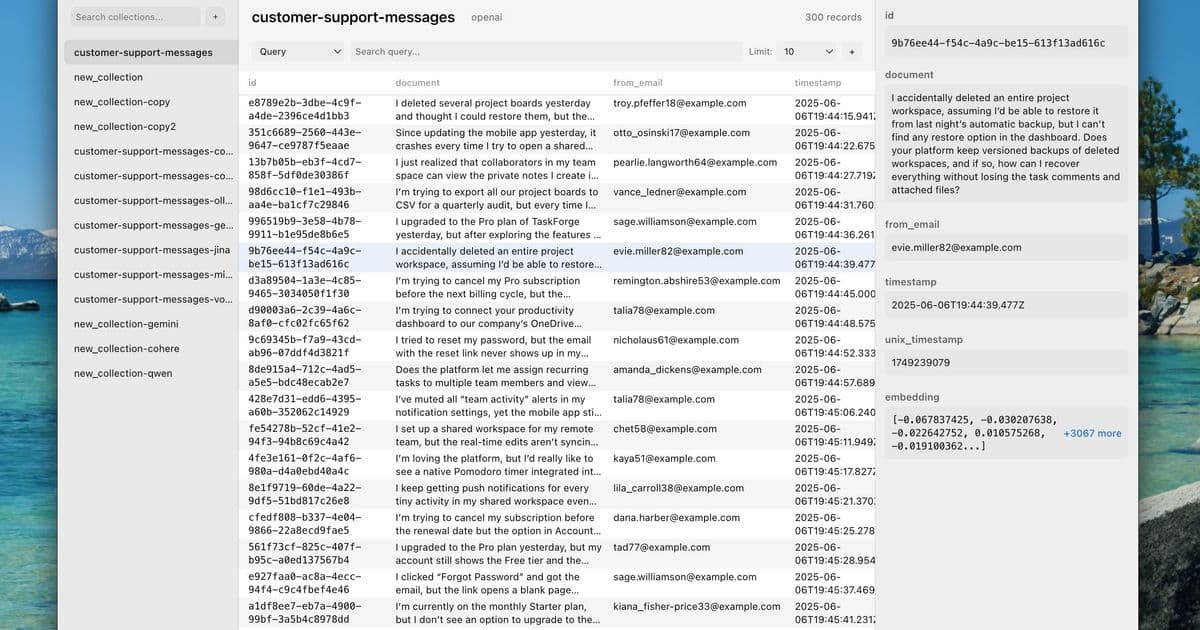
A new native macOS client for ChromaDB offers a visual interface for semantic search and vector embedding management, signaling a maturation of tooling around popular vector databases.
The vector database ecosystem has matured rapidly over the past year, but the tooling has largely remained command-line first. Chroma Explorer, a new native desktop client for ChromaDB, attempts to change that dynamic by providing a visual layer over the increasingly popular open-source vector store.
The Visual Gap in Vector Management
ChromaDB itself has gained significant traction as a lightweight, developer-friendly vector database. It's easy to spin up locally, integrates well with LangChain and LlamaIndex, and handles embedding storage and retrieval without the complexity of heavier solutions like Pinecone or Weaviate. But that ease of use comes with a trade-off: most interaction happens through Python scripts or API calls.
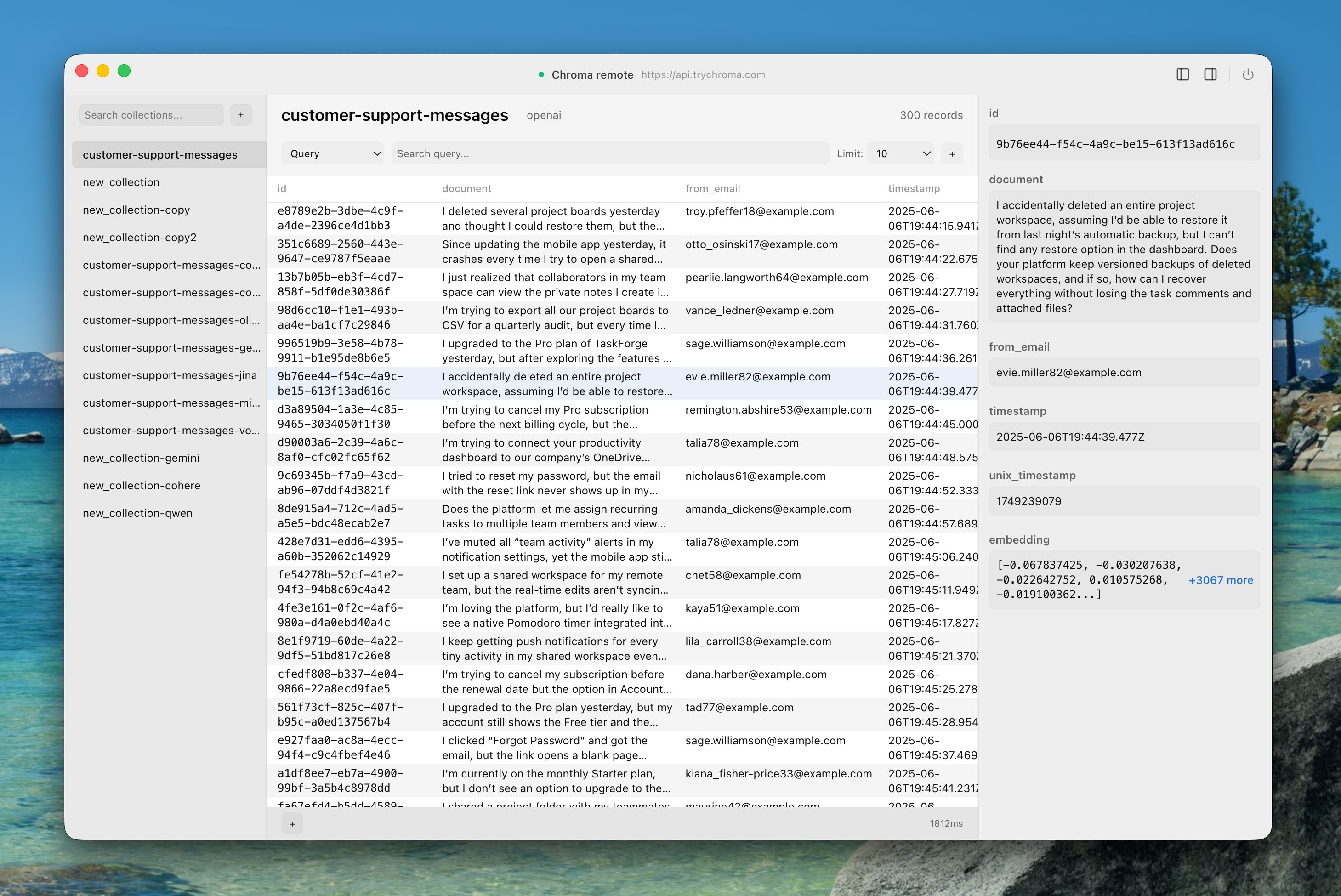
This creates a friction point for developers trying to understand what's actually happening inside their collections. When you're debugging semantic search results or trying to understand why certain documents aren't retrieving as expected, staring at JSON outputs in a terminal only gets you so far. Chroma Explorer attempts to fill this gap by providing a native interface for browsing collections, visualizing embeddings, and performing semantic searches without writing code.
What the App Actually Does
The application focuses on core ChromaDB operations but wraps them in a visual workflow. You can connect to multiple database instances—local, remote servers, or Chroma Cloud—through saved profiles. This multi-profile approach acknowledges that developers often work across different environments, switching between local development, staging, and production databases.
Collection management becomes point-and-click rather than script-based. Creating collections, setting HNSW parameters (the hierarchical navigable small world graphs that power efficient vector search), and configuring custom embedding functions all happen through forms rather than code. The app supports over 13 embedding providers including OpenAI, Cohere, Gemini, Ollama, Jina, Mistral, and Voyage AI, which covers most of the current landscape.
Where the visual interface adds real value is in document operations and search. You can browse individual documents, edit them inline, and perform batch operations for bulk management. The semantic search interface lets you type natural language queries and immediately see results with similarity scores, making it easier to tune your search parameters and understand retrieval behavior.
The Broader Pattern: Tooling Follows Adoption
Chroma Explorer's emergence fits a pattern we've observed across the AI infrastructure stack. When a technology reaches sufficient adoption, the ecosystem naturally produces tools that abstract away complexity for specific use cases. We saw this with database GUIs like TablePlus and Postico for SQL databases, and we're seeing it now with vector database management tools.
The question is whether this particular approach—native desktop client—makes sense for vector databases specifically. Vector operations are inherently distributed and cloud-native in many production scenarios. A desktop client that focuses on local development and single-instance management might feel limiting for teams running scaled vector search infrastructure.
However, the local development story for ChromaDB is strong. Many developers run ChromaDB locally during development, and having a visual tool to inspect and manipulate local collections could significantly speed up the iteration cycle. The ability to quickly search through embeddings and understand document structure without spinning up Jupyter notebooks or writing temporary scripts addresses a real pain point.
Counter-Perspectives on Visual Tooling
There's also an argument that visual tools can obscure what's actually happening under the hood. Vector search is complex—similarity metrics, embedding models, chunking strategies, and index parameters all interact in non-obvious ways. A GUI that hides these details might lead to developers who don't understand the fundamentals of their retrieval system.
The terminal and code-first approach forces you to engage with these concepts directly. When you write Python to query ChromaDB, you're explicitly handling embeddings, specifying distance metrics, and understanding query construction. A visual tool risks turning vector search into a black box where you type queries and get results without understanding why certain documents match.
That said, Chroma Explorer doesn't necessarily replace code—it complements it. The app is positioned as a way to visualize and manage your existing ChromaDB workflows, not to eliminate the need for understanding vector search fundamentals. The export and API integration features suggest it's meant to fit into existing development pipelines rather than replace them.
The Native App Question
The choice to build a native macOS application rather than a web-based tool is interesting. Native apps can provide better performance for large datasets and tighter OS integration, but they sacrifice accessibility. Developers on Windows or Linux are left out, and teams can't easily share a web-based tool.
The glass morphism design language and native macOS feel suggest the developer prioritizes user experience for Mac users, betting that the quality of the interface will outweigh the platform limitation. For a tool meant to make vector database management more approachable, this trade-off might make sense.
Looking Ahead
Chroma Explorer represents a maturation of the vector database ecosystem. As more developers integrate semantic search into their applications, the need for better debugging and management tools becomes apparent. Whether this specific implementation—the native desktop client—becomes the standard approach remains to be seen.
The broader trend is clear: the tooling around AI infrastructure is becoming more sophisticated and user-friendly. We're moving from raw APIs and command-line interfaces toward tools that acknowledge how developers actually work. Chroma Explorer is an early example of this shift for vector databases, and it will be interesting to see how the space evolves from here.
You can download Chroma Explorer for macOS from GitHub or learn more at chroma-explorer.com.
Comments
Please log in or register to join the discussion