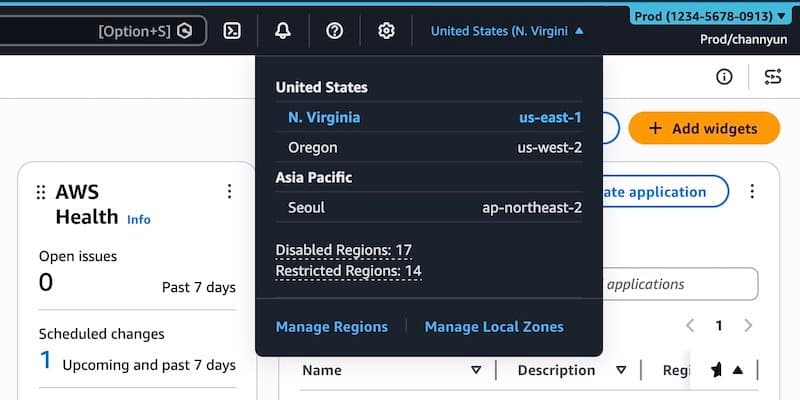
AWS expands its User Experience Customization (UXC) capability with new features for account color assignment, region visibility control, and service filtering to reduce cognitive load and improve navigation efficiency.
AWS has expanded its User Experience Customization (UXC) capability with new features that let you customize the visual appearance and selective visibility of AWS Management Console components. These enhancements, announced today, build upon the August 2025 introduction of UXC by adding the ability to control which AWS Regions and services appear in the console, alongside the existing account color customization.
Visual Account Categorization
The new account color feature allows administrators to assign distinct colors to AWS accounts, making it easier to visually distinguish between different environments or purposes. To set up account colors, users can navigate to the AWS Management Console, click their account name in the navigation bar, and select "Account" to access display settings. From there, you can choose from a palette of colors and apply them to your accounts.
This visual differentiation proves particularly useful for organizations managing multiple accounts. For example, you might use orange for development accounts, light blue for test environments, and red for production systems. The chosen color appears prominently in the navigation bar, providing immediate visual context about which account you're currently operating in.
Selective Region and Service Visibility
The most significant enhancement is the ability to control which AWS Regions and services appear in the console interface. This feature addresses a common pain point for users who work with limited subsets of AWS's global infrastructure and service catalog.
To configure region visibility, users can click the gear icon in the navigation bar and select "See all user settings." If you have administrator privileges, you'll see a new "Account settings" tab where you can edit visible regions. You can choose to display either "All available Regions" or select a specific subset of regions that are relevant to your team's work.
Similarly, service visibility can be customized by selecting which AWS services appear in the console navigation. Users can search for specific services or browse by category, such as "Popular services," to create a personalized service menu. Once configured, only the selected services appear in the "All services" menu and search results.
Implementation and Management
These customization settings are managed through the AWS Management Console interface, but they can also be controlled programmatically using the UXC API. The new visibleServices and visibleRegions parameters allow for automated configuration and integration with existing infrastructure-as-code workflows.
AWS provides a CloudFormation template example that demonstrates how to set up these customizations. The template allows you to specify account color, visible services (such as S3, EC2, and Lambda), and visible regions (like us-east-1 and us-west-2). This programmatic approach enables organizations to maintain consistent console configurations across multiple accounts and teams.
Important Considerations
It's crucial to understand that these visibility settings control only the appearance of services and regions within the AWS Management Console. They do not restrict access through other AWS interfaces such as the AWS Command Line Interface (CLI), AWS SDKs, AWS APIs, or Amazon Q Developer. This means that while the console interface becomes more focused and streamlined, users still have full access to all AWS services and regions through programmatic means.
Benefits and Use Cases
These customization capabilities offer several practical benefits:
Reduced Cognitive Load: By hiding unused regions and services, users can focus on the tools and resources relevant to their work without being overwhelmed by options they don't need.
Improved Navigation Efficiency: Eliminating unnecessary clicks and scrolling through long lists of regions or services helps users complete tasks more quickly.
Enhanced Account Management: Color-coding accounts makes it easier to identify the purpose and environment of each account at a glance, reducing the risk of operating in the wrong account.
Team-Specific Configurations: Different teams can have tailored console experiences based on their specific service usage patterns and regional requirements.
Getting Started
The new customization features are available immediately in the AWS Management Console. Users can begin configuring their account colors, visible regions, and visible services through the settings interface. For organizations looking to implement these changes across multiple accounts, the programmatic options via API and CloudFormation provide scalable deployment options.
To learn more about these capabilities, AWS provides comprehensive documentation including the AWS User Experience Customization API Reference and AWS CloudFormation template reference. Users can also access sample templates and deployment commands to quickly implement customizations.
AWS encourages users to try these new features and provide feedback through the console's feedback link, the AWS re:Post forum for AWS Management Console, or by contacting AWS Support. This feedback will help AWS continue refining the UXC capability to better meet user needs.
The expansion of UXC represents AWS's ongoing commitment to improving the user experience in its management console, recognizing that as the platform grows more complex, tools for customization and simplification become increasingly valuable for efficient cloud operations.
Comments
Please log in or register to join the discussion