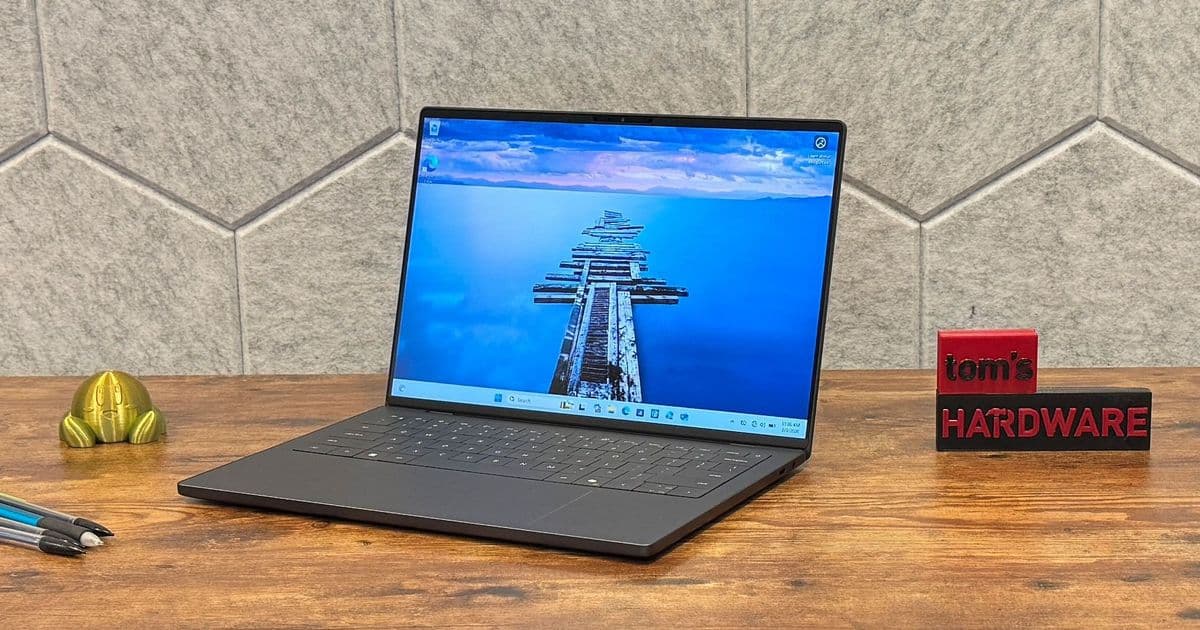
Dell's redesigned XPS 14 addresses past criticisms with a physical function row, improved touchpad, and excellent battery life, though its shallow keyboard and premium pricing remain drawbacks.
Dell has taken a significant step in the right direction with the XPS 14 (2026), addressing many of the criticisms that plagued its recent predecessors. After a brief identity crisis that saw the XPS branding temporarily disappear, Dell has brought back the name that consumers trust, along with several practical improvements that make this ultrabook a compelling option in the premium laptop market.
Design: Back to Basics, Better Than Ever
The XPS 14's design philosophy is clear: functionality over form. While it still maintains the sleek, MacBook Air-inspired aesthetic that Dell has cultivated over the years, the company has listened to user feedback and made meaningful changes.
The most welcome addition is the physical function row. After the controversial touch-based function keys of previous models, users can now adjust volume, brightness, and other settings without looking or dealing with unreliable touch inputs. The subtle borders around the touchpad provide clear visual and tactile feedback, eliminating the guesswork that plagued earlier haptic designs.
Dell offers the XPS 14 in graphite gray, with a "shimmer" champagne option coming soon. The laptop starts at just 3 pounds and measures 12.19 x 8.26 x 0.58 inches, making it competitive with Apple's MacBook Pro with M5 (3.4 pounds, 212.31 x 8.71 x 0.61 inches) and lighter than the Asus Zenbook Duo (3.64 pounds with keyboard).
Display Options: OLED Excellence vs. Practical Efficiency
Dell provides two distinct display options that cater to different user needs. The tandem OLED touchscreen offers a 2880 x 1800 resolution with a variable refresh rate that can drop as low as 1 Hz. This display delivers exceptional color accuracy and deep blacks, making it ideal for content creators and media consumers.
The 1080p non-touch option, while less visually impressive, offers practical advantages. Its ability to reduce the refresh rate to 1 Hz contributes to the XPS 14's remarkable battery life, and it's perfectly adequate for productivity tasks like spreadsheets and document editing.
In our testing, the OLED display achieved 365 nits of brightness with 89.7% DCI-P3 color gamut coverage, while the 1080p LCD reached 466 nits but only covered 71.4% DCI-P3. The MacBook Pro's mini-LED display was the brightest at 558 nits.
Performance: Intel's Core Ultra Series 3 Delivers
We tested two configurations that highlighted the performance differences within Intel's Core Ultra Series 3 lineup. The high-end model with the Intel Core Ultra X7 358H, featuring 16 cores, significantly outperformed the entry-level Ultra 7 355 with its 8 cores.
On Geekbench 6, the X7 358H achieved a single-core score of 2,867 and a multi-core score of 16,927, compared to the Ultra 7 355's 2,685 and 7,964. The MacBook Pro with M5 still led overall with scores of 4,288 and 17,926.
Graphics performance showed a similar pattern. The X7 358H with Intel Arc B390 integrated graphics scored 1,446 on 3DMark Steel Nomad, while the Ultra 7 355 with standard Intel graphics managed only 532 points.
Keyboard and Touchpad: Mixed Results
The keyboard remains a point of contention. Dell's lattice-free design, which eliminates space between keys, continues to affect typing accuracy. In our tests, typing speed dropped from the usual 98% accuracy to 95%, with some users reporting difficulty differentiating between keys.
The keyboard's 0.8mm key travel is exceptionally shallow, providing minimal tactile feedback despite a bouncy feel. This design choice seems to be a trade-off for the laptop's thin profile and upgradeability features.
On the positive side, the haptic touchpad feels improved over previous models. The addition of borders provides clear demarcation, and the overall responsiveness is excellent. Users may want to adjust the click intensity in Windows settings to match their preferences.
Battery Life: Exceptional Performance
The 1080p model delivered outstanding battery life, running for 20 hours and 41 minutes on our test. This makes it the longest-running x86 laptop we've tested since 2024. The OLED model lasted 12 hours and 23 minutes, still competitive but naturally shorter due to the higher-resolution display.
Dell's adaptive charging feature, which can stop charging at 80% after 12 hours of being plugged in, is designed to extend battery longevity. However, this feature is buried in the BIOS rather than being easily accessible through Windows software, which may confuse some users.
Upgradeability: A Pleasant Surprise
Despite its thin design, the XPS 14 offers impressive upgradeability. The bottom panel is secured with four Torx T5H screws, and the keyboard deck can be removed for access to internal components. This design allows for SSD upgrades (supporting both M.2 2230 and 2280 drives), battery replacement, and USB-C port repairs.
However, the RAM is soldered to the motherboard, and the Wi-Fi module is also integrated. The upgrade process is more complex than Framework laptops but more accessible than many competitors in this class.
Audio and Webcam: Quality Improvements
The XPS 14 features a 10-watt quad speaker system with two 3W main speakers and two 2W tweeters. The hidden design, with tweeters firing upward and main speakers downward, produces surprisingly loud and clear audio with good vocal reproduction. However, bass response is limited, as expected in a laptop of this size.
The 8-megapixel HDR webcam delivers sharp, color-accurate images and performs well in various lighting conditions. The inclusion of IR capabilities for Windows Hello facial recognition adds convenience for security-conscious users.
Pricing and Configurations
Dell offers the XPS 14 in several configurations:
- Entry-level: Intel Core Ultra 5 325, 16GB RAM, 512GB SSD, 1080p display - $1,599.99
- Mid-range: Intel Core Ultra 7 355, 16GB RAM, 512GB SSD, 1080p display - $1,699.99 (launching February 19)
- High-end: Intel Core Ultra X7 358H, 32GB RAM, 1TB SSD, 2880 x 1800 OLED - $2,199.99
The pricing reflects the current RAM shortage, making these systems more expensive than comparable models from previous years. Upgrading from 32GB to 64GB in the high-end model costs an additional $400.
The Verdict: A Strong Comeback
The Dell XPS 14 (2026) represents a significant improvement over its predecessors. By addressing user complaints about the touch function row, improving the touchpad design, and delivering exceptional battery life, Dell has created a laptop that's both practical and powerful.
The shallow keyboard and premium pricing are notable drawbacks, but the overall package is compelling. The XPS 14 offers a lightweight design, strong performance options, excellent battery life on the 1080p model, and the return of the trusted XPS brand.
For users seeking a premium Windows ultrabook that can compete with Apple's MacBook lineup, the XPS 14 is now a strong contender. While it may not be perfect, Dell has clearly listened to its customers and delivered a laptop that balances style with substance.
Pros:
- Attractive, lightweight design
- Strong battery life on 1080p model
- Excellent OLED display option
- Physical function row and touchpad borders
- Surprisingly good speakers
- XPS brand restoration
Cons:
- Shallow, lattice-free keyboard affects typing accuracy
- Premium pricing, especially with RAM shortage
- No discrete GPU option
- Adaptive charging feature poorly implemented
The Dell XPS 14 proves that sometimes the smallest changes make the biggest difference. By focusing on practical improvements rather than just aesthetic refinements, Dell has created a laptop that's not just beautiful, but genuinely useful.
Comments
Please log in or register to join the discussion