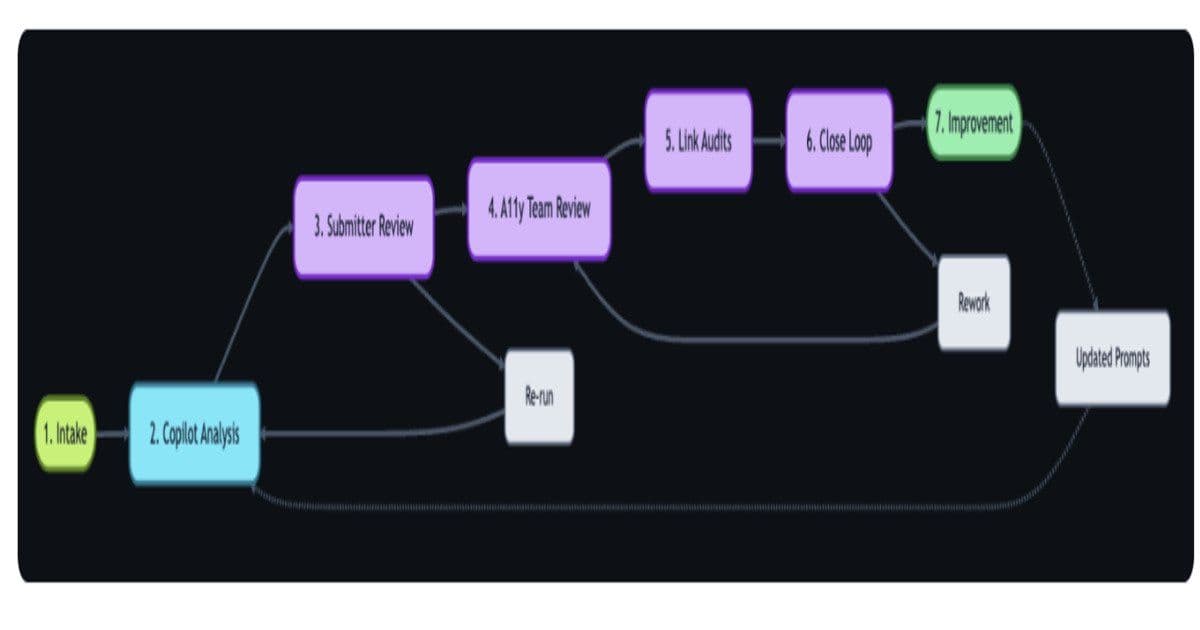
GitHub has implemented an automated, AI-driven workflow that centralizes accessibility feedback from multiple sources, analyzes it using GitHub Copilot and Models APIs, and coordinates issue triage across teams, resulting in a 4x increase in resolved feedback within 90 days and a 60% reduction in resolution time.
GitHub has introduced an automated, AI-powered workflow that transforms accessibility feedback into tracked, prioritized engineering work across product teams. Built using GitHub Actions, GitHub Copilot, and GitHub Models APIs, the system centralizes user reports, analyzes them for severity and compliance with the Web Content Accessibility Guidelines, and coordinates issue triage and resolution across services.
Historically, accessibility reports originated from multiple channels, including support tickets, social media, and discussion forums, often without clear ownership across teams responsible for navigation, authentication, and shared components. GitHub addressed this by centralizing intake and introducing standardized issue templates that capture structured metadata, including source, affected components, and user-reported barriers.
Submitting an issue triggers an automated workflow that initiates AI-based analysis and updates a centralized project board. Carie Fisher, Senior Accessibility Program Manager at GitHub, highlighted the challenge of managing fragmented and high-volume input across large engineering organizations, stating, "Accessibility feedback is gold, but at scale, it can quickly become overwhelming."
The AI-Powered Workflow Architecture
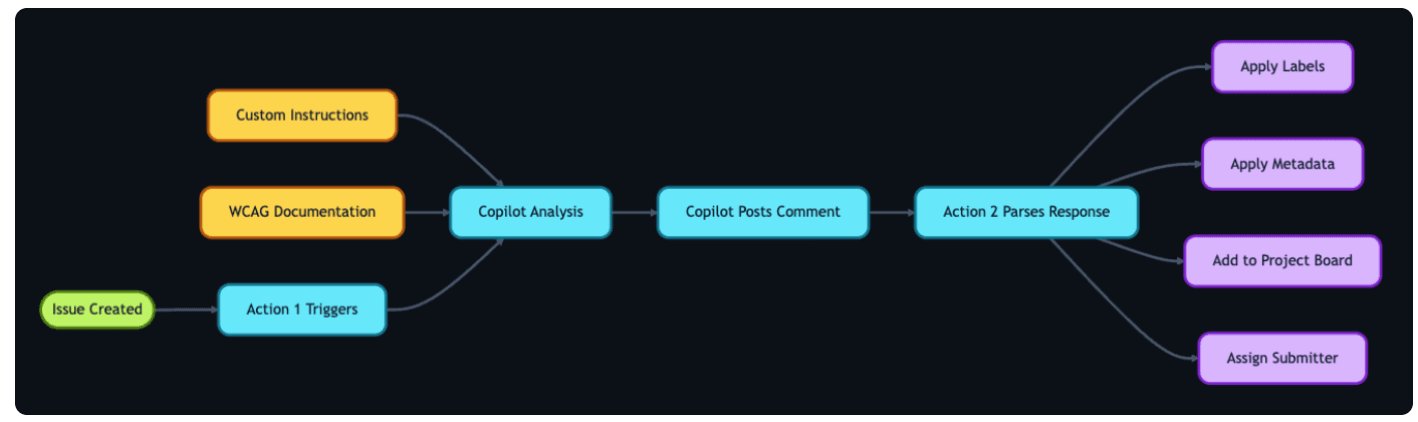
The workflow begins with intake and categorization. Feedback from public discussion boards, tickets, or direct submissions is acknowledged within days and funneled into a single tracking pipeline. A custom accessibility issue template embeds metadata, including source, component context, and user-reported barriers. Creating the issue triggers a GitHub Action that initiates AI analysis and updates the project status on a centralized board.

Once a tracking issue is detected, another Action invokes GitHub Copilot with stored prompts to classify WCAG violations, severity, and impacted user segments (screen readers, keyboard users, low-vision users). These prompts reference internal accessibility policies and component library documentation maintained in Markdown and updated via code. Copilot auto-fills about eighty percent of structured metadata, including recommended team assignment and a checklist of basic accessibility tests, and posts a comment summarizing its analysis.
A second Action parses this comment to apply labels, status updates, and assignments. "Our prompt serves two roles: triage analysis, which classifies issues by WCAG violation, severity, and affected user group, and accessibility coaching, where GitHub Copilot acts as a subject-matter expert to help teams write and review accessible code," according to the GitHub blog post.
Human Oversight and Continuous Improvement
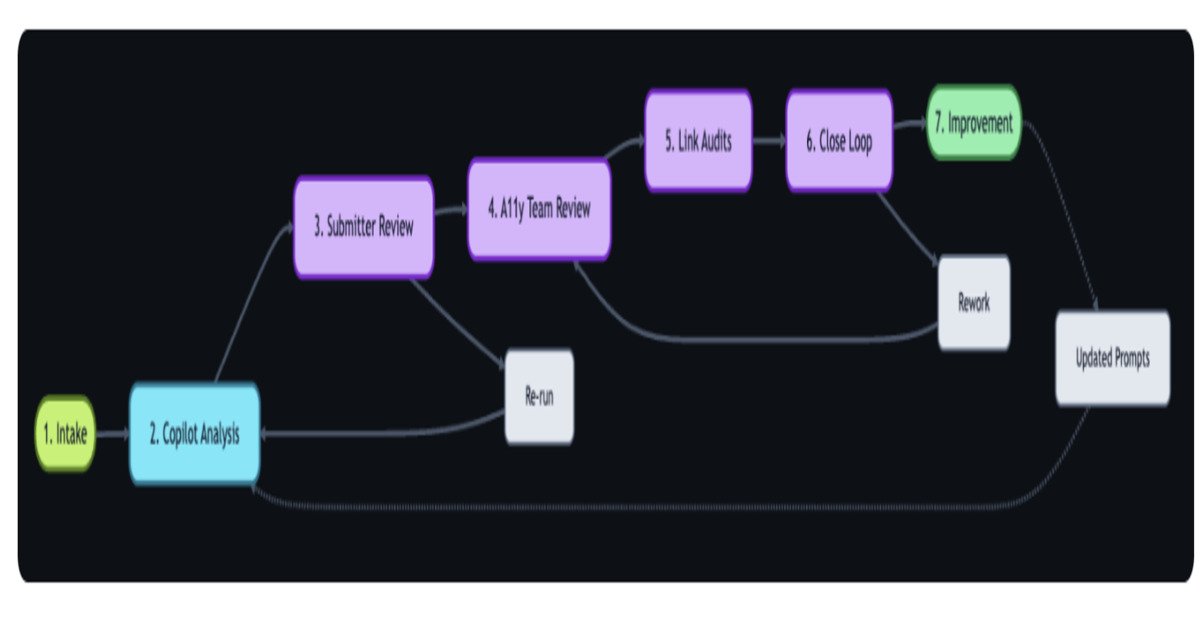
Human reviewers remain central to the process. After Copilot's draft analysis, the accessibility team validates severity levels and category labels on a first-responder board. Discrepancies are corrected, with corrections logged to refine prompt files and improve future AI outputs. Post-validation, the resolution path is determined: immediate documentation updates, direct code fixes, or assignment to the appropriate service team.
Linked audit issues from internal compliance systems further contextualize real-world impact and help prioritize true risk over theoretical criticality.
Measurable Impact
In a related LinkedIn post, Lianne G., a Customer Engagement Specialist, noted the impact of the workflow, stating that "We resolve 4x as much feedback in 90 days with our new AI-powered workflow."
GitHub reported measurable changes following the system's adoption. The percentage of accessibility issues resolved within 90 days increased to 89 percent from 21 percent, while overall resolution time decreased by more than 60 percent year over year. The workflow also provides visibility into recurring accessibility patterns and includes feedback loops that refine AI prompts and evaluation criteria.
Broader Implications for Developer Experience
The approach reflects how continuous AI systems are being applied to operational workflows, combining automated analysis with human review to address cross-cutting concerns, such as accessibility, across large engineering organizations. This represents a significant shift in how developer platforms can leverage AI not just for coding assistance but for comprehensive workflow automation and quality assurance.
This implementation demonstrates the practical application of AI agents in real-world software development processes, moving beyond simple code generation to handle complex, multi-step workflows that require both automated analysis and human judgment. The success metrics show that when properly implemented, AI-powered workflows can dramatically improve both the speed and quality of issue resolution while maintaining human oversight for critical decisions.
The GitHub accessibility workflow serves as a blueprint for other organizations looking to implement similar AI-driven approaches to manage complex, cross-team workflows and improve developer productivity through intelligent automation.
Comments
Please log in or register to join the discussion