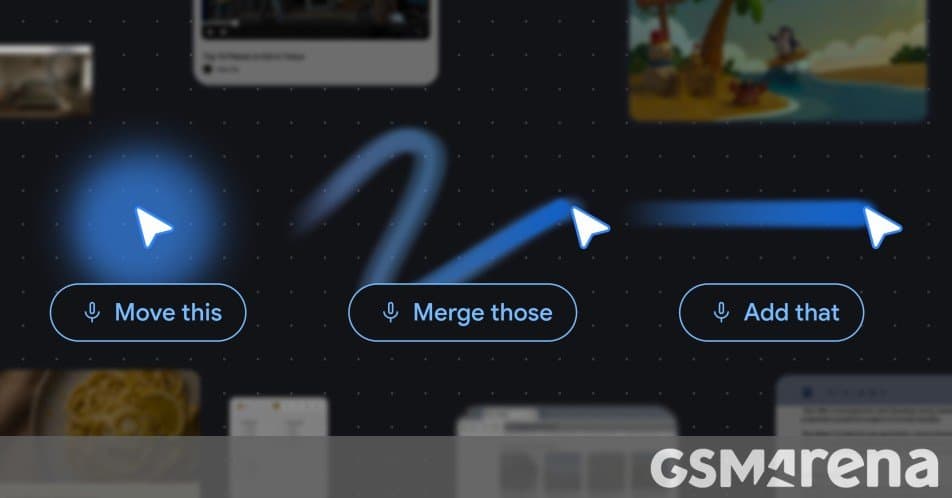
Google's innovative Magic Pointer feature will soon make its way to Chrome's desktop version, bringing contextual AI capabilities directly to users' cursor movements without leaving their current browsing context.
Google's recent Android Show I/O Edition event unveiled several exciting developments, with one of the most significant being the introduction of Magic Pointer—a feature that will soon enhance the desktop version of Gemini in Chrome. This innovation represents Google's continued push to integrate AI more seamlessly into everyday computing experiences.
What is Magic Pointer?
Magic Pointer is a contextual AI activation system that allows users to summon Google's Gemini AI simply by moving their cursor around the screen. Rather than requiring users to switch applications or open new tabs, this feature brings AI assistance directly to whatever content a user is currently viewing. The implementation appears particularly well-suited for Google's new Googlebook laptop lineup, which is positioned as the successor to Chromebooks.
Key Features and Capabilities
During the keynote demonstration, Google showcased several practical applications of Magic Pointer:
- Writing Assistance: The AI can help draft, edit, or improve text directly within the current context
- Content Summarization: Quickly generate concise summaries of lengthy articles or documents
- Calendar Integration: Automatically create calendar entries based on detected dates and times
- Image Editing: Perform basic image enhancements or modifications without leaving the current page
What makes these features particularly compelling is their contextual awareness. Magic Pointer can analyze the content currently visible on screen, allowing Gemini to provide relevant assistance based on the specific material a user is engaging with.
Technical Implementation
While Google hasn't provided detailed technical specifications, the feature appears to leverage several existing technologies:
- Cursor Position Tracking: The system monitors cursor movement patterns to determine when to activate
- Screen Content Analysis: Gemini's ability to read and understand on-screen content
- Contextual AI Processing: The underlying Gemini AI model that interprets user needs and generates appropriate responses
The implementation suggests a lightweight approach that doesn't significantly impact system performance, which would be crucial for maintaining Chrome's reputation as a fast, efficient browser.
Availability and Potential Limitations
Google has confirmed that Magic Pointer will be available in the desktop version of Gemini in Chrome "soon," but hasn't provided a specific rollout timeline. Historically, Google has often limited new AI features to English-speaking countries initially, suggesting a similar approach might be taken with Magic Pointer.
There's also the possibility that Magic Pointer could be locked behind one of Google's AI subscription plans, similar to how some premium features are gated behind Google One or Gemini Advanced subscriptions. This would align with Google's strategy of monetizing advanced AI capabilities while maintaining free access to basic functionality.
Ecosystem Integration and Implications
The introduction of Magic Pointer represents several important developments in Google's ecosystem strategy:
- Deeper Chrome-Android Integration: As Chromebooks evolve into Googlebooks running Android, features like Magic Pointer help bridge the gap between mobile and desktop experiences
- AI-First Computing: The feature embodies Google's vision of making AI assistance ubiquitous and accessible without disrupting user workflows
- Competitive Positioning: This move positions Google against Microsoft's Copilot integration in Windows and Apple's intelligence features in macOS
For users, Magic Pointer promises to streamline numerous tasks that currently require switching between applications or manually copying information between contexts. The potential time savings could be substantial, particularly for knowledge workers, students, and content creators who regularly interact with diverse types of digital content.
Privacy and Data Considerations
As with any AI feature that analyzes screen content, users will naturally have questions about data privacy and security. While Google hasn't addressed these concerns specifically, the company's approach to similar features suggests that:
- Screen content analysis likely occurs locally when possible
- Sensitive information might be filtered before being sent to Google's servers
- Users will likely have controls to disable the feature or limit its scope
The Future of Browser-Based AI
Magic Pointer's arrival in Chrome signals a broader trend toward embedding AI directly into browser interfaces. Rather than requiring users to install separate AI applications or extensions, browsers are becoming platforms for AI-powered assistance that works seamlessly across websites and applications.
This approach contrasts with some competitors that position AI as a separate experience. By integrating AI directly into the browsing workflow, Google aims to make assistance feel more natural and less obtrusive—something that could significantly influence how users interact with digital content in the coming years.
As Google continues to develop this feature, we can expect to see more sophisticated capabilities, potentially including real-time translation, advanced data analysis, and deeper integration with Google's suite of productivity tools. The success of Magic Pointer will likely depend on its ability to provide genuinely useful assistance without becoming distracting or intrusive—a balance that Google will need to carefully maintain as the feature evolves.
For those interested in experiencing Magic Pointer firsthand, keeping an eye on Chrome's release notes and the official Google Gemini page will be essential. As with many Google features, the rollout will likely be gradual, with early adopters in specific regions getting access first before a broader release.
Comments
Please log in or register to join the discussion