
HandyMKV combines MakeMKV and HandBrakeCLI into a single automated workflow for disc ripping and video encoding.
HandyMKV is a command-line tool that automates the process of ripping DVDs and Blu-rays using MakeMKV, then encoding the resulting files with HandBrakeCLI. Created to address the fragmented and time-consuming nature of manual disc processing, this tool consolidates what was once a multi-step workflow into a streamlined, automated pipeline.
The Problem It Solves
The creator of HandyMKV found themselves frustrated with the disjointed process of manually ripping discs with MakeMKV and then encoding with HandBrake. This workflow required switching between applications, managing multiple processes, and was prone to errors. Additionally, the need to offload this processing from a main desktop computer to a headless home server without a GUI made the manual approach even more cumbersome.
Core Features
Automated Ripping and Encoding HandyMKV handles the entire workflow from disc insertion to final encoded files. It first uses MakeMKV to rip selected titles from discs, then passes those files to HandBrakeCLI for encoding.
Flexible Configuration Options Users can configure encoding settings in three ways:
- Simplified encoding options with guided prompts and sensible defaults
- Built-in HandBrake presets for users familiar with specific settings
- Custom HandBrake preset files for granular control
Concurrency and Performance While maintaining sequential execution within each pipeline to avoid resource contention, HandyMKV processes ripping and encoding concurrently to reduce overall processing time. For multi-disc setups, each disc drive's ripping process runs concurrently.
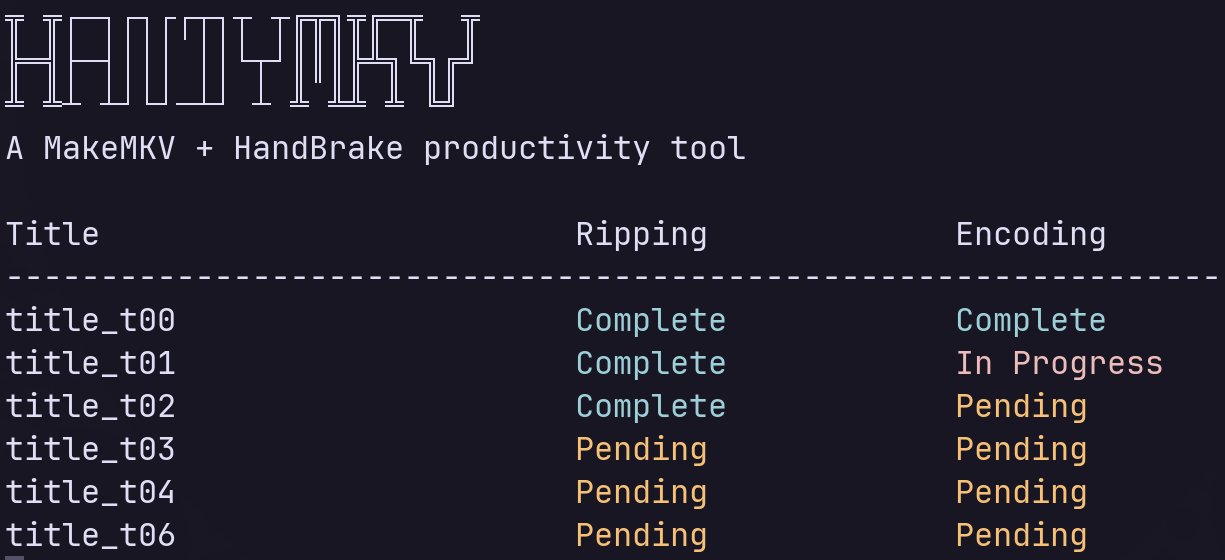
Progress Tracking and Cleanup The tool provides clear, concise progress displays throughout the process and automatically cleans up raw unencoded MKV files after successful encoding. It also tracks space saved and time elapsed for each operation.
Key Capabilities
Run History Management
After each operation, HandyMKV creates manifest files recording what was processed, file sizes, durations, and cleanup status. Users can browse past runs with handymkv history, inspect specific runs, or clear history entirely.
Post-Processing Automations HandyMKV supports custom scripts that run after encoding completes. These automations can be configured to receive parameters from various sources:
- User prompts at runtime
- Static hardcoded values
- Data from the current HandyMKV run (output directories, file counts, sizes)
Scripts receive parameters as environment variables prefixed with HMKV_PARAM_, ensuring cross-platform compatibility.
Multi-Disc Support For systems with multiple disc drives, HandyMKV can process several discs simultaneously. Output files are organized into subdirectories indicating their source disc.
Installation and Setup
Prerequisites
- MakeMKV (commercial, requires license)
- HandBrakeCLI (free)
- Both tools must be in the system PATH
Installation Options
- Install Script: Quick setup with
curl -fsSL https://raw.githubusercontent.com/dmars8047/handymkv/release/install.sh | bash - Pre-built Binaries: Available for Linux, macOS, and Windows across multiple architectures
- Go Installation:
go install github.com/dmars8047/handymkv/cmd/handymkv@latest - Building from Source: Using Makefile or direct Go commands
Configuration
Run handymkv config setup to start the configuration wizard, which guides users through encoding settings and operational preferences. The configuration is stored in platform-specific locations:
- Unix:
~/.config/handymkv/config.json - Windows:
%APPDATA%\handymkv\config.json
Basic Usage
After configuration, the workflow is straightforward:
- Insert disc(s)
- Run
handymkvto start the process - Select titles to rip when prompted
- Monitor progress in the terminal
- Review summary upon completion
For multi-disc processing: handymkv -d 0,1,2
For listing available discs: handymkv discs
Technical Implementation
HandyMKV parses output from both MakeMKV and HandBrakeCLI to provide user-friendly progress information. It handles error conditions gracefully, with automation failures producing warnings but not aborting the main pipeline. The tool's design emphasizes reliability and ease of use while maintaining flexibility for power users.
Use Cases
This tool is particularly valuable for:
- Media collectors digitizing physical disc libraries
- Home server administrators managing media libraries
- Users who frequently process multiple discs
- Anyone seeking to automate repetitive video processing workflows
The combination of automation, concurrency, and post-processing capabilities makes HandyMKV a comprehensive solution for disc ripping and video encoding workflows.
Project Links:
HandyMKV represents a practical solution to a common problem faced by media enthusiasts and professionals alike, transforming a tedious manual process into an efficient automated workflow.
Comments
Please log in or register to join the discussion