
Microsoft's High Scale Compatibility (HSC) mode in Entra External ID offers enterprises a pathway to migrate from Azure AD B2C without disrupting user experiences or requiring password resets. This strategic approach enables coexistence of both identity solutions during transition, with significant operational and business considerations.
Microsoft's introduction of High Scale Compatibility (HSC) mode in Entra External ID (EEID) represents a significant development for organizations managing large-scale identity solutions. This new capability addresses a critical challenge: how to migrate from Azure AD B2C to Microsoft's newer identity platform without disrupting existing user experiences or requiring costly and disruptive password resets.
Understanding the HSC Mode Architecture
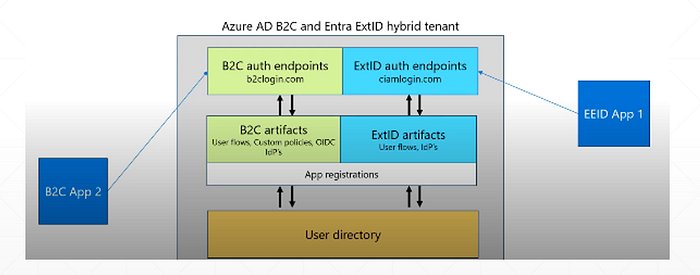
The HSC mode fundamentally changes how Azure AD B2C and Entra External ID interact within the same tenant. Rather than requiring a complete cutover, this approach allows both solutions to coexist and share the same directory objects. This architectural decision provides enterprises with unprecedented flexibility during migration.
The technical implementation is straightforward yet powerful. Both B2C and EEID operate within the same tenant, meaning user objects remain consistent across both platforms. When a user updates their password through B2C, that change immediately becomes available for authentication via EEID. This eliminates one of the most significant pain points in identity migrations: the requirement for users to reset passwords during transition.
From an endpoint perspective, the solutions maintain separate interfaces but with sufficient similarity to simplify the migration process. Applications typically require minimal changes, primarily involving adjustments to configuration files like appsettings.json to point to the appropriate endpoints. This reduces the development overhead typically associated with identity platform migrations.
Comparative Analysis: B2C vs. Entra External ID in HSC Mode
Functional Differences
While HSC mode enables coexistence, the underlying architectures of Azure AD B2C and Entra External ID present distinct functional approaches:
Policy Framework: Azure AD B2C relies heavily on custom policies for complex authentication flows. Entra External ID takes a different approach, utilizing user flows and application-specific mappings rather than policy parameters.
Identity Provider Configuration: The two platforms handle federation and social identity providers differently. B2C's custom policy approach allows for complex OIDC federation configurations, while EEID provides built-in support for social identity providers and enterprise OIDC providers with a simplified configuration model.
Authentication Flow: In B2C, applications include a policy parameter (p=xxx) in requests to specify the authentication flow. EEID eliminates this parameter, instead mapping applications directly to specific user flows.
Technical Limitations and Considerations
Organizations must carefully evaluate several technical limitations when planning a migration using HSC mode:
Claim Handling: The sub claim in EEID doesn't match the oid claim value as it does in B2C. Applications depending on this matching should request the profile scope to retrieve the oid claim as a stable user identifier.
Age Gating: Azure AD B2C tenants using custom policies for age-based attributes must develop alternative approaches, as age gating isn't currently supported in Microsoft Entra External ID.
Custom Policy Migration: Custom policy logic implemented in B2C must be recreated in EEID using custom authentication extensions. Organizations should note that one-to-one parity between B2C custom policies and EEID extensions isn't guaranteed.
Feature Availability: Some advanced features like passkeys aren't currently available in Microsoft Entra External ID or HSC mode. Conversely, EEID offers native authentication capabilities that allow organizations to create custom user experiences, and future security features will be deployed to EEID first.
Migration Strategy and Implementation
The HSC mode is specifically designed for large Azure AD B2C tenants with over 5 million directory objects, making it particularly valuable for enterprise organizations. Microsoft has developed comprehensive automation tools to facilitate this migration process.
The GitHub repository provides automated scripts to configure, validate, and test each step of enabling High Scale Compatibility mode in Azure AD B2C. These tools also demonstrate how to configure and test Native Authentication APIs, which represent a significant enhancement in EEID.
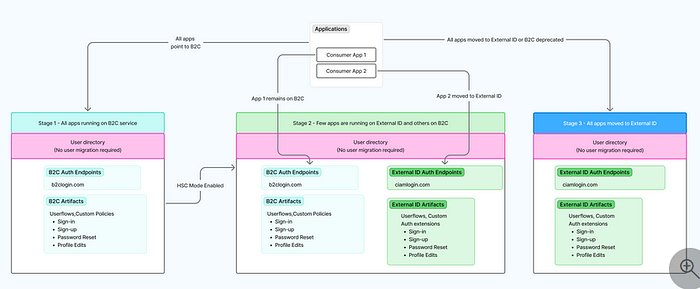
A strategic migration approach using HSC mode typically follows these phases:
Assessment and Planning: Evaluate current B2C implementation, identify dependencies, and document all custom policies and identity provider configurations.
EEID Configuration: Set up Entra External ID with equivalent user flows and application registrations, recreating necessary authentication logic.
Gradual Migration: Move applications from B2C to EEID one by one, allowing thorough testing at each stage.
Validation and Optimization: Ensure all functionality works correctly in EEID, then optimize the implementation.
Cutover: Once all applications are migrated and validated, complete the transition.
This approach offers significant advantages over traditional migration strategies. Organizations can maintain a fallback option to B2C if issues arise during testing. The ability to run applications on both platforms simultaneously provides operational flexibility and reduces migration risk.
Business Impact and Considerations
Operational Efficiency
The HSC mode fundamentally changes how organizations approach identity migrations. Instead of requiring a weekend cutover with significant user disruption, enterprises can now execute migrations over weeks or months with minimal impact on end users. This operational flexibility reduces the need for extensive communication campaigns and help desk support typically associated with identity platform changes.
Cost Implications
From a pricing perspective, Microsoft maintains consistent pricing between Azure AD B2C and Entra External ID, with the first 50,000 monthly active users remaining free. This eliminates financial disincentives for migration. However, organizations should consider the development costs associated with recreating custom policies and the potential need for additional consulting expertise during the transition.
Security and Compliance
The migration presents both challenges and opportunities from a security perspective. While some advanced security features like passkeys aren't yet available in EEID, the platform offers native authentication capabilities that enable more granular control over user experiences. Organizations should evaluate how EEID's security model aligns with their compliance requirements, particularly regarding fraud prevention and third-party integrations.
Notably, third-party fraud protection integration for web-hosted sign-in and sign-up flows isn't supported in HSC mode. Organizations relying on these solutions will need to evaluate alternative approaches or temporarily suspend these integrations during migration.
Future-Proofing Strategy
Microsoft's strategic direction clearly positions Entra External ID as the future of their external identity solutions. New features and security enhancements will be deployed to EEID first, making migration a forward-looking decision. Organizations considering long-term identity strategy should evaluate how EEID's capabilities align with their future requirements, particularly regarding emerging authentication methods and integration capabilities.
Implementation Recommendations
For organizations considering migration using HSC mode, several best practices emerge:
Start with Non-Critical Applications: Begin migration with less critical applications to establish processes and identify challenges.
Prioritize Federation Testing: Thoroughly test federation and social identity provider configurations early in the process, as these often present the most significant configuration differences.
Develop Custom Extension Testing Frameworks: Given the differences in custom policy implementation, create comprehensive test cases for all custom authentication logic.
Plan for Administrative Changes: Recognize that administrative configuration in EEID relies more heavily on Microsoft Graph and automation compared to the B2C portal experience.
Establish Rollback Procedures: Maintain clear procedures to revert applications to B2C if issues arise during EEID testing.
Conclusion
The High Scale Compatibility mode in Entra External ID represents a significant advancement in identity migration strategy. By enabling Azure AD B2C and EEID to coexist within the same tenant, Microsoft has provided organizations with a practical pathway to modernize their identity infrastructure without user disruption.
For large enterprises with complex identity requirements, HSC mode offers a structured approach to migration that balances technical feasibility with operational continuity. While challenges exist in areas like custom policy migration and feature parity, the benefits of a controlled, user-friendly transition process outweigh these limitations for most organizations.
As Microsoft continues to invest in Entra External ID, organizations should view migration not as a one-time project, but as an opportunity to modernize their identity strategy and prepare for future authentication requirements. The HSC mode provides the flexibility needed to execute this transformation at a pace that aligns with business priorities and technical capabilities.
For organizations ready to begin this journey, the combination of Microsoft's documentation, GitHub automation tools, and the gradual migration approach makes Entra External ID an increasingly compelling choice for external identity management.
Comments
Please log in or register to join the discussion