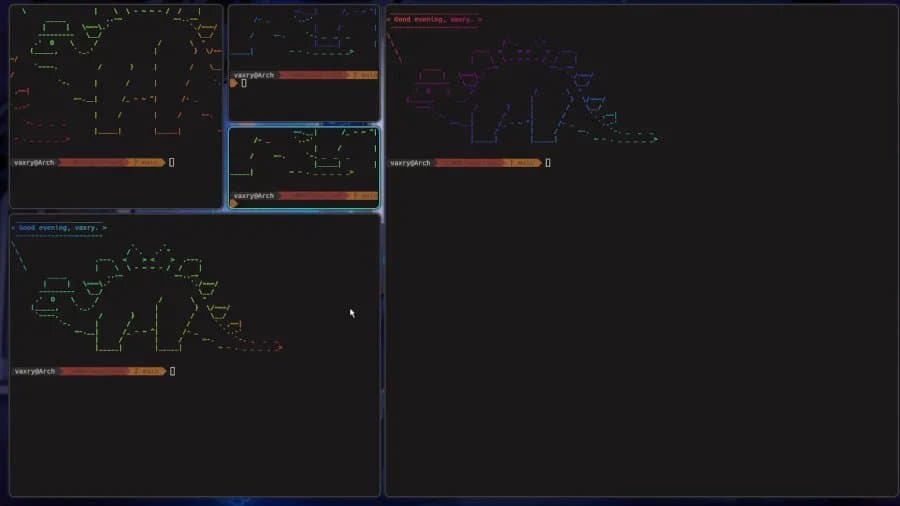
Hyprland 0.55 marks a significant milestone in the Wayland compositor landscape, completing the transition to Lua-based configuration while introducing powerful new features like user-defined window layouts, improved color management, and enhanced rendering precision.
Hyprland 0.55 has landed, representing a major evolution in the Wayland compositor space. This release completes the transition to a fully Lua-based configuration system while introducing several groundbreaking features that position Hyprland as one of the most customizable and performant compositors available today.
The Lua Configuration Revolution
The most significant aspect of Hyprland 0.55 is the completion of its migration to Lua-based configuration. This transition began in earlier versions and now reaches its culmination, providing users with a powerful, programmable way to manage their compositor settings. The maintainers have wisely included backward compatibility for older Hyprland configurations, giving users time to migrate without disrupting their workflows.
The Lua configuration system transforms how users interact with their compositor. Rather than being limited to static configuration files, users can now write scripts that dynamically adjust behavior based on system state, time of day, application type, or virtually any other condition they can imagine. This opens up possibilities for creating highly personalized desktop experiences that adapt to user needs in real-time.
Layout API: Custom Window Management at Your Fingertips
Perhaps the most exciting new feature in Hyprland 0.55 is the Layout API, which allows users to define their own window layouts directly in the configuration. This goes far beyond the basic tiling and floating modes found in other compositors.
Layouts can be configured at multiple levels:
- Global layouts that apply across all workspaces
- Workspace-specific layouts for different organizational needs
- Per-monitor layouts for multi-display setups
Imagine creating a custom layout that automatically arranges coding windows in a specific pattern when you open your development environment, then switches to a different arrangement when you switch to a media workspace. The Layout API makes this level of customization possible.
Technical Enhancements and Performance Improvements
Hyprland 0.55 brings several technical enhancements that impact both visual quality and performance:
ICC Display Profile Support
The addition of per-output ICC profile support is a significant boon for users who require color accuracy. This feature allows users to load specific color profiles for each display, ensuring consistent color reproduction across multiple monitors. For photographers, video editors, and other professionals working with color-critical applications, this feature alone could justify the switch to Hyprland.
Rendering Precision and Color Management
The implementation of FP16 (16-bit floating-point) precision for rendering represents a substantial improvement in visual quality. This higher precision allows for more accurate color interpolation and reduces banding in gradients. Combined with the improved color management pipeline, Hyprland 0.55 delivers superior visual fidelity compared to compositors limited to integer or lower-precision floating-point rendering.
Scrolling Improvements
Scrolling behavior has been refined across the compositor, providing smoother and more responsive scrolling experiences. While the exact implementation details aren't specified, these improvements likely involve better interpolation of scroll events, reduced latency, and possibly support for more advanced scrolling techniques like smooth scrolling with momentum.
Performance Considerations
While benchmarks specifically for Hyprland 0.55 aren't yet available, we can make some educated assessments based on the new features:
The Lua configuration system does introduce additional processing overhead compared to static configuration files. However, this impact is likely minimal for most users, especially given modern CPU capabilities. The Layout API, while powerful, may have a slight performance impact when switching between custom layouts, but this should be negligible for well-designed layouts.
The FP16 rendering precision may increase GPU memory usage slightly compared to lower-precision rendering, but the visual benefits likely outweigh this minimal cost for most users. The scrolling improvements, conversely, should reduce CPU usage by making scrolling more efficient.
Build Recommendations
Based on the new features in Hyprland 0.55, here are some build recommendations for different use cases:
For Developers and Power Users
- Hardware: Modern CPU with good single-thread performance, 16GB+ RAM, mid-range GPU
- Configuration: Focus on the Layout API to create custom workspace arrangements for different development environments
- Optimizations: Enable FP16 rendering for better visual quality in code editors with syntax highlighting
For Creative Professionals
- Hardware: High-core-count CPU, 32GB+ RAM, professional GPU with good color management support
- Configuration: Prioritize ICC profile setup for each display, create workspace-specific layouts for different creative applications
- Optimizations: Utilize the enhanced color management pipeline for accurate color reproduction
For General Users
- Hardware: Entry-level modern CPU, 8GB+ RAM, integrated graphics or entry-level discrete GPU
- Configuration: Start with basic Lua scripts to automate common tasks, gradually explore more advanced features
- Optimizations: Enable scrolling improvements for better daily usability
Migration Path for Existing Users
For users coming from earlier versions of Hyprland, the migration to Lua-based configuration will require some effort. The good news is that the Hyprland team has provided documentation and examples to help with the transition. Existing configurations will continue to work for several releases, giving users time to adapt.
The migration process involves converting existing configuration syntax to Lua scripts. While this may seem daunting, it provides an opportunity to rethink and optimize one's desktop setup. The Lua configuration system offers so much flexibility that many users will likely discover new ways to organize their workflows during the migration process.
Community and Ecosystem
Hyprland has cultivated an active community of users and developers who contribute plugins, scripts, and documentation. The move to Lua-based configuration is likely to further stimulate community innovation, as users share their custom layouts and configuration approaches.
For users interested in exploring what others have created, the Hyprland GitHub repository and community forums are excellent resources. The Hyprland blog provides regular updates on development progress, while the GitHub repository contains the source code, issue tracker, and discussion forums.
Conclusion
Hyprland 0.55 represents a significant step forward in Wayland compositor development. The completion of the Lua configuration transition, combined with powerful new features like the Layout API and enhanced color management, positions Hyprland as one of the most innovative and customizable compositors available.
For users who value control over their desktop environment and appreciate the benefits of a tiling compositor, Hyprland 0.55 offers an impressive combination of features, performance, and flexibility. While there may be a learning curve for those new to Lua or compositors in general, the payoff in terms of customization and performance is substantial.
As Wayland adoption continues to grow, compositors like Hyprland that push the boundaries of what's possible in window management and desktop experiences will play an increasingly important role in the Linux desktop ecosystem.
Comments
Please log in or register to join the discussion