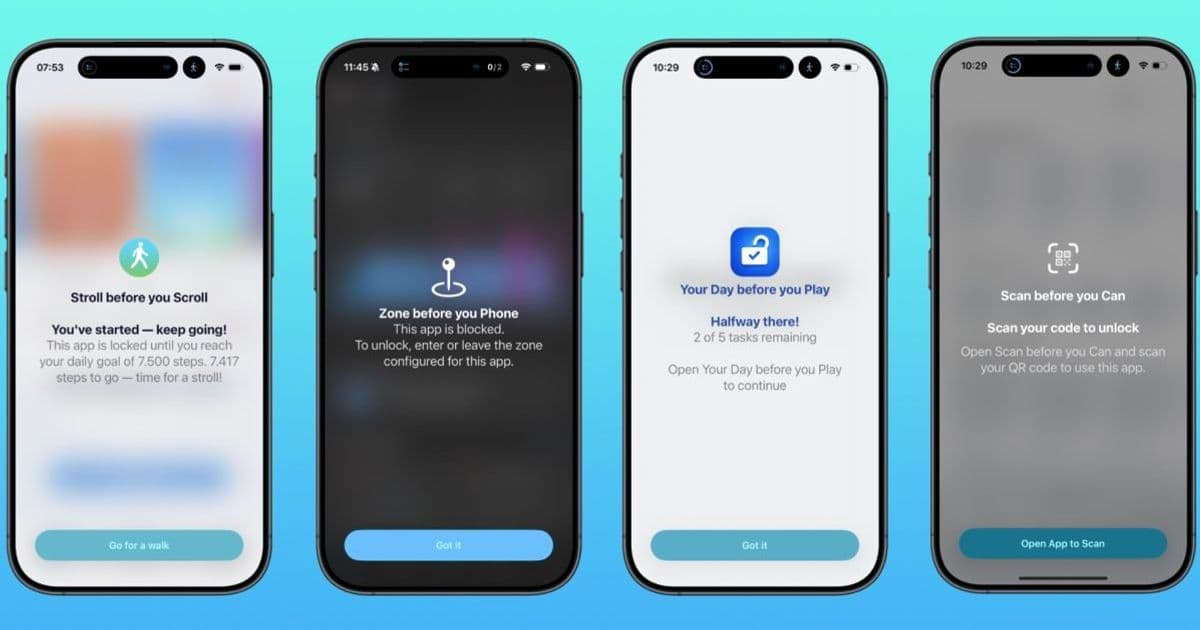
Developer Florian Schimanke bundles four purpose‑built iOS apps—Stroll, Scan, Your Day and Zone—into the $8.99 “Before You” pack, giving users granular, health‑aware and location‑aware ways to curb phone use without subscriptions or ads.
 )
)
A fresh take on screen‑time management
Most people know they spend too many minutes scrolling, yet the built‑in iOS Screen Time controls feel either too blunt or too hidden. Florian Schimanke’s new Before You bundle tackles the problem from four different angles, each app offering a single, clearly defined rule that nudges you toward healthier habits. All four are available individually for $2.99, but the bundle lets you grab the whole set for $8.99 – effectively getting one app free.
What’s inside the bundle?
| App | Core idea | How it works |
|---|---|---|
| Stroll before you Scroll | Earn screen time with steps | Connects to HealthKit; you set a daily step target. Until you hit that number, selected apps stay locked. You choose which apps are gated, so you can still use messaging or navigation while you walk. |
| Scan before you Can | Physical QR‑code challenge | When you try to open a blocked app, the app presents a QR‑code scanner. Place a printed code in another room; you must walk there, scan it, and then the app unlocks for a limited window. No extra hardware required, but the extra step makes mindless scrolling harder. |
| Your Day before you Play | Task‑first rule | Uses the Apple Reminders API. You pick a reminder list (e.g., "Work" or "Household"). The app checks completion status; only when every reminder is marked done does it lift the block on your chosen distraction apps. |
| Zone before you Phone | Location‑based blocking | Leverages the Screen Time API and CoreLocation. Define up to 20 zones – office, gym, bedroom – and assign apps to each zone. When you enter a zone, the specified apps automatically hide; they reappear when you leave. You can trigger on arrival, departure, or both. |
Why these approaches matter
- Health‑first integration – Stroll reads your step count directly from HealthKit, meaning you don’t need a separate fitness tracker. It turns a common wellness metric into a screen‑time lever.
- Physical friction – Scan before you Can adds a tiny real‑world task (finding a QR code) that interrupts the dopamine loop of opening an app. The friction is enough to make you think twice, but not so much that you abandon the habit.
- Task‑completion incentive – Your Day before you Play ties productivity to leisure. By checking off reminders first, you get a concrete sense of accomplishment before the reward of scrolling or gaming.
- Context‑aware control – Zone before you Phone respects that not all environments are equal. You might be fine using social media at home but want it hidden at work. The app automates that decision, reducing the mental load of manual toggles.
Ecosystem lock‑in and technical polish
All four apps are built on native iOS frameworks: HealthKit, Screen Time, CoreLocation, and the Reminders API. Because they rely on Apple‑provided services, they feel native – no extra permissions dialogs beyond the initial setup, and the UI follows the system’s light/dark mode automatically. There are no ads, no in‑app purchases, and no subscription churn, which is a relief for users wary of hidden costs.
From a developer perspective, the bundle showcases how a single indie studio can combine several Apple APIs into a cohesive product line without needing a massive team. Each app is under 15 MB, starts in under a second, and respects battery life by only polling sensors when a block is active.
Pricing and value proposition
Individually, the apps sit at $2.99 each – a price point that most users find acceptable for a one‑time utility. The bundle’s $8.99 price effectively gives you a 33 % discount, which is compelling for anyone looking to experiment with more than one method. Because the apps are sold through the App Store, you get the usual Apple‑managed updates and security guarantees.
Who should consider the bundle?
- Fitness‑oriented users who already track steps and want a gentle reminder to move before they scroll.
- Remote workers who need location‑specific rules without configuring complex profiles.
- Students or freelancers who struggle to finish tasks before gaming.
- Anyone tired of generic screen‑time sliders and looking for a rule‑based system that feels more personal.
If you’re comfortable granting the necessary permissions (Health, Reminders, Location), the bundle offers a low‑commitment way to test which rule works best for you. You can start with one app, see the impact, and then add the others as needed.
Where to get them
All four apps are available on the App Store. You can purchase them individually or grab the Before You bundle here: Before You Bundle – App Store.
Final thoughts
The indie scene continues to produce niche tools that fill gaps left by big‑platform defaults. Florian Schimanke’s Before You suite proves that thoughtful design, tight integration with Apple services, and a clear pricing model can deliver real value without the bloat of subscription‑based screen‑time apps. Give one (or all) a try and see whether a step, a scan, a completed reminder, or a change of scenery is the trigger you need to reclaim a little more focus.
Michael Burkhardt is 9to5Mac’s weekend editor and an indie iOS developer. Follow him on X/Twitter, Bluesky, and Instagram.
Comments
Please log in or register to join the discussion