Six months with iOS 26 reveals that the screenshot-based calendar creation feature isn't just convenient—it's fundamentally changed how this developer handles event management during busy conference seasons.
It's been half a year since iOS 26 debuted in beta, and after living with it through multiple product launches and conference seasons, one feature has quietly become indispensable: the ability to create calendar events directly from screenshots. While the massive visual redesign grabs headlines, this subtle addition to the screenshot interface represents a practical evolution in how mobile devices handle real-world information capture.
The Visual Intelligence Overhaul
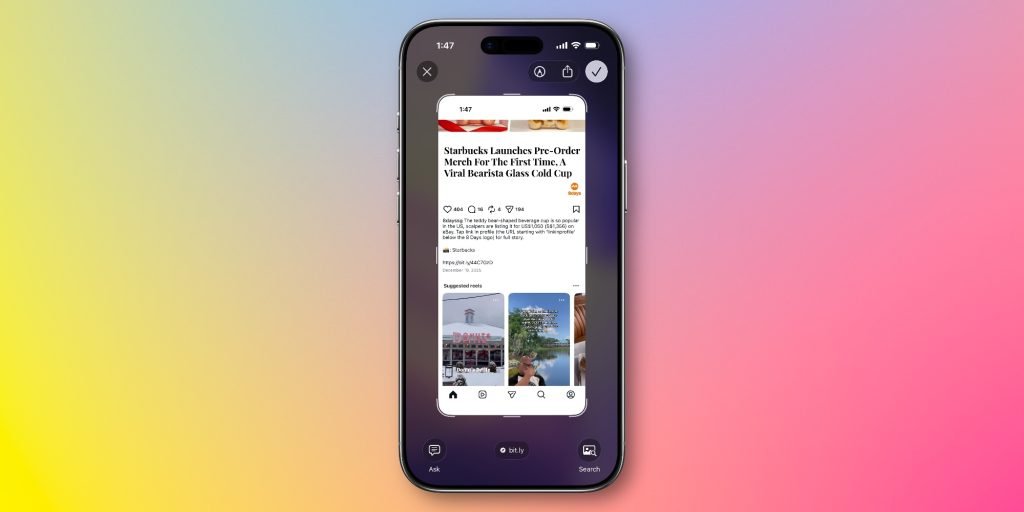
Screenshots in iOS 26 received a comprehensive interface redesign that goes beyond simple annotation tools. The new system integrates three distinct Apple Intelligence features: creating calendar events from screenshots, image-based web search, and ChatGPT analysis of captured images. Each serves a different use case, but the calendar integration has proven most transformative for daily workflow.
The feature works by analyzing screenshot content for temporal information—event times, dates, locations, and descriptions. Whether capturing an Instagram story with event details, an email invitation, or a website listing conference schedules, the system extracts relevant data and presents a pre-filled calendar entry for review and one-tap addition.
Why This Changes Daily Workflow
For developers who attend conferences, client meetings, or community events, information arrives scattered across platforms. Before iOS 26, the typical workflow involved: screenshotting the information, manually switching to Calendar, creating a new event, and transcribing details while cross-referencing the screenshot. Each step introduced friction and potential errors.
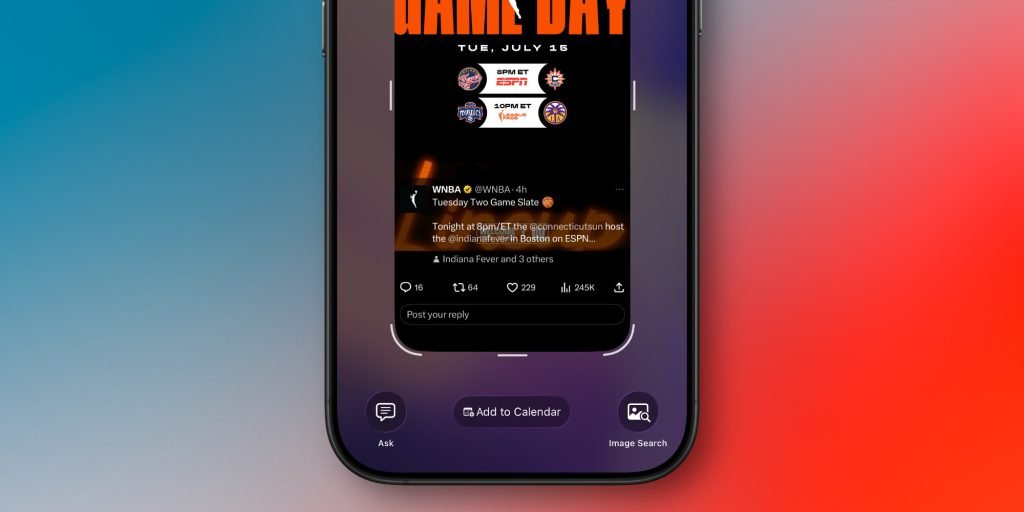
The new approach collapses this into: screenshot, tap "Add to Calendar," review, and confirm. During CES 2026, this meant capturing booth times, press briefings, and dinner reservations directly from event apps, email confirmations, and social media posts without breaking focus from the conversation at hand.
The accuracy rate matters here. After months of testing across Instagram stories, Gmail invitations, Safari pages, and Notion documents, the feature hasn't failed to extract relevant details. The natural language processing understands context—distinguishing between a flight departure time and a meeting start time, recognizing timezone information, and even parsing ambiguous formats like "next Thursday at 3pm."
Technical Implementation and Developer Considerations
For iOS developers, this feature demonstrates the practical application of on-device machine learning models. The screenshot analysis happens locally using the Neural Engine, which explains the instant response time and lack of network dependency. The system uses Vision framework for text recognition combined with Natural Language framework for entity extraction, specifically targeting temporal expressions and location data.
The integration point is clever—Apple extended the screenshot thumbnail interface that appears in the lower-left corner. After taking a screenshot, users can now tap a calendar icon alongside the existing share and markup options. This placement leverages existing muscle memory rather than requiring new navigation patterns.
Cross-Platform Implications
For developers maintaining both iOS and Android applications, this feature highlights a growing divergence in platform philosophy. Android's screenshot tools have focused on OCR extraction and smart text selection, while iOS is pushing toward semantic understanding and action-oriented interfaces.
If you're building cross-platform apps that involve event creation or time management, consider how your users currently capture information. The screenshot-as-input pattern is becoming native to iOS, which means your app might benefit from:
- Supporting calendar event import from clipboard content
- Recognizing screenshot paste actions for event parsing
- Providing share sheet extensions that can process image content
Practical Usage Patterns
The feature excels in specific scenarios:
Conference and Event Management: Capturing schedule screenshots from event apps or emails creates instant calendar entries. The system handles multi-day events and recurring meetings.
Social Media Event Discovery: Instagram stories and posts often contain event details with times and locations. The feature extracts these even from stylized text overlays.
Email Confirmations: Flight itineraries, restaurant reservations, and meeting invites in email can be screenshot and added without manual entry.
Web Content: Event listings on websites, especially those without explicit "Add to Calendar" buttons, become instantly actionable.
Limitations and Workarounds
The feature isn't perfect. It struggles with:
- Handwritten notes or extremely stylized fonts
- Events requiring complex recurrence rules
- Timezone conversions when the screenshot doesn't specify
- Events with multiple time slots or conditional details
For these cases, the manual review step becomes crucial. The pre-filled event always allows editing, so the feature serves as a starting point rather than a complete automation.
Broader iOS 26 Context
This screenshot feature fits into iOS 26's larger push toward making Apple Intelligence practical rather than flashy. While generative AI gets attention, the real value appears in features that reduce friction in existing workflows. The calendar integration doesn't replace your to-do app or task manager—it makes calendar usage so effortless that you might actually start using it.
For developers, this pattern suggests opportunities. The most successful AI features on iOS will be those that enhance existing behaviors rather than requiring new ones. Screenshotting is already a universal iOS behavior; adding intelligence to that action creates value without demanding habit changes.
Migration Considerations
If you're developing apps that create calendar events, consider these implications:
User Expectations: Users accustomed to one-tap calendar creation from screenshots may expect similar convenience from your app. The standard has been raised.
Share Sheet Integration: Your app should consider providing a share extension that can process image content for event creation, meeting users where they already are.
Data Format: Ensure your event data is extractable by OCR and NLP systems. Clear, structured information in screenshots will be more actionable.
Privacy: Since this processing happens on-device, users may expect similar privacy guarantees from third-party apps. Consider on-device processing for sensitive event information.
The Developer Perspective
As an indie iOS developer, this feature represents something important: Apple is making the platform smarter without making it more complex. The screenshot interface hasn't fundamentally changed—it's just gained intelligence. This is the right approach for mobile platforms where screen real estate and user attention are limited.
The feature also demonstrates practical AI implementation. Instead of asking "what can we do with machine learning," Apple asked "what existing friction can we reduce." The answer—manually creating calendar events from captured information—was hiding in plain sight.
For those maintaining apps across platforms, this creates an interesting challenge. Android's equivalent features focus on different use cases, so cross-platform apps may need platform-specific optimizations. However, the underlying principle—making information capture effortless—applies universally.
Looking Forward
After six months, the screenshot calendar feature has changed how I handle time-sensitive information. It's not about replacing task management systems or calendar apps—it's about removing the barrier between capturing information and scheduling it.
For iOS developers, the takeaway is clear: users will embrace features that make existing behaviors more powerful. The screenshot button is pressed millions of times daily; making that action intelligent creates value at scale.
The feature is available now in iOS 26 beta and will likely see refinements before public release. For developers building productivity apps, understanding this pattern—capture, analyze, act—will be crucial for staying relevant on the platform.
Comments
Please log in or register to join the discussion