The Azure Logic Apps OneDrive for Business connector received a version update in February 2026 that adds support for explicit folder identifiers, allowing workflows to target shared folders directly. This article explains the change, compares the integration approach with AWS Step Functions and Google Cloud Workflows, and outlines the business implications for data governance, cost management, and migration planning.
What changed
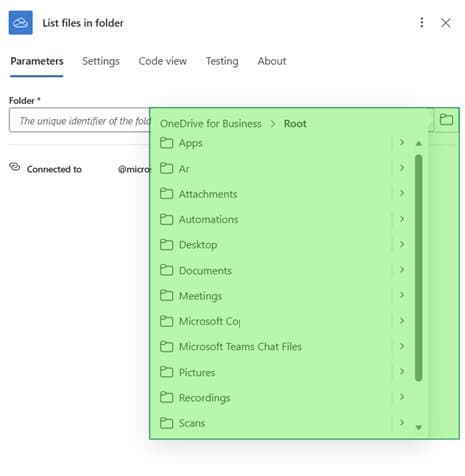
The Azure Logic Apps OneDrive for Business connector received a version update in February 2026 that altered how folder selection works. Previously the connector displayed only the root directory of the authenticated user, and shared folders appeared under the “Shared with me” view but were not selectable. The new version adds a manual entry field that accepts a folder identifier composed of the drive ID and folder ID, which makes it possible to enumerate shared locations directly. Microsoft announced the change as part of the Azure Integration Services release notes on February 18, 2026. The update aligns the connector with the Microsoft Graph API behavior that returns shared folders in the same response as personal items when the appropriate permissions are granted. Note that the signed‑in user must retain read access to the shared folder; otherwise the request returns a 403 error. 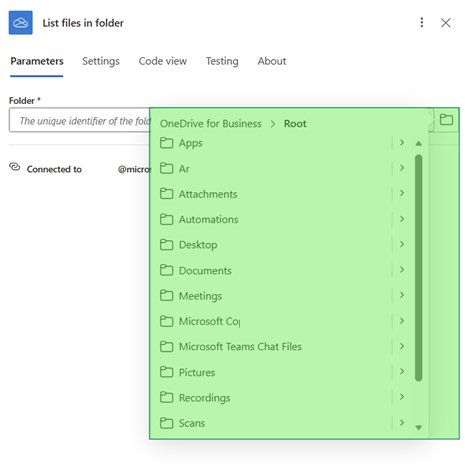
Provider comparison
When evaluating cloud‑native automation services, Azure Logic Apps, AWS Step Functions, and Google Cloud Workflows each offer distinct ways to interact with file storage. Azure Logic Apps integrates natively with OneDrive for Business through the OneDrive connector, which now supports explicit folder IDs. AWS Step Functions does not have a built‑in OneDrive connector; users must invoke the Microsoft Graph API via an HTTP action, which requires additional identity management and error handling. Google Cloud Workflows provides a similar HTTP‑based approach with the Google Drive API, but the service does not natively expose a OneDrive connector, so the same manual configuration is needed. Pricing models differ as well. Azure Logic Apps charges per execution and per connector usage, with a free tier that includes 5,000 actions per month. AWS Step Functions charges per state transition, with a free tier of 4,000 transitions per month. Google Cloud Workflows charges per execution minute, with a free tier of 200 minutes per month. Enterprises that already operate in a multi‑cloud environment may find the HTTP‑based method more portable, but the Azure connector reduces the number of external calls and simplifies authentication. For detailed guidance on configuring the HTTP with Microsoft Entra ID (preauthorized) connector, see the Microsoft Learn page for the connector at Microsoft Learn page for the HTTP with Microsoft Entra ID (preauthorized) connector. For Graph Explorer documentation, refer to Microsoft Graph documentation for listing folder children. For the OneDrive for Business connector reference, consult OneDrive for Business connector reference. 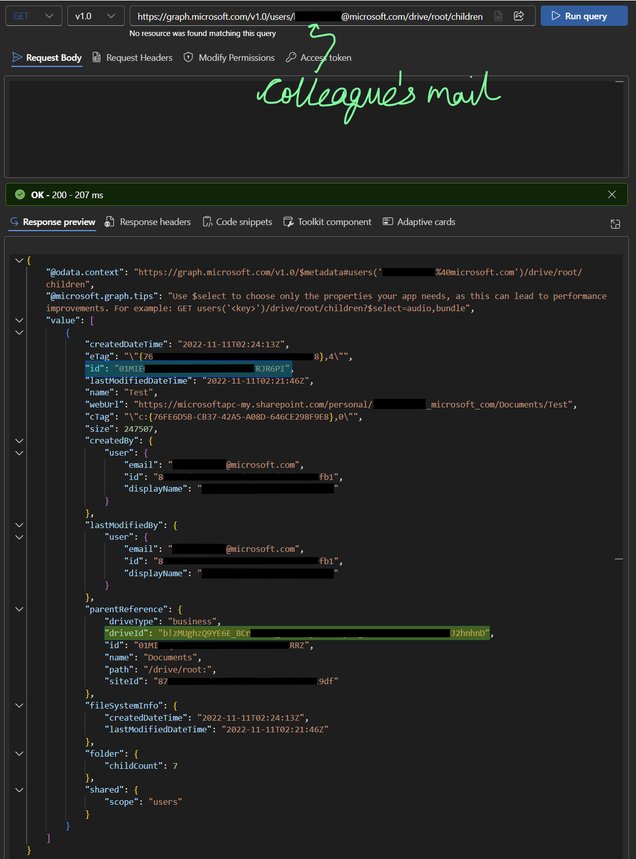
Business impact
Automating file movement from shared OneDrive folders can improve data processing latency and reduce manual effort for teams that rely on collaborative storage. By using the updated connector, organizations can design workflows that start at the exact shared location, apply conditional logic, and route files to downstream services such as SharePoint or Azure Blob Storage without intermediate steps. This capability supports compliance requirements that mandate audit trails for data accessed across multiple users, because each Logic App run records the specific drive and folder identifiers used. The ability to target shared folders directly also influences cost calculations. Fewer connector calls mean lower execution costs, especially when the workflow runs frequently. For example, a daily batch that processes 10,000 files from a shared folder would incur fewer per‑action fees compared with a design that first copies files to a personal OneDrive location before moving them. Additionally, the explicit folder ID approach reduces the risk of accidental data leakage, because the workflow cannot inadvertently enumerate personal drive contents unless the identifier is provided. Migration considerations arise when moving from a legacy design that relied on the folder picker to the new manual entry method. Teams must update existing Logic App definitions, verify that the signed‑in user retains read permissions on the shared folder, and test the workflow against a sample set of files. Documentation for the connector is available at the Microsoft Learn page for the OneDrive connector, which includes a sample HTTP request that demonstrates how to obtain the drive and folder IDs using Graph Explorer. 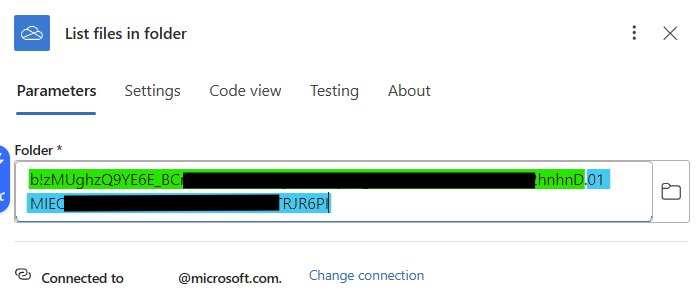
Troubleshooting shared folder identifiers
If the drive ID or folder ID cannot be retrieved through Graph Explorer, a reliable fallback is to capture the request in the browser network trace. Open the shared folder in the OneDrive web interface, launch the developer tools, and filter for calls that include the path drives/{driveId}. The response payload contains the CurrentFolderUniqueId property, which is the folder ID, and the drives/{driveId} segment, which is the drive ID. Extract these values and paste them into the Logic App action in the format {driveId}.{folderId}. Important: The folder ID must be the value returned for the shared folder, not the ID of a subfolder that contains it. Using the wrong identifier results in a 404 Not Found error during execution. For a visual guide on capturing the network trace, see the example at Browser network trace example. 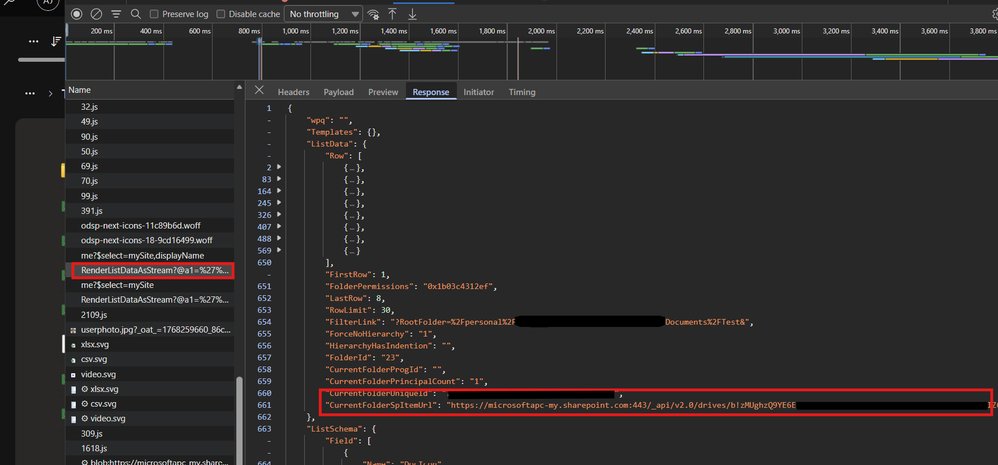
Conclusion
The February 2026 update to the OneDrive for Business connector removes a long‑standing limitation and opens the door for more precise automation scenarios. By understanding how to construct the folder identifier and by comparing the integration options across major cloud providers, architects can select the approach that best fits their existing identity model, cost constraints, and governance policies. The next step for most teams is to review their Logic App definitions, verify permissions, and test the new configuration against a representative data set. Azure Logic Apps pricing details are available at the Azure Logic Apps pricing page.
Comments
Please log in or register to join the discussion