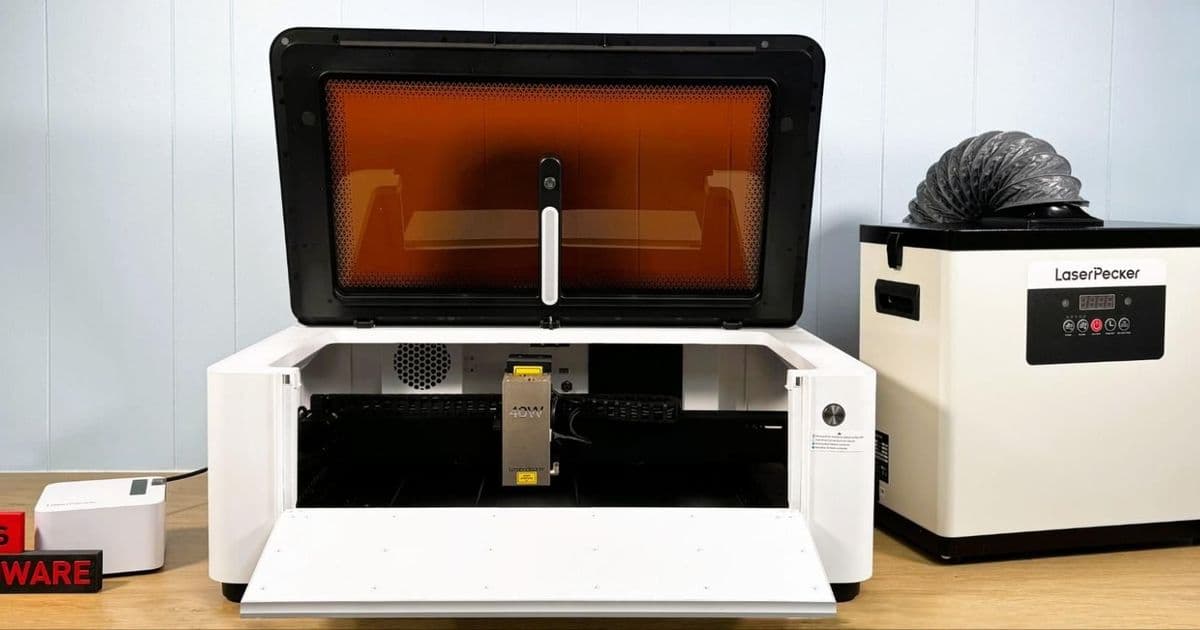
The LaserPecker LX2 offers impressive cutting power and versatility with its swappable 40W diode and 2W IR laser modules, but inconsistent camera calibration and buggy probe detection hold it back from being a top-tier laser cutter.
The LaserPecker LX2 represents a significant evolution for the company, moving from its portable engraver roots to a full-featured, enclosed laser cutter with impressive specifications. With a spacious 500 × 305 mm work area, tool-free laser swapping, and speeds up to 1000mm/s, this machine has the potential to be a standout in the desktop laser market. However, our testing revealed that while the LX2 excels at cutting and engraving, it needs refinement in its positioning and probing systems.
Design and Build Quality
The LX2 is a fully enclosed Class 1 laser system that prioritizes safety without sacrificing functionality. The unit arrives completely assembled, requiring only removal of shipping materials and connection of the laser module. The modular design allows users to choose from multiple laser options - a 20W diode (available now), 40W diode (tested), and a forthcoming 60W diode - plus a 2W IR module for metal etching.
The gantry-style motion system rides on robust linear rails, providing stability and precision during operation. The work area is well-lit with LED strips mounted on both sides and an additional light on the lid housing the positioning camera. The ability to automatically raise and lower the laser head for focusing or accommodating taller items adds versatility to the system.
Laser Module Performance
40W Diode Laser
The cutting performance of the 40W diode module is genuinely impressive. During testing, it effortlessly sliced through 20mm pine boards with minimal charring, completing the task in just over a minute with six passes at 100% power and 12mm/s. The air assist system worked excellently at limiting charring on deep cuts, producing clean results even on challenging materials.
For more delicate work, the LX2 handled 3mm bass plywood with clean long cuts, though some intricate filigree work required additional weeding. The system also performed well on 3mm opaque acrylic, with clean separations and good line engraving at 80% power and 7mm/s.
2W IR Laser
The 2W IR module adds significant versatility for metal etching. It produced excellent results on both bare and painted metals, creating dark, crisp engravings on stainless steel and beautifully detailed work on black aluminum business card blanks. The IR laser took approximately 5 minutes for stainless steel engraving at 80% power and 76mm/s, and just over 9 minutes for the business cards at 50% power and 75mm/s.
Rotary Attachment
The optional rotary extension worked extremely well during testing. The software does an excellent job of showing where designs will be placed on cylindrical objects, and the results were impressive. Using the IR laser with clip art and text from Canva, the engraving came out nicely on curved surfaces, demonstrating the system's versatility beyond flat materials.
Software Experience
LaserPecker Design Space, the included free software, is quite capable and user-friendly. It supports a wide variety of common file types including bitmaps, JPEGs, and PNGs, and makes it easy to add text or clip art with cutting or engraving outlines. The preset material settings are mostly accurate, though the library isn't as comprehensive as some users might want.
The LX2 is also compatible with LightBurn, which is a significant advantage for users who prefer that industry-standard software. This compatibility adds flexibility for more advanced users who want greater control over their projects.
Critical Issues
Camera Calibration Problems
The most significant issue we encountered was with the camera calibration system. The calibration routine is straightforward, but achieving accurate results proved frustratingly difficult. It took at least ten attempts to get the calibration within a few millimeters of correct. For small items like jewelry, this level of inaccuracy is unacceptable and could render the camera positioning feature useless for detailed work.
The image below shows the discrepancy between where the laser thought it was engraving versus the actual engraving location, highlighting the calibration inconsistency that needs to be addressed.
Mechanical Probe Reliability
The mechanical height probe, while generally accurate in measuring distance, was plagued by false "failure to retract" warnings. Our test unit would correctly measure the distance but then fail to recognize that the probe had retracted, throwing error messages that had to be manually dismissed. This bug prevented us from fully testing the probe's ability to handle curved surfaces and could be a significant workflow disruption for users.
Positioning Preview Method
The high-speed positioning preview, while precise, creates a safety hazard when trying to adjust materials. The laser tool head moves at high speed tracing the cutting area with visible crosshairs, making it nearly impossible to nudge items without risking hand injury. Users must stop the preview, move the item, and restart the preview, which is particularly irksome on a large gantry-mounted laser compared to LaserPecker's smaller galvo-based models.
Safety Features
The LX2 excels in safety features, which is crucial for any laser cutter. As a Class 1 laser, the enclosure prevents exposure to the beam during operation. The lid, front panel, and riser base doors will automatically stop the laser if opened during a job, and this safety feature cannot be disabled in the software. Flame sensors are included, though they were overly sensitive at the default high setting and perfect at low sensitivity.
LaserPecker includes an S-type fire extinguishing set with two extinguishers in all bundles, which is a thoughtful addition that many competitors charge extra for. The unit also has a large red emergency stop button on the right-hand side for immediate shutdown if needed.
Performance Summary
Strengths:
- Excellent cutting power with 40W diode laser
- High-quality metal etching with 2W IR module
- Large 500 × 305 mm work area
- Tool-free laser swapping
- Good software with LightBurn compatibility
- Comprehensive safety features
- Rotary attachment works well
Weaknesses:
- Inconsistent camera calibration
- Buggy mechanical probe detection
- Limited material settings in presets
- Positioning preview method is cumbersome
- No built-in screen requires PC connection
Pricing and Value
Bundles start at $1,649 for the 20W version and go up to $2,999 for the 40W model with rotary extension and smoke purifier. The 2W IR module costs an additional $599, and a 60W laser upgrade adds $1,699. While these prices are competitive for the feature set, the software issues detract from the overall value proposition.
Conclusion
The LaserPecker LX2 is a capable and versatile laser cutter that gets the fundamentals right - powerful lasers, large work area, good safety features, and modular design. The cutting and engraving results are excellent when the system works correctly. However, the inconsistent camera calibration and buggy probe detection are significant issues that prevent it from being a top recommendation.
These problems appear to be software-related rather than hardware limitations, which means they could potentially be fixed through firmware updates. If LaserPecker addresses these calibration and probing issues, the LX2 could become a standout choice for makers who need a versatile, enclosed laser system. As it stands, it's a strong performer with excellent capabilities but requires patience and workaround strategies for the current software limitations.
For users who prioritize cutting power and versatility over precision positioning, the LX2 remains a compelling option. However, those who need reliable camera-based positioning for detailed work might want to wait for software refinements or consider alternatives in the meantime. The system's compatibility with LightBurn and its overall build quality suggest that with proper software updates, the LX2 could fulfill its considerable potential as a professional-grade desktop laser cutter.
Comments
Please log in or register to join the discussion