
The Linux Mint team has officially released version 22.3, codenamed 'Zena', bringing significant updates to its flagship Cinnamon desktop environment, enhanced internationalization support, and new system administration tools. The release continues the project's tradition of providing a user-friendly alternative to Ubuntu, now based on Ubuntu 24.04.3 with kernel 6.14.
The Linux Mint project has officially released version 22.3, codenamed 'Zena', marking a significant update to its popular user-friendly Linux distribution. The release arrives at a time when many Windows 10 users are seeking alternatives as Microsoft continues to phase out support for the operating system. Mint 22.3 maintains the project's commitment to providing a stable, accessible Linux experience while incorporating newer technologies and improved tools.
Foundation and Architecture
Linux Mint 22.3 is built upon Ubuntu 24.04.3 "Noble Numbat," which itself is the third point release of Ubuntu's long-term support (LTS) version. This foundation brings kernel 6.14 from Ubuntu 25.04 "Plucky Puffin" and updated display drivers, ensuring better hardware compatibility and security updates. The release follows Mint's updated point release strategy, where each point release now tracks the newer kernels and display drivers included in corresponding Ubuntu point releases. This change eliminates the need for separate "EDGE" releases that were previously used for newer hardware support.
All three desktop editions—Cinnamon, MATE, and Xfce—have been updated. The project has streamlined its documentation by creating a unified "New Features" page and comprehensive release notes, replacing the previous approach of separate announcements for each edition.
New System Tools and Utilities
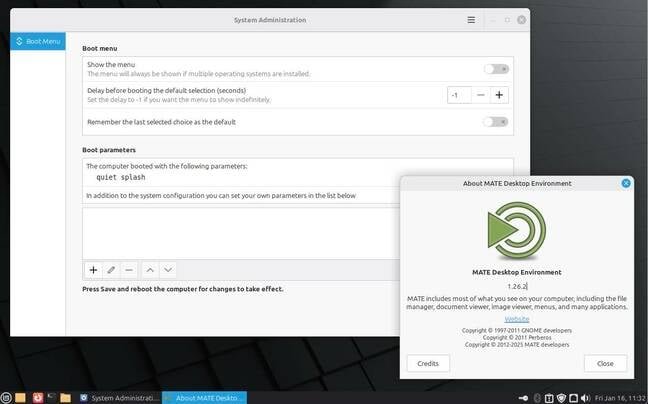
One of the most practical additions in Zena is the introduction of two new system information tools. The existing System Reports tool has been enhanced with new pages for reporting information about USB devices, GPUs, PCI devices, and system firmware, and has been renamed to System Information accordingly. Complementing this is a new System Administration application that requires root privileges and provides a graphical interface for adjusting bootloader configuration and menu settings—an area often neglected by other distributions.
A new applet for managing Thunderbolt devices has also been added, addressing compatibility issues between Thunderbolt 4 and older versions. This tool helps users identify what their computer can detect and identify, filling a gap that exists in some other distributions and desktops.
Icon System Overhaul

A system-wide change in Zena is the introduction of the XApp Symbolic Icons, a new set of monochrome icons. This change was necessitated by the GNOME project's removal of certain icons from its Adwaita theme that Mint was still using, which caused visual problems. This isn't the first time Mint has faced interoperability issues with GNOME's changes. In 2022, the project had to create the Blueman Bluetooth management tool due to changes in GNOME's version, and similar issues with the Adwaita theme prompted Mint to fork both Adwaita and libadwaita. Despite these efforts, icon compatibility problems have persisted.
Application Updates
Several applications in the Mint suite have received improvements:
- Timeshift: The system snapshot tool can now pause and resume operations
- Mint Backup: Added an option to show hidden files and include them in backups
- Warpinator: The cross-platform file-transfer app now supports IPv6 and can send text messages to other users
- Hypnotix: The IPTV app hides the mouse pointer during full-screen playback
- Update Manager: The applet now shows an indicator when a reboot is required
Cinnamon 6.6: The Flagship Update
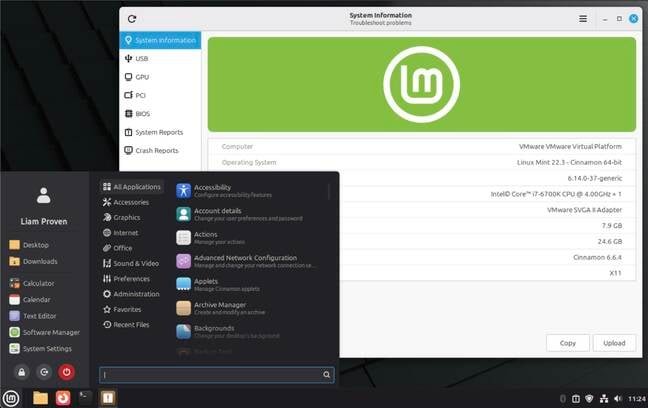
As with most Mint point releases, the most substantial changes are in the flagship Cinnamon edition. Zena ships with Cinnamon 6.6.4, which includes numerous enhancements:
Menu Customization
The main menu has become significantly more customizable. The sidebar now offers several display modes beyond the previous single column of icons. Users can customize the sidebar, show text labels, or hide it entirely. Sections of the menu can be rearranged, and users can choose which entries appear on the main menu. Keyboard controls have also been improved.
Taskbar and Virtual Desktops
The taskbar can now display badges on app icons, showing counts for pending notifications (such as unread emails). The virtual-desktop switcher features a simpler, clearer display. The app-switcher can optionally be limited to the currently visible desktop, and fractional scaling options now allow users to choose whether to scale up or scale down.
Internationalization Improvements
A major focus in Cinnamon 6.6 is internationalization (i18n) support. Previous versions of Cinnamon only supported the US English keyboard layout when using Wayland, which was a significant limitation for non-English users. The new release provides much richer keyboard localization support, understanding combinations of alphabet layout, regional character set, and additional input methods for languages requiring more symbols than standard QWERTY layouts, including Chinese, Japanese, Korean, Arabic, and various Cyrillic forms.
New additions include an on-screen keyboard, layout switching tools, and enhanced support for complex input methods. These improvements make Cinnamon more viable for global users who need to work with multiple languages and character sets.
Nemo File Manager Updates
Cinnamon's Nemo file manager has received several enhancements:
- File copy and move operations can now be paused and resumed
- A templates manager for file templates
- Search using wildcards or regular expressions
- Improved thumbnailing
- Easier access to the split-screen mode
Nemo remains a robust file manager that some other distributions use as a replacement for GNOME's Nautilus, which has had many features stripped out for simplicity. Ubuntu Unity, for example, uses Nemo.
Desktop Environment Comparisons
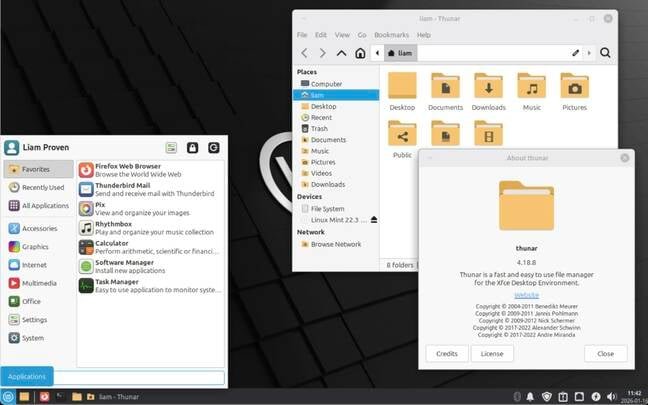
While Cinnamon receives the most attention, the MATE and Xfce editions also benefit from the underlying system updates. However, the MATE edition still uses the same dated MATE interface, and the Xfce edition continues to use Ubuntu Noble's older Xfce version. Notably, neither MATE nor Xfce uses Nemo as their file manager—MATE uses Caja, and Xfce uses Thunar—despite the development effort Mint puts into Nemo.
Historical Context and Linux Mint's Position
Linux Mint has evolved significantly since its 2006 origins, when it was essentially Kubuntu with added drivers and codecs. The distribution gained prominence when Canonical switched Ubuntu's default desktop to Unity in 2011, offering users a Windows-like alternative on a solid Ubuntu base. When Canonical later moved to GNOME 3 in 2017, Mint continued to thrive by providing familiar desktop experiences.
The project has made several popular decisions, such as removing Snap support in favor of Flatpak and choosing traditional Windows-like desktops with sober, legible themes and color schemes. Cinnamon benefits from a modern technological foundation, including HiDPI support and fractional scaling. Full Wayland support is progressing and will arrive soon, which will improve support for modern display subsystems.
Upgrade Recommendations
Users running any version of Mint 22 should upgrade to 22.3, as the process should be safe with minimal risk of breaking existing setups. For users on Mint 21, the upgrade should be viable unless they have very old Nvidia graphics cards. Those still on Mint 20 are advised to back up their data and perform a fresh installation.
Availability and Community
Linux Mint provides a single download page for all three desktop editions, simplifying the selection process. As a popular distribution, the project encourages users to share bandwidth by seeding torrents after downloading, helping others obtain the ISO files more efficiently.
Linux Mint continues to be an excellent choice for users transitioning from Windows or seeking a user-friendly Linux distribution. It offers good hardware support, extensive third-party software availability, numerous applications and drivers, and a welcoming community. The distribution maintains a balance between modern features and accessibility, making it "about as un-nerdy as Linux gets this side of ChromeOS Flex."
The Zena release represents steady progress in unifying documentation, improving internationalization, and enhancing system tools—all while maintaining the stability and user-friendliness that have made Linux Mint a preferred choice for both newcomers and experienced users.
For more information about the release and to download the ISO files, visit the Linux Mint official website. The complete release notes and feature details are available on their new features page.
Comments
Please log in or register to join the discussion