
Microsoft has made its Purview eDiscovery Graph API generally available for E3 license holders, bringing automation capabilities previously limited to E5 customers.
Microsoft has officially launched the general availability of the Purview eDiscovery Graph API Standard for Microsoft 365 E3 customers, marking a significant shift in eDiscovery capabilities across license tiers. The announcement, effective December 1st, 2025, extends programmatic automation features that were previously exclusive to E5 license holders or those with equivalent add-on SKUs.
What the API Enables
The Graph API provides comprehensive programmatic control over eDiscovery workflows:
- Case Management: Create, list, update, close, or reopen cases programmatically
- Hold Management: Place or remove content locations on hold within cases
- Search Management: Create searches, update parameters, delete searches, and run statistics jobs
- Job Monitoring: View all jobs run in a case with status and runtime information
- Export Operations: Trigger export jobs, generate export reports, and download packages programmatically
- Search and Purge: Purge email messages from mailboxes identified in modern UX searches
Why This Matters for E3 Customers
Previously, organizations with only E3 licenses faced significant limitations in automating their eDiscovery processes. They were restricted to manual operations or partial automation through legacy PowerShell cmdlets. The new Graph API levels the playing field, allowing E3 customers to implement end-to-end automation previously available only to E5 customers.
Migration from Legacy PowerShell Cmdlets
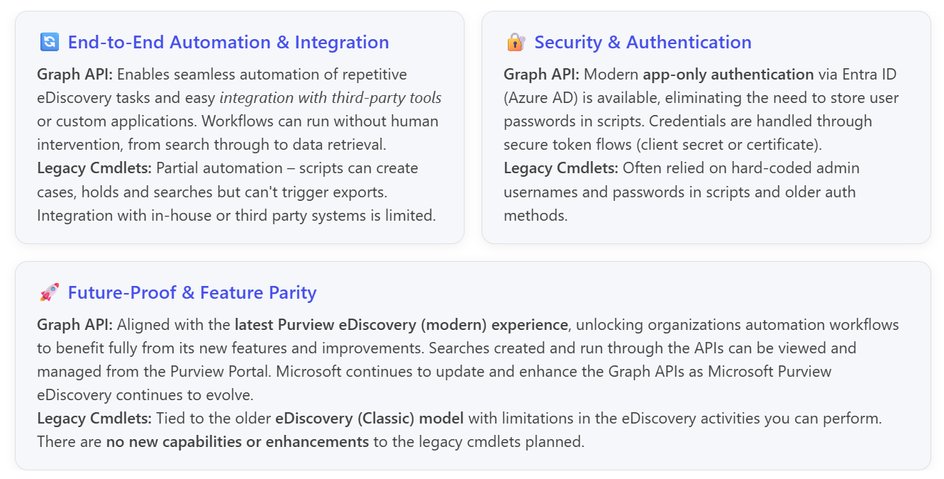
For organizations currently using legacy eDiscovery PowerShell cmdlets, this presents both an opportunity and a migration path. The Graph API offers several advantages:
- Modern Authentication: Uses Entra ID with secure token-based credentials instead of older authentication methods
- Full Automation: Supports unattended workflows from search to data retrieval
- Future-Proof: Aligns with the modern Microsoft Purview eDiscovery experience with ongoing feature development
- Integration Ready: Easier integration with third-party tools and custom applications
Getting Started Requirements
Before using the APIs, E3 customers must enable Microsoft Purview pay-as-you-go features. This involves registering an app in the Microsoft Identity Platform (Entra ID) and selecting the appropriate access model:
- App-only access: For unattended scripts and automation scenarios with no direct user interaction
- Delegated access: For scenarios where investigators authenticate as themselves
Authentication and Permissions
Two key permissions are available:
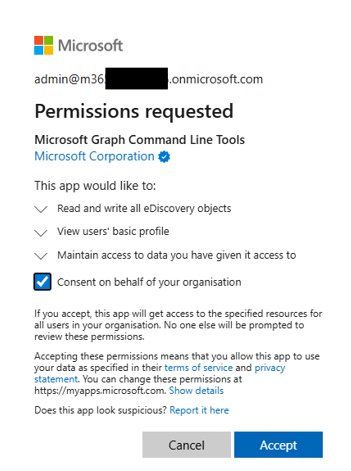
- eDiscovery.Read.All: Read-only access to eDiscovery objects
- eDiscovery.ReadWrite.All: Full read and write access to eDiscovery objects
Organizations must grant these permissions to the Microsoft Graph Command Line Tools enterprise app in Entra ID. Users must also be assigned relevant eDiscovery Purview roles to make use of the APIs.
Cost Considerations
While most API usage doesn't contribute to billing, the Export API is billed based on data volume exported. Each organization receives 50GB of free storage per month, with additional usage billed at $10 per GB. Organizations with mixed E3 and E5 licenses should note that exports from premium-enabled cases incur no costs, while exports from non-premium cases contribute to billing.
Integration Options
The API supports multiple integration approaches:
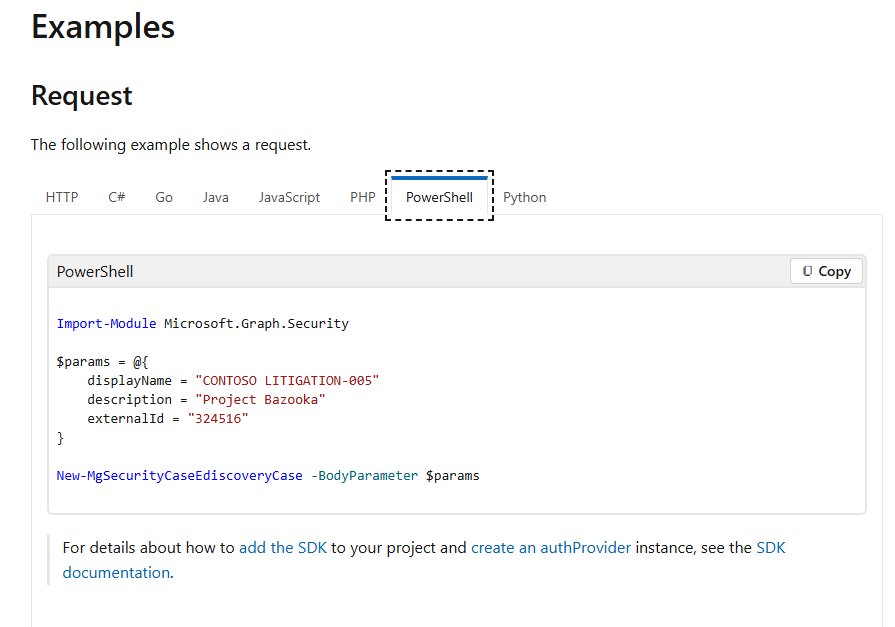
- PowerShell Cmdlets: Available within the Microsoft Graph PowerShell module
- Microsoft Graph SDK: Available for .NET, Go, Java, JavaScript, PHP, PowerShell, and Python
- Custom Applications: Direct integration using REST APIs
Availability
The API is available across all Microsoft 365 environments, including GCC, GCC High, and DoD tenants, making it suitable for organizations with various compliance requirements.
Looking Ahead
Microsoft has indicated that scenario-based guidance with examples will be released soon to help organizations adopt and benefit from the eDiscovery Graph APIs. This guidance will be particularly valuable for both E3 and E5 organizations looking to implement automation in their eDiscovery workflows.

The general availability of the Purview eDiscovery Graph API for E3 customers represents a democratization of advanced eDiscovery capabilities, allowing more organizations to implement sophisticated automation without requiring the highest-tier licenses. This move aligns with Microsoft's broader strategy of making powerful tools accessible across its product ecosystem while maintaining a pay-as-you-go model for premium features.
For organizations currently relying on manual eDiscovery processes or limited automation, this API provides a clear path to modernization and efficiency gains. The ability to programmatically manage cases, searches, holds, and exports can significantly reduce the time and resources required for eDiscovery operations while improving consistency and auditability.
Comments
Please log in or register to join the discussion