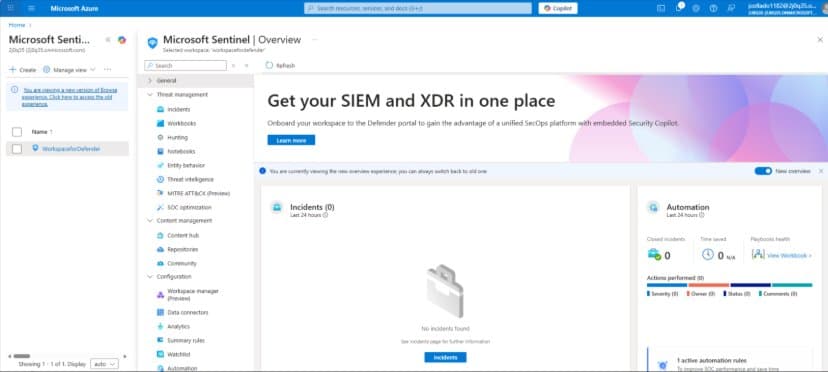
Microsoft's integration of Dataverse with Sentinel brings unified security monitoring to Power Platform environments, enabling real-time threat detection, automated response, and enhanced governance through centralized audit log analysis.
Integrating Microsoft Sentinel with Microsoft Dataverse brings advanced, unified security monitoring to your Power Platform environments. Microsoft Sentinel is a cloud-native SIEM (Security Information and Event Management) that collects and correlates logs from across Azure, Microsoft 365, and more to detect and respond to threats in real time. By streaming Dataverse audit logs into Sentinel, organizations gain centralized visibility into Power Platform activity and can leverage Sentinel's analytics and automation to rapidly detect suspicious behavior and enhance governance.
Benefits of Connecting Dataverse to Sentinel
Unified Visibility and Threat Detection
All Dataverse audit events (e.g. record access, changes, logins) are ingested into Sentinel, where they can be correlated with signals from identities, devices, and other applications. This holistic view enables detection of suspicious patterns that might be missed in isolation. For example, security analysts can spot anomalies like:
- Mass data exports
- Unusual access locations
- Sudden policy changes in Dataverse operations
Sentinel provides out-of-the-box analytics rules to flag many of these risky behaviors (such as a departing user downloading large datasets or deleting records) without requiring custom queries.
Faster Investigation and Response
With Dataverse logs in Sentinel, analysts can use Kusto Query Language (KQL) to quickly search and correlate Dataverse activity with other security logs (identity sign-ins, Office 365 events, etc.). This speeds up root-cause analysis during incidents. Moreover, Sentinel's SOAR capabilities mean you can trigger automated playbooks in response to Dataverse threats. For instance, if Sentinel detects an anomalous privilege escalation in Dataverse, it could automatically disable the user's account or alert an admin via Teams. This rapid, automated response helps contain threats immediately, reducing the time to mitigate incidents.
Improved Governance and Compliance
Integrating Dataverse with Sentinel strengthens oversight of Power Platform usage. All audit logs are stored in Sentinel's scalable data lake, allowing long-term retention for compliance at a lower cost than storing in Dataverse. By correlating Dataverse activity with other enterprise logs, organizations can ensure that Power Platform apps adhere to security policies and can prove compliance.
Prerequisites
Before deploying the integration, ensure the following prerequisites are in place:
- Microsoft Sentinel workspace: Microsoft Sentinel enabled in the workspace
- Data Collection Rules (DCR) permissions: You must have permission to create Data Collection Rules and Data Collection Endpoints in that workspace
- Dataverse environment: The Dataverse environment must be a production environment (Dataverse logging for Sentinel is only supported for production, not sandbox)
- Power Platform usage: Your organization should be using Dynamics 365 Customer Engagement and/or Power Platform apps
- Audit logging enabled: Auditing must be turned on for the Dataverse environment in the Power Platform admin settings
Setup Process
Enable Dataverse Auditing
In the Power Platform admin center, ensure tenant-level and environment-level auditing is on. Dataverse auditing is not enabled by default, so this is critical. You'll also need to enable auditing on the entity (table) level for all relevant Dataverse tables.
Microsoft provides a managed solution to simplify this:
- Import the Audit Settings solution: If your environment uses Dynamics 365 CE apps, import the solution from aka.ms/AuditSettings/Dynamics; otherwise use aka.ms/AuditSettings/DataverseOnly
- This managed solution will turn on detailed auditing for all standard tables (entities) in Dataverse
- For any custom tables, manually enable auditing in their settings (toggle on Auditing for the entity)
- In each entity's settings, under Auditing, enable the options for "Single record auditing" and "Multiple record auditing" to capture detailed create/update/delete events
Install Sentinel Solution and Connect Data Sources
In the Azure Sentinel portal or the Security Admin Portal, navigate to the Content hub and install the "Microsoft Sentinel Solution for Microsoft Business Applications." This deploys all the components (analytics rules, workbooks, connectors, etc.) for Power Platform integration.
Once installed, go to Configuration > Data connectors in Sentinel. You will see new connectors available for:
- Microsoft Dataverse
- Microsoft Power Platform Admin Activity
- Microsoft Power Automate
For each relevant data connector (Dataverse, Power Platform Admin, Power Automate), open its page and select Connect. This step links your Dataverse environment's audit stream to Sentinel via the Azure Monitor DCR infrastructure.
Validate Data Ingestion
With auditing enabled and connectors in place, perform some sample activities in your Dataverse environment to generate logs (for example, create or update a row in a Dataverse table, change a Power Platform environment setting, run a Power Automate flow).
In general, Dataverse and Power Automate activity logs should begin flowing into Sentinel within a few minutes, whereas Power Platform admin logs may take up to an hour for the first time. Validate ingestion by querying the logs in Sentinel using KQL queries in the Logs blade.
After a successful setup, Microsoft Sentinel will be populating three main Log Analytics tables with your Dataverse-related logs:
| Log Analytics Table | Data Collected |
|---|---|
| PowerPlatformAdminActivity | Power Platform administrative logs (e.g. environment settings changes, user role assignments) |
| PowerAutomateActivity | Power Automate (Flow) activity logs (creation, runs, etc.) |
| DataverseActivity | Dataverse and model-driven app business data activity logs (create, update, delete events on records, etc.) |
Analytics and Threat Detection Capabilities
Once the data is flowing, you can leverage Microsoft Sentinel's powerful analytics and automation on your Dataverse logs. The Microsoft Business Apps Sentinel solution comes with prebuilt analytics rules tailored to Dataverse and Power Platform scenarios. These rules will automatically generate incidents for suspicious patterns, such as:
- Mass record downloads or deletions (which could indicate a potential data theft or misuse)
- Anomalous access, like a user accessing Dataverse from an unusual location or at an odd time
- Privilege escalations or policy changes, e.g. a user suddenly gaining a system admin role, or a DLP policy being turned off
Security teams can also create custom detection rules using KQL to address organization-specific threats. All the Dataverse audit logs in Sentinel are fully queryable – for example, you could write a query to find when a particular record was modified and by whom, or to detect an unusual spike in Power Automate flow failures.
Sentinel provides interactive workbooks and a hunting interface to help visualize and drill into this data for proactive threat hunting.
In addition to detection, Sentinel enables automated response for Power Platform incidents. Using Playbooks (Logic Apps), you might automate actions like disabling a user's Power Platform account, alerting the IT team via Microsoft Teams, or creating a ticket in ServiceNow whenever a high-severity Dataverse incident is detected.
For example, if multiple deletion events are detected in a short span on a sensitive table, a playbook could immediately notify a security channel and suspend the user's access pending investigation.
Conclusion
Connecting Dataverse auditing to Microsoft Sentinel equips organizations with a unified view of business application activity and the advanced tools to detect, investigate, and respond to potential security issues in their Power Platform environments. It marries the rich audit data from Dataverse with Sentinel's powerful SIEM capabilities – enabling proactive monitoring of user actions, quick identification of anomalies, and automated defense measures to protect your low-code applications.
With the integration set up, Power Platform admins and security analysts can rest easier knowing that any unusual or malicious activity in Dataverse will light up on the Sentinel radar and be handled swiftly.
For detailed step-by-step guidance, refer to Microsoft's documentation on connecting Power Platform (Dataverse) to Sentinel and Connect Microsoft Dynamics 365 Finance and Operations to Microsoft Sentinel. These resources provide deeper instructions and additional tips for a successful integration.
Comments
Please log in or register to join the discussion