
A sophisticated dual-vector campaign uses phishing to steal credentials, then deploys legitimate LogMeIn RMM software as a persistent backdoor on compromised systems.
A new phishing campaign demonstrates a particularly insidious evolution in attacker tactics: instead of deploying custom malware, threat actors are weaponizing trusted IT tools to establish persistent access. Researchers from KnowBe4 Threat Labs have uncovered a dual-vector attack that first steals victim credentials through phishing, then uses those credentials to deploy legitimate Remote Monitoring and Management (RMM) software.
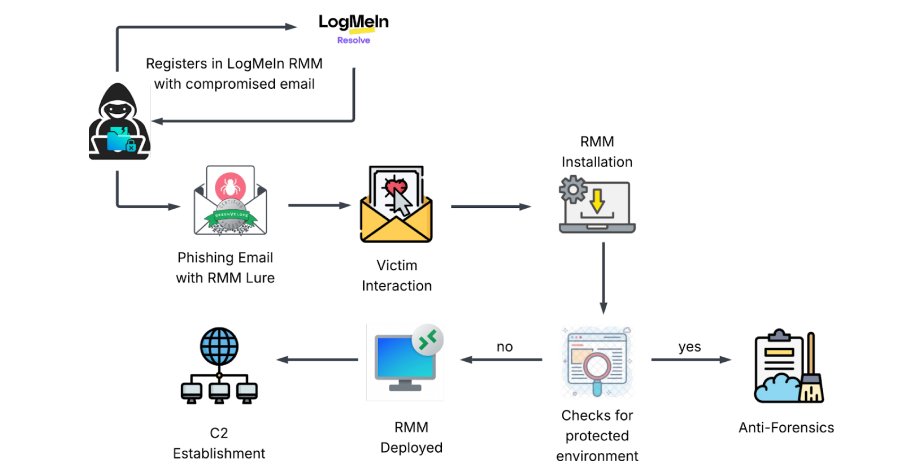
The Two-Phase Attack
The campaign unfolds in two distinct waves. The initial phase involves phishing emails disguised as invitations from Greenvelope, a legitimate digital invitation platform. These emails contain links designed to harvest login information for Microsoft Outlook, Yahoo!, and AOL.com accounts. Once credentials are stolen, the attackers move to the second phase: using the compromised email to register with LogMeIn and generate RMM access tokens.
The researchers note that this approach bypasses traditional security controls. "Instead of deploying custom viruses, attackers are bypassing security perimeters by weaponizing the necessary IT tools that administrators trust," said KnowBe4 Threat Labs researchers Jeewan Singh Jalal, Prabhakaran Ravichandhiran, and Anand Bodke. "By stealing a 'skeleton key' to the system, they turn legitimate Remote Monitoring and Management (RMM) software into a persistent backdoor."
Technical Execution
The follow-on attack delivers an executable named "GreenVelopeCard.exe" (note the intentional misspelling) that contains a valid digital certificate. This binary includes a JSON configuration that silently installs LogMeIn Resolve (formerly GoTo Resolve) and connects to an attacker-controlled URL without user knowledge.
Once installed, the RMM tool is weaponized through several persistence mechanisms:
- Service Configuration: The attackers modify the RMM service settings to run with unrestricted access on Windows systems
- Scheduled Tasks: Hidden scheduled tasks are created to automatically relaunch the RMM program if it's manually terminated
- Silent Operation: The installation and connection process occurs without user interaction or visible indicators
Why This Matters
This attack represents a significant shift in threat actor methodology. Traditional endpoint detection often focuses on known malware signatures and suspicious binaries. By using legitimately signed software with valid certificates, attackers can evade many security controls.
RMM tools like LogMeIn Resolve are designed for system administrators to manage endpoints remotely. They have extensive system access by design, making them ideal for persistent access. When deployed maliciously, these tools provide:
- Full remote control over the compromised system
- File transfer capabilities
- Command execution
- Screen sharing and remote desktop functionality
- Persistence mechanisms that survive reboots
Detection and Mitigation Strategies
Organizations should implement several defensive measures to counter this threat:
Monitoring for Unauthorized RMM Installations
Security teams should establish baseline inventories of approved RMM tools and monitor for unauthorized installations. Key indicators include:
- New RMM software installations outside of IT management workflows
- Connections to external RMM servers not owned by the organization
- Service modifications that grant elevated privileges
- Scheduled tasks referencing RMM executables
Credential Protection
Since the attack begins with credential theft, strengthening authentication is critical:
- Multi-factor authentication (MFA): Enforce MFA on all email and cloud services
- Email security: Deploy advanced email filtering to detect phishing attempts
- User training: Educate users about recognizing phishing attempts, especially those mimicking legitimate services
Endpoint Detection and Response (EDR)
Modern EDR solutions can detect suspicious RMM behavior:
- Monitor for RMM software running from unusual locations
- Alert on RMM connections to unknown external servers
- Detect modifications to Windows services and scheduled tasks
- Flag processes with valid certificates but suspicious behavior patterns
Application Control
Consider implementing application whitelisting policies that restrict which RMM tools can be installed and run. This should include:
- Blocking unsigned or unknown RMM executables
- Restricting RMM installations to IT-managed devices only
- Monitoring for RMM tools that bypass standard installation procedures
Broader Implications
This campaign highlights a growing trend of "living off the land" tactics, where attackers use legitimate tools and system features to conduct malicious activities. The use of RMM software is particularly concerning because:
- Legitimacy: RMM tools are expected to have extensive system access, making malicious use harder to distinguish from legitimate administration
- Persistence: These tools are designed for long-term management, providing natural persistence mechanisms
- Trust: Many security tools are configured to trust RMM software, potentially allowing malicious activity to go undetected
Recommendations for Security Teams
- Inventory and Audit: Maintain an accurate inventory of all RMM tools deployed across your environment
- Network Monitoring: Monitor for unusual RMM traffic patterns, especially connections to unknown external servers
- Incident Response Planning: Develop specific playbooks for responding to malicious RMM deployments
- Vendor Communication: Work with RMM vendors to understand their security features and reporting capabilities
- Regular Reviews: Periodically review RMM tool usage and permissions to ensure they align with business needs
Conclusion
The LogMeIn RMM phishing campaign represents a sophisticated evolution in attack methodology that leverages legitimate tools for malicious purposes. By combining credential theft with the deployment of trusted software, attackers can establish persistent access while evading traditional security controls.
Organizations must adapt their security posture to address this threat, focusing on detection of unauthorized tool usage, strengthening authentication mechanisms, and implementing comprehensive endpoint monitoring. The key is recognizing that the tools themselves aren't malicious—it's their unauthorized use that poses the threat.
Security teams should treat any unauthorized RMM installation as a potential incident and investigate immediately. The combination of legitimate software and stolen credentials creates a challenging detection scenario that requires proactive monitoring and rapid response capabilities.
For more information about this campaign and detailed indicators of compromise, security teams should consult the KnowBe4 Threat Labs research and maintain awareness of evolving phishing techniques targeting RMM tools.
Comments
Please log in or register to join the discussion