
Microsoft Intune adds a GA setting that lets macOS devices complete Entra ID registration and Platform SSO during the Setup Assistant phase of Automated Device Enrollment, eliminating post‑login prompts, reducing compliance gaps, and accelerating user productivity.
What changed
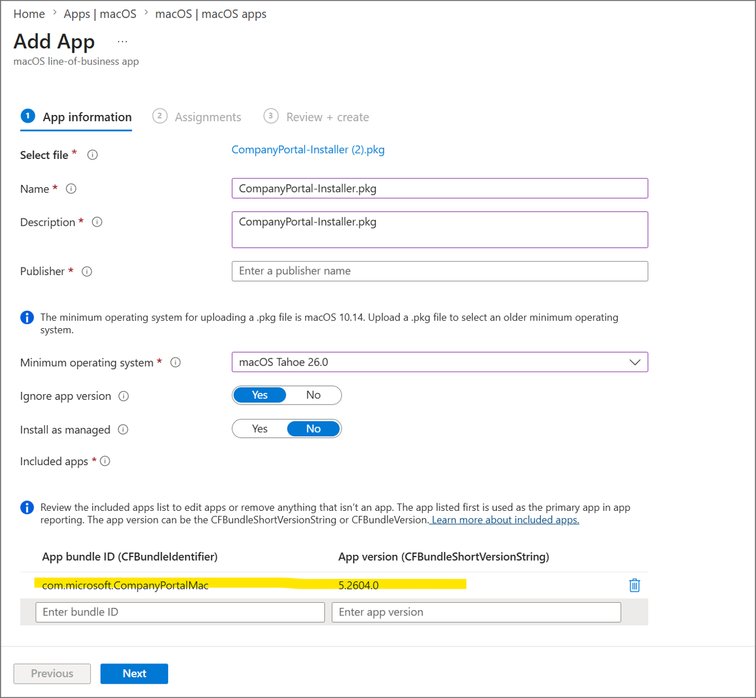
Microsoft Intune has made the Enable Registration During Setup option for Platform Single Sign‑On (PSSO) generally available on macOS devices. When this setting is turned on—and the Intune Company Portal app version 5.2604.0 or newer is deployed—users sign in with their Microsoft Entra credentials during the macOS Setup Assistant. The device registers with Entra ID, receives a hardware‑bound Workplace Join certificate, and finishes the PSSO flow before the desktop appears. The result is a fully authenticated Mac that can immediately satisfy Conditional Access policies and launch corporate apps without the extra post‑login prompts that previously caused compliance and support headaches.
Provider comparison
| Feature | Current macOS enrollment (pre‑GA) | New Platform SSO during ADE | Impact on cost & operations |
|---|---|---|---|
| When registration occurs | After Setup Assistant, on the desktop | During Setup Assistant, before desktop | Reduces help‑desk tickets caused by missed PSSO prompts; fewer re‑enrollments needed |
| Certificate issuance | Issued after user reaches desktop, may be delayed by policy sync | Issued instantly, stored in Secure Enclave | Hardware‑bound credentials lower risk of phishing, aligning with Zero Trust without extra licensing |
| User sign‑ins | Two separate sign‑ins (macOS Apple ID, then Entra) plus an optional third for Company Portal | Two Entra sign‑ins (one for enrollment, one for Company Portal) – future update will collapse to a single sign‑in | Slight increase in enrollment time now, but eliminates post‑login friction; future single‑sign‑in will improve UX further |
| Compliance reporting | Devices may appear non‑compliant until PSSO completes | Devices are compliant immediately after enrollment | Faster compliance posture, less need for manual remediation |
| Prerequisites | macOS 13+, Company Portal 5.2603, standard ADE profile | macOS 14 (26)+, Company Portal 5.2604+, static user groups, Secure Enclave (recommended) | Minor OS upgrade cost for older fleets; deployment of newer Company Portal package required |
Pricing considerations
The feature itself does not introduce new per‑device fees; it uses existing Intune and Entra ID licenses. The main cost impact comes from:
- OS upgrades – moving to macOS 14 (version 26) for devices still on older releases.
- Company Portal rollout – distributing the newer PKG via Intune LOB app, which may require a one‑time packaging effort.
- Static group management – ensuring groups are static (not dynamic) may involve a small administrative overhead, but it prevents enrollment failures that would otherwise incur device wipe and re‑provision costs.
How it works (technical walk‑through)
- Three policies must be aligned and assigned to the same static user group:
- Platform SSO settings catalog with Enable Registration During Setup = Enabled.
- Intune Company Portal deployed as a macOS LOB app (version 5.2604+).
- ADE enrollment profile with Setup Assistant → Modern authentication, Await final configuration = Yes, and User affinity = Enroll with User Affinity.
- Enrollment flow
- Device powers on, contacts Apple DEP and receives the ADE profile.
- Intune pushes the Platform SSO catalog policy and the Company Portal LOB app.
- During Setup Assistant the user enters Entra credentials (first sign‑in). This triggers the normal device enrollment.
- The Company Portal app installs silently, then prompts for a second Entra sign‑in to fetch the Enterprise SSO extension.
- Intune registers the device with Entra ID, issues a Workplace Join certificate stored in the Secure Enclave, and activates Platform SSO.
- The user lands on the desktop already signed in, with Conditional Access satisfied and Outlook, Teams, etc., ready to authenticate.
- Key technical benefits
- Early device identity – the certificate is bound to the hardware before any user apps launch, enabling immediate Zero Trust checks.
- Secure Enclave storage – credentials are protected by the Apple T2/Apple Silicon security chip, providing phishing‑resistant, hardware‑backed protection.
- Zero‑touch experience – no manual post‑enrollment steps; the device is ready for work right out of the box.
Business impact
- Reduced onboarding time – Users reach a productive state minutes faster, which translates into higher employee satisfaction and lower onboarding labor costs.
- Lower support volume – By eliminating the post‑setup PSSO prompt, help‑desk tickets for “cannot sign in to Outlook” or “device non‑compliant” drop dramatically.
- Improved compliance posture – Devices report as compliant immediately, helping organizations meet audit windows without manual remediation.
- Simplified migration – Companies moving macOS fleets from legacy MDMs to Intune no longer need a separate “PSSO after enrollment” phase, accelerating the overall migration schedule.
- Future‑proofing – The upcoming single‑sign‑in enhancement will bring macOS enrollment closer to the zero‑touch model already available for iOS/iPadOS, aligning macOS with the broader enterprise provisioning strategy.
Migration checklist
- Verify all target Macs run macOS 14 (26) or later.
- Package and publish Company Portal 5.2604+ as a required LOB app.
- Create a static user group for the pilot and assign the three required policies.
- Run a small pilot (5‑10 devices) to confirm the double‑sign‑in flow works and that devices appear compliant.
- Scale rollout, monitoring Intune enrollment logs for any “policy missing” or “profile mismatch” errors.
- Document the new workflow for the support team – note that the only user‑visible step is the two Entra sign‑ins during Setup Assistant.
Looking ahead
Microsoft has announced a forthcoming enrollment setting that will collapse the two Entra sign‑ins into a single prompt. When that lands, macOS ADE will match the truly zero‑touch experience already seen on iOS, further reducing friction and cementing Intune as the preferred MDM for mixed‑platform enterprises.
Related resources
- Configure Platform Single Sign‑On (PSSO) during Automated Device Enrollment for macOS devices
- Add Platform SSO policy to ADE Profile on macOS devices
- Microsoft Entra device registration documentation
- Intune Company Portal download (macOS PKG)
For feedback or pilot experiences, reach out on X @IntuneSuppTeam or leave a comment in the Microsoft Community Hub thread.
Comments
Please log in or register to join the discussion