
Leaked regulatory filings reveal a redesigned Xbox controller with Wi‑Fi 6 and Bluetooth 5.3, aimed at lower‑latency cloud gaming. The article examines the hardware specs, the impact on cross‑platform game developers, and what migration to a Wi‑Fi‑first controller might mean for iOS and Android streaming apps.
Microsoft’s Wi‑Fi‑Enabled Xbox Controller Leaks Hint at New Cloud‑Gaming Path
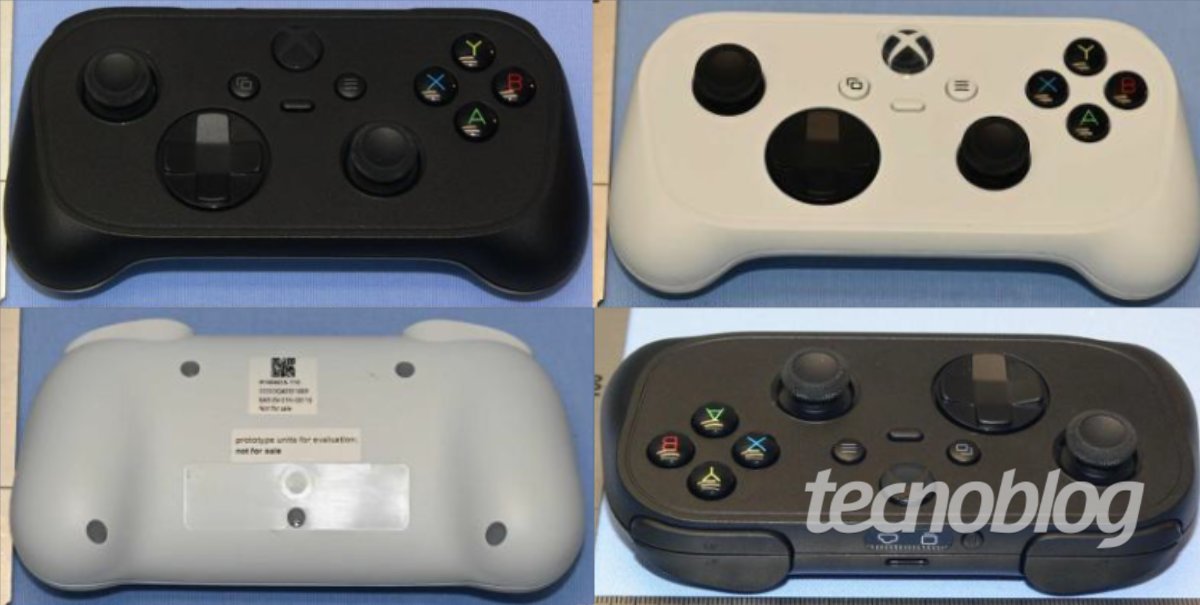
New hardware details
Recent filings with Brazil’s ANATEL show a prototype controller built around a Realtek RTL8730E chip. The chipset supports Wi‑Fi 6 (802.11ax) and Bluetooth 5.3, and the device ships with a 500 mAh rechargeable battery and a USB‑C charging port. Apart from the wireless upgrades, the layout is familiar: dual analog sticks, a D‑Pad, four face buttons, two bumpers and two triggers. The grips are slimmer than the current Xbox Series X|S controller, suggesting a design aimed at handheld or low‑power devices.
Why Wi‑Fi matters for cloud gaming
Cloud‑gaming services such as Xbox Cloud Gaming (formerly Project xCloud) rely on a stable, low‑latency link between the controller and the streaming server. Bluetooth, while convenient for local play, introduces additional latency and can suffer from interference in crowded RF environments. By connecting directly to a Wi‑Fi 6 network, the controller can bypass the host device’s Bluetooth stack, reducing round‑trip time to the cloud server by a few milliseconds. This is similar to the approach Google took with its Stadia controller, which also featured a dedicated Wi‑Fi link.
Platform impact for mobile developers
iOS and Android SDKs
Both Apple’s Game Controller framework and Android’s Gamepad API already support Bluetooth controllers. To take advantage of a Wi‑Fi‑only controller, developers will need to add a custom networking layer that discovers the device on the local network, establishes a UDP or TCP channel, and translates raw input packets into the standard GCController or InputDevice events.
- iOS: The
Network.frameworkcan be used to create a zero‑configuration (Bonjour) service that advertises the controller. Once discovered, the app can open aNWConnectionto receive input data. Apple’s documentation on Network Framework provides sample code for peer‑to‑peer connections. - Android: The
WifiP2pManagerAPI enables Wi‑Fi Direct discovery, while the newerNetworkCapabilitiesclass can filter for Wi‑Fi 6 capable links. Input can be fed into the existingGamepadevent pipeline via theInputDeviceclass.
Cross‑platform toolkits
Frameworks like Unity, Unreal Engine, and Godot already abstract controller input, but they assume a Bluetooth transport. To support the new Xbox controller out‑of‑the‑box, engine maintainers will likely add a plugin that handles the Wi‑Fi discovery and packet parsing. For Unity developers, the upcoming Unity Input System package (v1.5) includes an extensible IInputDevice interface where a custom Wi‑Fi driver can be registered.
Migration considerations
- Detecting the controller – Implement a fallback that first looks for a Bluetooth device, then scans for a Wi‑Fi service. This ensures compatibility with older Xbox controllers and third‑party gamepads.
- Battery management – The 500 mAh cell promises several hours of play, but Wi‑Fi transmission consumes more power than Bluetooth. Provide an in‑app battery indicator that queries the controller’s status over the custom protocol.
- Latency testing – Measure round‑trip latency on both Wi‑Fi 6 and Bluetooth 5.3 paths. If Wi‑Fi consistently beats Bluetooth by more than 5 ms, expose a setting that lets users choose the lower‑latency mode.
- Security – Since the controller will open a network socket, enforce encryption (e.g., DTLS) to prevent packet sniffing on public Wi‑Fi networks.
What this means for developers targeting cloud gaming
- Simpler client architecture – A Wi‑Fi‑only controller removes the need for the host device to act as a Bluetooth bridge, potentially reducing CPU usage on low‑end Android phones or iPads.
- Broader device support – Even devices without Bluetooth LE (some budget Android tablets) can still pair with the controller via Wi‑Fi, expanding the reachable audience for streaming titles.
- Potential for new UI patterns – With a dedicated network link, developers could stream haptic feedback or adaptive trigger data from the cloud server back to the controller, opening possibilities for richer gameplay experiences.
Outlook and pricing speculation
No official pricing has been announced, but the inclusion of Wi‑Fi 6 hardware and a USB‑C port suggests a cost comparable to the current Xbox Series X|S controller, likely in the US$70‑80 range. Availability could align with the next major Xbox Cloud Gaming update, tentatively slated for late 2026.
For more technical details on the Realtek RTL8730E chip, see the official datasheet.
Stay tuned for official announcements from Microsoft and updates to the Unity Input System that will make integration easier.
Comments
Please log in or register to join the discussion