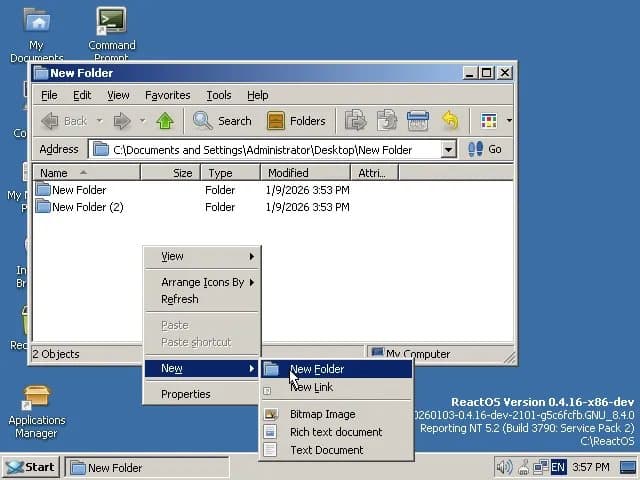
The open-source Windows clone finally solves a fundamental usability issue where file changes wouldn't appear without manual refresh, addressing a core shell32.dll implementation gap.
ReactOS has resolved a persistent usability issue that has plagued the open-source operating system for years: the file manager's failure to automatically display folder changes. The fix, merged this week, eliminates the need for manual refresh operations when creating folders, deleting files, or emptying the Recycle Bin.
The Core Problem
Until now, creating a new folder on the ReactOS desktop or within any file directory would not trigger an immediate visual update. Users had to right-click and manually refresh the view to see their newly created folder. Similarly, emptying the Recycle Bin left the desktop icon unchanged, still showing as full even when completely empty.
This behavior represented a significant departure from Windows NT's shell functionality and created friction for daily use. The issue stemmed from how ReactOS handles change notifications within its shell32.dll implementation.
Technical Root Cause: PIDL Mismatch
The problem traced back to Pointer to an Item ID List (PIDL) handling in the change notification system. PIDLs are Windows Shell's internal method for identifying objects in the namespace hierarchy - essentially unique paths that the shell uses to track files, folders, and other objects.
When a user created a folder or modified the filesystem, ReactOS's shell would generate change notifications, but these notifications contained mismatched PIDLs. The desktop window and file manager would receive notification that something changed, but couldn't correlate it to the specific folder being monitored. The result: no automatic refresh.
The fix involves proper PIDL translation within the change notification pipeline. The merged pull request ensures that when filesystem changes occur, the shell receives correctly formatted notifications with matching PIDLs that the desktop and file manager can act upon.
Why This Matters
This isn't just a minor UI polish issue - it's fundamental to the Windows shell experience. Windows NT's Explorer has always provided real-time feedback for filesystem changes. The absence of this feature made ReactOS feel broken and unfinished, particularly for users attempting to use it as a daily driver.
The fix demonstrates ReactOS's continuing progress toward NT 6.x compatibility. While the project has focused heavily on kernel-level compatibility and driver support, shell functionality remains equally critical for user adoption. Shell32.dll is one of the most complex components in the Windows ecosystem, handling everything from file operations to drag-and-drop, context menus, and namespace extensions.
Implementation Details
The solution required updating ReactOS's implementation of the SHChangeNotify function and related shell notification mechanisms. These functions are responsible for broadcasting filesystem changes to all registered listeners, including:
- The desktop window
- Open Explorer/Folder windows
- Taskbar components (like the Recycle Bin icon)
- Third-party shell extensions
By ensuring PIDLs are properly translated and matched during these notifications, ReactOS now correctly propagates changes throughout the shell. This means:
- Desktop folders appear immediately after creation
- File operations (copy, move, delete) reflect instantly in open windows
- Recycle Bin icon updates correctly when emptied or files restored
- Directory watching applications receive proper notifications
Context: Shell32.dll and Wine
ReactOS has long leveraged Wine's implementation of Windows DLLs, including shell32.dll. However, Wine's focus has historically been on application compatibility rather than perfect shell behavior. Wine runs Windows applications in a Unix-like environment, so perfect shell integration isn't always necessary.
ReactOS, being a complete operating system, needs accurate shell behavior. This fix likely required custom modifications beyond Wine's baseline implementation, demonstrating the project's unique requirements.
Current Status and Future
This fix lands shortly after ReactOS's January 2026 update to its MSVCRT implementation, which improved Microsoft C Runtime compatibility. The project continues making steady progress toward Windows NT 6.x compatibility, though major gaps remain in areas like:
- Driver signing and security infrastructure
- Modern Windows API features (especially post-Vista)
- UEFI and Secure Boot support
- DirectX 12 and modern graphics stacks
For users interested in testing this fix, ReactOS is available as a free download from the official ReactOS website. The project welcomes contributions and testing from the community, particularly for shell functionality where real-world usage reveals edge cases that automated testing misses.
The fix represents incremental but meaningful progress. While ReactOS still has considerable distance to travel before matching Windows NT's shell polish, eliminating this particular annoyance makes the OS substantially more usable for daily tasks.
Comments
Please log in or register to join the discussion