A deep dive into reviving email notifications on a 2010-era QNAP NAS by creating a local SMTP relay, bridging the gap between legacy hardware and modern authentication requirements.
The digital landscape evolves at an unforgiving pace, leaving behind hardware that remains perfectly capable for its primary purpose while becoming incompatible with the services we've come to depend on. This is precisely the situation faced by the owner of a QNAP TS-559 Pro+, a network-attached storage device that has faithfully served since around 2010. The hardware itself remains functional for file storage, yet a critical feature—email notifications—has silently ceased working, not due to device failure, but because the internet moved on without it.
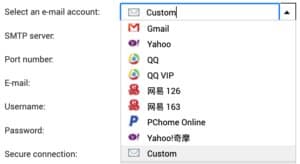
The initial symptoms suggested a straightforward authentication issue. Google's sunset of basic SMTP authentication in favor of OAuth rendered the previous email configuration useless. Attempts to alternative services like Yahoo proved fruitless, while Chinese options remained inaccessible despite translation tools. Even modern services like Resend, which offers flexibility with non-standard ports, failed to establish a working connection.
The troubleshooting journey began with what seemed the most likely culprit: the device's ancient OpenSSL version (1.0.1u from 2016). The theory suggested that this outdated cryptographic library might be incapable of negotiating modern TLS protocols required by contemporary email services. However, direct testing with openssl s_client revealed a different problem entirely—the NAS lacked the necessary root certificates to validate modern SSL certificates, specifically the ISRG Root X1 certificate used by Let's Encrypt.
After downloading and manually adding the missing root certificate, the OpenSSL connection test succeeded, disproving the initial theory. The device could indeed negotiate TLS 1.2 with modern ciphers when properly configured. This discovery shifted the investigation focus to the actual mail delivery mechanism.
Random discovery of a Reddit post mentioning sSMTP—a lightweight program designed specifically for forwarding automated system alerts to external email servers—provided the next breakthrough. The presence of an /etc/ssmtp directory confirmed this as the likely mail transport agent. Testing with ssmtp revealed the true limitation: while the system's OpenSSL could handle modern TLS, the sSMTP application itself (version 2.64) appeared unable to complete the TLS handshake successfully, despite accepting the STARTTLS command.
At this point, the solution strategy shifted from attempting to upgrade the legacy device's capabilities to creating an intermediary system that could bridge the compatibility gap. The approach involved setting up a local SMTP relay on a neighboring Raspberry Pi that would:
- Accept unauthenticated SMTP connections from the local network
- Forward emails to Resend using modern TLS and API key authentication
- Handle all the complex security protocols that the legacy NAS could no longer manage
This architecture elegantly solves the problem by isolating the legacy device's responsibilities to what it can still perform reliably—sending plain SMTP to a local IP address—while offloading all modern authentication and encryption requirements to a more capable system.
The implementation involved configuring Postfix on the Raspberry Pi with specific settings to:
- Accept connections from the local network segment
- Disable local delivery (relay only)
- Use implicit TLS (port 465) for secure communication with Resend
- Authenticate using SASL with an API key stored in a password file
The configuration process revealed additional challenges, including IPv6/IPv4 compatibility issues and the need for proper sender domain verification with Resend. An Ansible playbook was developed to automate the setup and testing process, demonstrating the power of infrastructure-as-code even for small-scale projects.
Once the relay was operational, configuring the NAS was remarkably simple—merely pointing its SMTP settings to the Raspberry Pi's IP address on port 25 with no authentication or encryption required. The solution worked perfectly, with test emails successfully arriving in the inbox seconds after being triggered from the NAS admin panel.
This case study illustrates a broader principle in technology maintenance: sometimes extending the useful life of legacy hardware requires not direct upgrades, but creating supportive infrastructure that compensates for evolving requirements. The local SMTP relay serves as a translation layer between the old and new, allowing valuable hardware to continue functioning in an environment that has otherwise moved on.
The solution also highlights the importance of understanding the underlying protocols and systems rather than focusing solely on symptoms. The initial misdiagnosis of OpenSSL as the culprit demonstrates how assumptions can lead down unproductive paths, while the eventual discovery of sSMTP's limitations shows the value of systematic investigation.
For those facing similar challenges with legacy systems, this approach offers a template for creating compatibility bridges. The Raspberry Pi, with its low power consumption and flexibility, serves as an ideal platform for such intermediary roles, capable of handling tasks that legacy hardware can no longer manage while extending the overall system's useful lifespan.
As we continue to accumulate legacy devices in our digital ecosystems, solutions like these will become increasingly valuable—not as permanent fixes, but as graceful ways to maintain functionality while planning for eventual hardware replacement. Sometimes, teaching an old dog new tricks isn't the most effective approach; providing it with the support it needs may be a more sustainable solution.
For those interested in implementing a similar solution, the Postfix configuration and Ansible playbook provide a solid foundation that can be adapted to various email providers and network configurations. The key insight remains: when direct modernization isn't feasible, creating an intermediary system that can handle the complexity often proves to be the most practical path forward.
Comments
Please log in or register to join the discussion