The comm utility offers powerful set operations for command-line users, but its syntax complexity and input requirements can be barriers. This article explores how to leverage comm effectively, work around its limitations, and understand its place in the Unix tool ecosystem.
The Unix command line has long been a powerful environment for text manipulation, and among its lesser-known yet powerful utilities is comm, a tool that brings set theory operations to the terminal. When working with sorted lists of data, comm enables users to perform intersections, differences, and unions without leaving the comfort of their shell. However, as with many specialized Unix tools, its power comes with a learning curve that can intimidate occasional users.
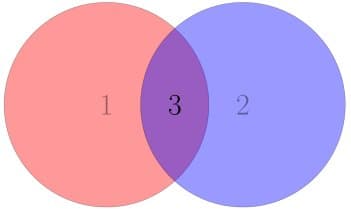
At its core, comm takes two sorted files as input and outputs three columns: lines unique to the first file, lines unique to the second file, and lines common to both. This elegant design allows users to derive set difference (A - B, B - A) and intersection (A ∩ B) operations from a single utility. The implementation reflects the Unix philosophy of doing one thing well, providing a focused solution to a specific problem.
The syntax of comm, however, presents challenges. The utility's filtering mechanism requires users to specify which columns to suppress rather than which to display, with options 1, 2, and 3 corresponding to the first file's unique lines, second file's unique lines, and common lines respectively. This counterintuitive approach means that to find the intersection of two files, one must suppress the first two columns with -12, rather than explicitly requesting the third column. This design choice, while logical from a programming perspective, creates a cognitive burden for users who think in terms of desired outputs rather than suppressed outputs.
Furthermore, comm imposes the strict requirement that input files must be sorted. This constraint, while technically necessary for the algorithm's efficiency, adds an additional step to workflows where data may not be pre-sorted. The author of the original article addresses this limitation by incorporating sorting directly into their wrapper scripts, using process substitution to sort inputs on the fly.
The author's solution demonstrates a common pattern in Unix tool usage: creating specialized tools that wrap more general utilities with simplified interfaces. Their intersect script, which implements comm -12 <(sort "$1") <(sort "$2"), and setminus script, implementing comm -23 <(sort "$1") <(sort "$2"), effectively hide the complexity of comm behind more intuitive function names. These scripts not only abstract away the filtering syntax but also handle the sorting requirement, creating a more user-friendly interface for set operations.
This approach highlights an important principle in command-line mastery: building a toolkit of specialized commands that leverage more general tools while providing clearer interfaces. By creating these wrapper scripts, the author demonstrates how users can extend their command-line environment with domain-specific utilities that follow the Unix philosophy of composability.
Beyond the specific utility and workarounds discussed, comm exemplifies a broader pattern in Unix tools: specialized programs that perform well-defined operations on text data. In an era of increasingly complex software, these focused utilities remain valuable precisely because they do one thing well, can be combined with other tools, and have predictable behavior. The ability to perform set operations at the command line, while perhaps not a daily need for all users, becomes invaluable in specific contexts such as data analysis, system administration, and software development.
For users who frequently work with lists or datasets, understanding comm and similar text processing utilities can significantly enhance productivity. The original article's suggestion to create wrapper scripts resonates with the practice of building a personalized command-line environment tailored to one's specific needs. This customization represents a form of programming at the meta-level, where users extend their tools to match their mental models and workflows.
In considering the evolution of command-line tools, one might wonder how comm compares to more modern alternatives. While newer tools like jq offer JSON processing capabilities, and specialized data processing tools provide advanced features, comm remains relevant for its simplicity and ubiquity on Unix-like systems. Its limitations, when viewed through the lens of modern software design, might suggest opportunities for improvement, yet its enduring presence in Unix toolkits speaks to its fundamental utility.
The author's workaround also illustrates a broader principle in software design: when existing tools don't perfectly match one's needs, the most effective solution often involves creating an abstraction layer that provides the desired interface while leveraging existing functionality. This pattern applies not just to command-line tools but to software development in general, where wrapper libraries, adapter patterns, and specialized interfaces frequently emerge to simplify complex underlying systems.
For those interested in exploring set operations further at the command line, several alternatives and enhancements to comm exist. Tools like sd (set difference) offer more intuitive syntax, while scripting languages like Python or Perl can be used for more complex set operations when performance requirements allow. However, for simple cases where only basic set operations are needed, comm remains an efficient choice, especially when inputs are already sorted.
In conclusion, while comm may present challenges with its syntax and input requirements, its underlying functionality provides valuable capabilities for set operations at the command line. By creating wrapper scripts that abstract away these complexities, users can leverage comm's power while maintaining intuitive interfaces. This approach exemplifies the Unix philosophy of building specialized tools from general ones, creating a personalized command-line environment that enhances productivity and aligns with individual workflows.
For those interested in implementing the author's approach, the scripts can be easily added to one's shell environment. The intersect script would be defined as intersect() { comm -12 <(sort "$1") <(sort "$2"); }, and the setminus script as setminus() { comm -23 <(sort "$1") <(sort "$2"); }. These can be placed in shell startup files or saved as standalone executable scripts for easy access.
The enduring relevance of comm and similar utilities reminds us that in an age of increasingly complex software, focused, predictable tools that do one thing well continue to hold value. By understanding these tools and creating appropriate abstractions, users can build powerful, personalized command-line environments that enhance productivity and align with their specific needs.
Comments
Please log in or register to join the discussion