Coder's wush-action enables developers to establish secure SSH connections directly into GitHub Actions runners, transforming CI debugging by providing real-time terminal access. Using WireGuard tunnels and end-to-end encryption, this open-source tool eliminates the need for third-party trust while supporting Linux, Windows, and macOS runners.
Debugging GitHub Actions workflows often feels like solving a puzzle blindfolded. When a CI job fails unexpectedly, developers typically resort to adding verbose logging, re-running jobs repeatedly, or—in extreme cases—attempting to replicate the environment locally. These approaches waste precious development time and rarely capture the exact conditions of the failure. Enter wush-action, an innovative open-source solution from Coder that brings direct SSH access to GitHub Actions runners, fundamentally changing how engineers interact with CI systems.
The SSH Lifeline for CI Workflows
wush-action operates by establishing a secure tunnel between your local machine and GitHub's ephemeral runners. The setup is remarkably straightforward:
jobs:
  debug_job:
    steps:
      - uses: actions/checkout@v4
      # ... your workflow steps ...
      - name: Enable SSH access
        if: ${{ !cancelled() }}
        uses: coder/[email protected]
        timeout-minutes: 30
After adding this step, developers install the wush CLI locally via a simple shell command:
curl -fsSL https://github.com/coder/wush/raw/main/install.sh | sh
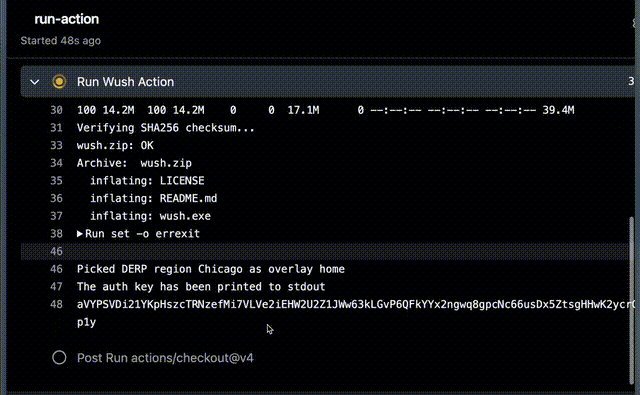
When the Action runs, it outputs a unique authentication key in the workflow logs. Copy this key, run wush ssh locally, paste the key, and you're immediately connected to the runner's environment. This direct access allows real-time inspection of filesystem states, process monitoring, and interactive debugging—capabilities previously impossible in GitHub's isolated CI environment.
Security by Design: No Third-Party Trust
Unlike many remote access solutions, wush-action prioritizes security through architectural decisions:
- WireGuard Tunnels: All traffic flows through end-to-end encrypted WireGuard VPN connections
- x25519 Keys: Cryptographic authentication eliminates reliance on external servers
- Zero Trust Model: The tunnel broker never handles unencrypted data or session contents
This approach ensures that even Coder—the tool's creators—can't intercept or monitor your debugging sessions. The tunnel exists solely between your machine and GitHub's runner, with encryption maintained throughout the session lifecycle.
Practical Implications for Development Teams
For engineers wrestling with flaky tests or environment inconsistencies, wush-action offers transformative benefits:
- Interactive Investigation: Run commands interactively to diagnose failures in real-time
- Environment Validation: Verify dependencies, file states, and configuration precisely as the job sees them
- Reduced Feedback Loops: Diagnose issues in minutes instead of waiting for repeated CI runs
The tool's cross-platform support (Linux/Windows/macOS on x86_64 and ARM64) ensures broad compatibility across GitHub's runner ecosystem. One crucial implementation note: using if: ${{ !cancelled() }} instead of always() ensures workflow cancellations properly terminate the tunnel, preventing orphaned connections that require manual termination.
Beyond Log Files: A New Debugging Paradigm
wush-action represents more than just technical convenience—it signals a shift toward treating CI environments as first-class development spaces. By bridging the gap between local and remote execution contexts, developers gain the superpower of immediate introspection during failures. This capability is particularly valuable for complex infrastructure setups, intermittent race conditions, and permissions issues where traditional logging falls short.
As CI/CD pipelines grow increasingly central to software delivery, tools like wush-action that enhance observability and control will become essential in every developer's toolkit. By open-sourcing this solution, Coder has provided the community with both a practical utility and a compelling vision for more interactive cloud-native development workflows.
Source: coder/wush-action on GitHub
Comments
Please log in or register to join the discussion