Microsoft Defender Experts uncovered a credential theft campaign by Storm-2561 that uses SEO poisoning to redirect users searching for legitimate VPN software to malicious websites hosting fake VPN clients signed with stolen certificates.
In mid-January 2026, Microsoft Defender Experts identified a sophisticated credential theft campaign that exploits search engine optimization (SEO) poisoning to distribute fake virtual private network (VPN) clients. The campaign, attributed to the cybercriminal threat actor Storm-2561, redirects users searching for legitimate enterprise software to malicious ZIP files on attacker-controlled websites, deploying digitally signed trojans that masquerade as trusted VPN clients while harvesting VPN credentials.
The Storm-2561 Campaign
Active since May 2025, Storm-2561 is known for distributing malware through SEO poisoning and impersonating popular software vendors. This campaign demonstrates how threat actors continue to exploit trusted platforms and software branding to avoid user suspicion and steal sensitive information.
By targeting users actively searching for enterprise VPN software, attackers take advantage of both user urgency and implicit trust in search engine rankings. The malicious ZIP files containing fake installer files are hosted on GitHub repositories, which have since been taken down. Additionally, the trojans are digitally signed by a legitimate certificate that has since been revoked.
Attack Chain Overview
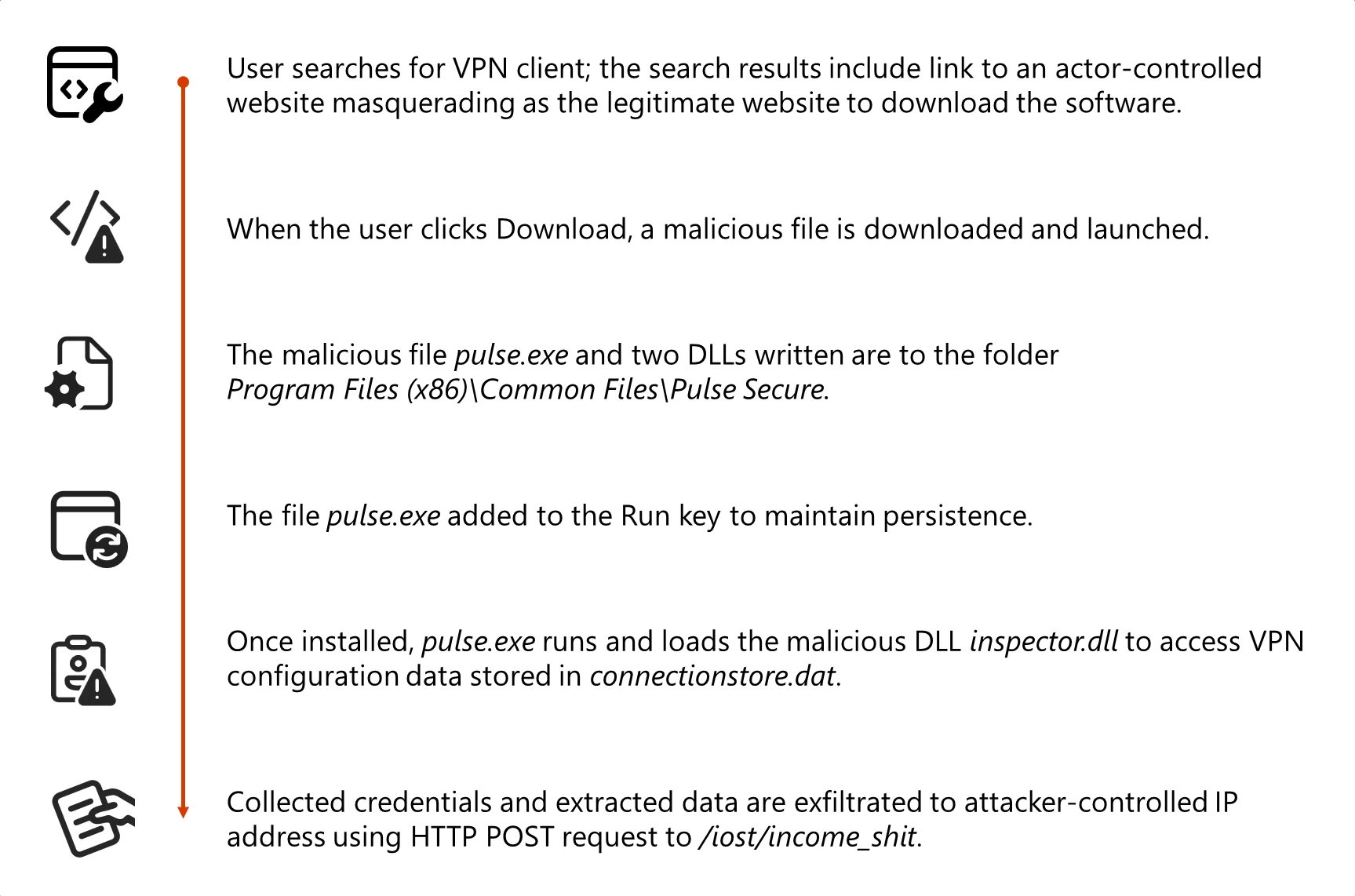
When users search for legitimate VPN software like "Pulse VPN download" or "Pulse Secure client," they are redirected from search results to spoofed websites that closely mimic trusted VPN products. These malicious websites deploy malware designed to harvest credentials and VPN data.
Once users click to download what appears to be legitimate software, they are redirected to a malicious GitHub repository (now unavailable) that hosts the fake VPN client for direct download. The GitHub repository contains a ZIP file with a Microsoft Windows Installer (MSI) installer file that mimics legitimate VPN software and side-loads malicious dynamic link library (DLL) files during installation.
The fake VPN software enables credential collection and exfiltration while appearing as a benign VPN client application. This campaign exhibits characteristics consistent with financially motivated cybercrime operations.
{{IMAGE:1}}
{{IMAGE:4}}
Technical Analysis
Initial Access and Execution
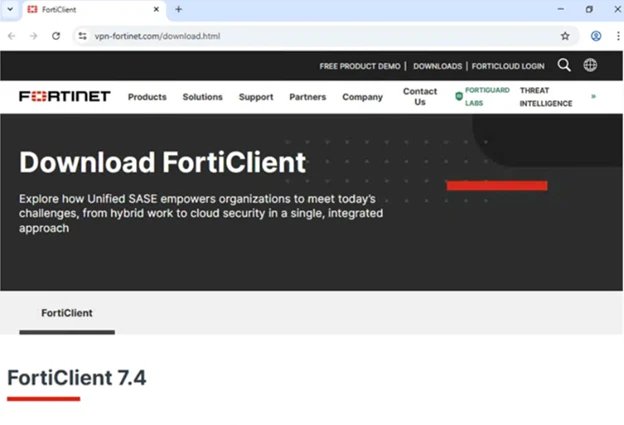
The initial access vector relies on abusing SEO to push malicious websites to the top of search results for VPN-related queries. Microsoft has observed spoofing of various VPN software brands across domains including:
- vpn-fortinet[.]com
- ivanti-vpn[.]org
- checkpoint-vpn[.]com
- cisco-secure-client[.]es
- forticlient-vpn[.]de (and other country-specific variants)
When users land on these malicious websites and attempt to download software, the malware is delivered through a ZIP download hosted at hxxps[:]//github[.]com/latestver/vpn/releases/download/vpn-client2/VPN-CLIENT.zip.
Installation and Persistence
When users launch the malicious MSI masquerading as a legitimate Pulse Secure VPN installer, the installer drops Pulse.exe along with malicious DLL files to a directory structure that closely resembles a real Pulse Secure installation path: %CommonFiles%\Pulse Secure. This installation path blends in with legitimate VPN software to appear trustworthy.
Alongside the primary application, the installer drops malicious DLLs, dwmapi.dll and inspector.dll, into the Pulse Secure directory. The dwmapi.dll file is an in-memory loader that drops and launches an embedded shellcode payload that loads and launches the inspector.dll file, a variant of the infostealer Hyrax.
The Hyrax infostealer extracts URI and VPN sign-in credentials before exfiltrating them to attacker-controlled command-and-control (C2) infrastructure.
Code Signing Abuse
The MSI file and malicious DLLs are signed with a valid digital certificate from Taiyuan Lihua Near Information Technology Co., Ltd., which has since been revoked. This abuse of code signing serves multiple purposes:
- Bypasses default Windows security warnings for unsigned code
- Might bypass application whitelisting policies that trust signed binaries
- Reduces security tool alerts focused on unsigned malware
- Provides false legitimacy to the installation process
Credential Theft Mechanism
The fake VPN client presents a graphical user interface that closely mimics the legitimate VPN client, prompting users to enter their credentials. Rather than establishing a VPN connection, the application captures the credentials entered and exfiltrates them to attacker-controlled C2 infrastructure (194.76.226[.]93:8080).
This approach relies on visual deception and immediate user interaction, allowing attackers to harvest credentials as soon as targets attempt to sign in. The credential theft operation follows a structured sequence:
- UI presentation: A fake VPN sign-in dialog is displayed to the user
- Error display: After credentials are submitted, a fake error message is shown
- Redirection: The user is instructed to download and install the legitimate Pulse Secure VPN client
- Access to stored VPN data: The inspector.dll component accesses stored VPN configuration data
- Data exfiltration: Stolen credentials and VPN configuration data are transmitted to attacker-controlled infrastructure
Persistence and Defense Evasion
To maintain access, the MSI malware establishes persistence through the Windows RunOnce registry key, adding the Pulse.exe malware to run when the device reboots.
One of the most sophisticated aspects of this campaign is the post-credential theft redirection strategy. After successfully capturing user credentials, the malicious application:
- Displays a convincing error message indicating installation failure
- Provides instructions to download the legitimate Pulse VPN client from official sources
- In certain instances, opens the user's browser to the legitimate VPN website
If users successfully install and use legitimate VPN software afterward, and the VPN connection works as expected, there are no indications of compromise to the end user. Users are likely to attribute the initial installation failure to technical issues, not malware.
Protection and Mitigation
Microsoft recommends the following mitigations to reduce the impact of this threat:
- Turn on cloud-delivered protection in Microsoft Defender Antivirus or the equivalent for your antivirus product to cover rapidly evolving attacker tools and techniques
- Run endpoint detection and response (EDR) in block mode so that Microsoft Defender for Endpoint can block malicious artifacts, even when your non-Microsoft antivirus does not detect the threat
- Enable network protection in Microsoft Defender for Endpoint
- Turn on web protection in Microsoft Defender for Endpoint
- Encourage users to use Microsoft Edge and other web browsers that support SmartScreen, which identifies and blocks malicious websites
- Enforce multifactor authentication (MFA) on all accounts, remove users excluded from MFA, and strictly require MFA from all devices, in all locations, at all times
- Remind employees that enterprise or workplace credentials should not be stored in browsers or password vaults secured with personal credentials
- Turn on the following attack surface reduction rule to block or audit activity associated with this threat: "Block executable files from running unless they meet a prevalence, age, or trusted list criterion"
Microsoft Defender Detection and Hunting Guidance
Microsoft Defender customers can refer to the list of applicable detections below:
- Microsoft Defender Antivirus: Trojan:Win32/Malgent, TrojanSpy:Win64/Hyrax
- Microsoft Defender for Endpoint (set to block mode): Detections for Malagent and Hyrax malware
- Microsoft Defender for Endpoint: Detections for suspicious DLL loading and registry anomalies
Customers can also deploy AI agents, including:
- Threat Intelligence Briefing agent
- Phishing Triage agent
- Threat Hunting agent
- Dynamic Threat Detection agent
Indicators of Compromise
File Hashes
- 57a50a1c04254df3db638e75a64d5dd3b0d6a460829192277e252dc0c157a62f (ZIP file)
- 862f004679d3b142d9d2c729e78df716aeeda0c7a87a11324742a5a8eda9b557 (MSI file)
- 6c9ab17a4aff2cdf408815ec120718f19f1a31c13fc5889167065d448a40dfe6 (dwmapi.dll)
- 6129d717e4e3a6fb4681463e421a5603b640bc6173fb7ba45a41a881c79415ca (inspector.dll)
- 44906752f500b61d436411a121cab8d88edf614e1140a2d01474bd587a8d7ba8 (Pulse.exe)
- 85c4837e3337165d24c6690ca63a3274dfaaa03b2ddaca7f1d18b3b169c6aac1 (Sophos-Connect-Client.exe)
- 98f21b8fa426fc79aa82e28669faac9a9c7fce9b49d75bbec7b60167e21963c9 (GlobalProtect-VPN.exe)
- cfa4781ebfa5a8d68b233efb723dbde434ca70b2f76ff28127ecf13753bfe011 (VPN-Client.exe)
- 26db3fd959f12a61d19d102c1a0fb5ee7ae3661fa2b301135cdb686298989179 (vpn.exe)
- eb8b81277c80eeb3c094d0a168533b07366e759a8671af8bfbe12d8bc87650c9 (WiredAccessMethod.dll)
- 8ebe082a4b52ad737f7ed33ccc61024c9f020fd085c7985e9c90dc2008a15adc (PulseSecureService.exe)
Network Indicators
- IP Address: 194.76.226[.]93 (C2 server)
- Domains: Multiple domains including vpn-fortinet[.]com, ivanti-vpn[.]org, and others
- URL: hxxps://github[.]com/latestver/vpn/releases/download/vpn-client2/VPN-CLIENT.zip (now unavailable)
This campaign highlights the evolving sophistication of credential theft operations and the importance of comprehensive security measures, including user education, advanced threat detection, and proper certificate management practices.
Comments
Please log in or register to join the discussion