OpenAI's Codex CLI is a local software agent that orchestrates interactions between users, models, and tools to perform software work. This post unpacks the core agent loop, explaining how it builds prompts, manages context, and handles performance challenges like token limits and caching.
OpenAI's Codex CLI is a cross-platform local software agent designed to produce high-quality, reliable software changes while operating safely on your machine. Since its launch in April, the team has learned a tremendous amount about building a world-class software agent. This post, the first in an ongoing series, explores the agent loop—the core logic in Codex CLI that orchestrates interactions between the user, the model, and the tools the model invokes to perform meaningful software work.
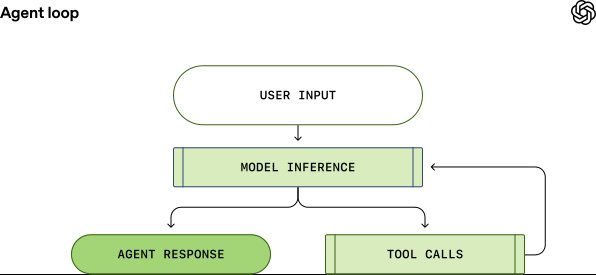
The agent loop is the heart of every AI agent. A simplified illustration shows the agent taking user input to prepare instructions for the model, then querying the model through inference. During inference, the textual prompt is translated into tokens, the model samples to produce output tokens, and these are translated back into text. The model either produces a final response or requests a tool call. If a tool call is requested, the agent executes it, appends the output to the original prompt, and re-queries the model. This process repeats until the model stops emitting tool calls and instead produces a message for the user, signaling a termination state.
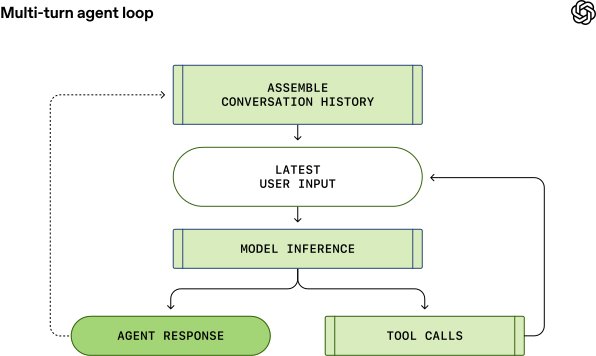
Each turn of a conversation can include many iterations between model inference and tool calls. When a user sends a new message to an existing conversation, the conversation history is included as part of the prompt for the new turn. This means the prompt length grows with the conversation, and every model has a context window—the maximum number of tokens it can use for one inference call, including both input and output tokens. An agent could make hundreds of tool calls in a single turn, potentially exhausting the context window, making context window management one of the agent's key responsibilities.
Codex CLI uses the Responses API to run model inference. The endpoint is configurable and can be used with any endpoint that implements the Responses API. When using ChatGPT login, it uses https://chatgpt.com/backend-api/codex/responses. When using API-key authentication with OpenAI hosted models, it uses https://api.openai.com/v1/responses. When running Codex CLI with --oss to use gpt-oss with ollama or LM Studio, it defaults to http://localhost:11434/v1/responses running locally. Codex CLI can also be used with the Responses API hosted by a cloud provider such as Azure.
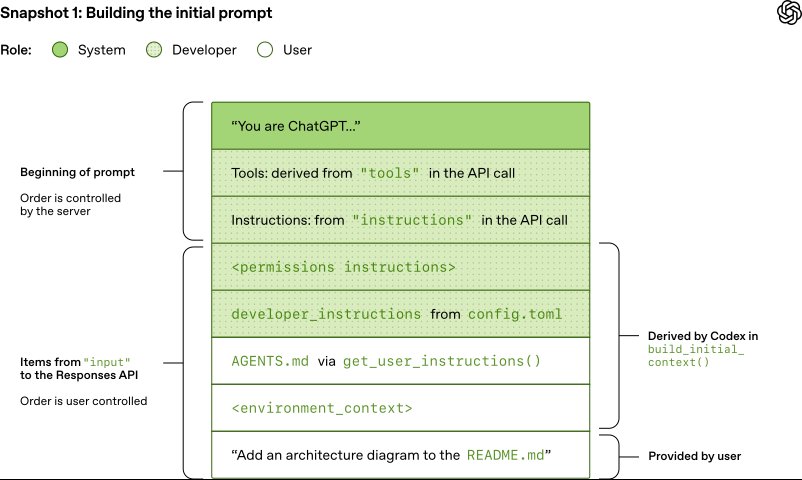
To create the initial prompt, Codex builds a JSON payload with several parameters. The instructions field is read from the model_instructions_file in ~/.codex/config.toml if specified; otherwise, base instructions associated with a model are used. The tools field is a list of tool definitions that conform to a schema defined by the Responses API. For Codex, this includes tools provided by the Codex CLI, tools provided by the Responses API, and tools provided by the user via MCP servers.
The input field is a list of items. Codex inserts several items before adding the user message:
- A message with role=developer describing the sandbox that applies only to the Codex-provided shell tool. This is built from templates bundled into the Codex CLI, such as
workspace_write.mdandon_request.md. - Optionally, a message with role=developer whose contents are the
developer_instructionsvalue from the user'sconfig.tomlfile. - Optionally, a message with role=user whose contents are the "user instructions," aggregated from sources like
AGENTS.override.mdandAGENTS.mdin the project root, or skills configured by the user. - A message with role=user describing the local environment, specifying the current working directory and the user's shell.
Once Codex initializes the input, it appends the user message to start the conversation. Each element of input is a JSON object with type, role, and content.
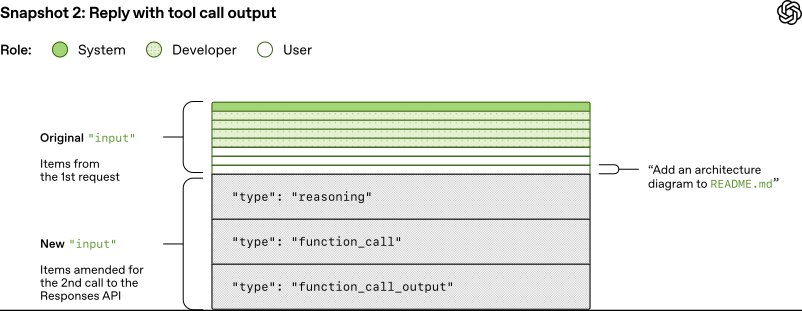
When Codex sends the full JSON payload to the Responses API, it makes an HTTP POST request. The server replies with a Server-Sent Events (SSE) stream. Codex consumes the stream and republishes it as internal event objects. Events like response.output_text.delta support streaming in the UI, while other events like response.output_item.added are transformed into objects appended to the input for subsequent Responses API calls.
Suppose the first request includes response.output_item.done events for reasoning and function calls. These are represented in the input field of the JSON when querying the model again with the response to the tool call. The resulting prompt is an exact prefix of the new prompt, which enables prompt caching and makes subsequent requests more efficient.
The agent loop can have many iterations between inference and tool calling. The prompt grows until an assistant message indicates the end of the turn. In the Codex CLI, the assistant message is presented to the user, and the composer is focused to indicate the user's turn. If the user responds, both the assistant message and the new user message are appended to the input in the next Responses API request.
Performance considerations are critical. The agent loop is quadratic in terms of the amount of JSON sent to the Responses API over the course of the conversation. While the Responses API supports an optional previous_response_id parameter to mitigate this, Codex does not use it today to keep requests fully stateless and support Zero Data Retention (ZDR) configurations. Avoiding previous_response_id simplifies things for the Responses API provider and supports ZDR customers, who do not sacrifice the ability to benefit from proprietary reasoning messages from prior turns, as the associated encrypted_content can be decrypted on the server.
The cost of sampling the model dominates the cost of network traffic, making sampling the primary target of efficiency efforts. Prompt caching is crucial, as it enables reuse of computation from a previous inference call. Cache hits are only possible for exact prefix matches within a prompt. To realize caching benefits, place static content like instructions and examples at the beginning of the prompt, and put variable content, such as user-specific information, at the end. This also applies to images and tools, which must be identical between requests.
Several operations could cause a cache miss in Codex: changing the tools available to the model mid-conversation, changing the model that is the target of the Responses API request, or changing the sandbox configuration, approval mode, or current working directory. The Codex team must be diligent when introducing new features that could compromise prompt caching. For example, initial support for MCP tools introduced a bug where tools were not enumerated in a consistent order, causing cache misses. MCP servers can change the list of tools they provide on the fly via notifications, which can cause expensive cache misses if honored mid-conversation.
When possible, Codex handles configuration changes by appending a new message to the input rather than modifying an earlier message. If the sandbox configuration or approval mode changes, it inserts a new role=developer message with the same format as the original permissions instructions. If the current working directory changes, it inserts a new role=user message with the same format as the original environment context.
Another key resource to manage is the context window. Codex's general strategy to avoid running out of context window is to compact the conversation once the number of tokens exceeds some threshold. Compaction replaces the input with a new, smaller list of items that is representative of the conversation, enabling the agent to continue with an understanding of what has happened. An early implementation required the user to manually invoke the /compact command, which would query the Responses API using the existing conversation plus custom instructions for summarization. Codex used the resulting assistant message containing the summary as the new input for subsequent conversation turns.
The Responses API has since evolved to support a special /responses/compact endpoint that performs compaction more efficiently. It returns a list of items that can be used in place of the previous input to continue the conversation while freeing up the context window. This list includes a special type=compaction item with an opaque encrypted_content item that preserves the model's latent understanding of the original conversation. Codex now automatically uses this endpoint to compact the conversation when the auto_compact_limit is exceeded.
The agent loop provides the foundation for Codex, but it's only the beginning. Future posts will dig into the CLI's architecture, explore how tool use is implemented, and take a closer look at Codex's sandboxing model.
Related Links:
Comments
Please log in or register to join the discussion