Windows Admin Center now offers two distinct architectural modes - stateless Administration Mode for general server management and stateful Virtualization Mode for managing large-scale virtualization environments. This architectural evolution enables purpose-built solutions while maintaining the platform's core simplicity.
Windows Admin Center has undergone a significant architectural transformation with the introduction of Virtualization Mode (vMode), creating a dual-mode platform that serves both general server administration and specialized virtualization management needs. This evolution represents a fundamental shift in how administrators interact with and manage their infrastructure, while preserving the simplicity that made Windows Admin Center popular in the first place.
The Tale of Two Modes
The architectural journey began with Administration Mode (aMode), which was designed to solve the limitations of traditional Windows Server Management Consoles (MMCs). These native C++ tools were difficult to modernize, lacked shared context across multiple servers, and were bound to specific OS versions, requiring separate jump boxes for different operating systems.
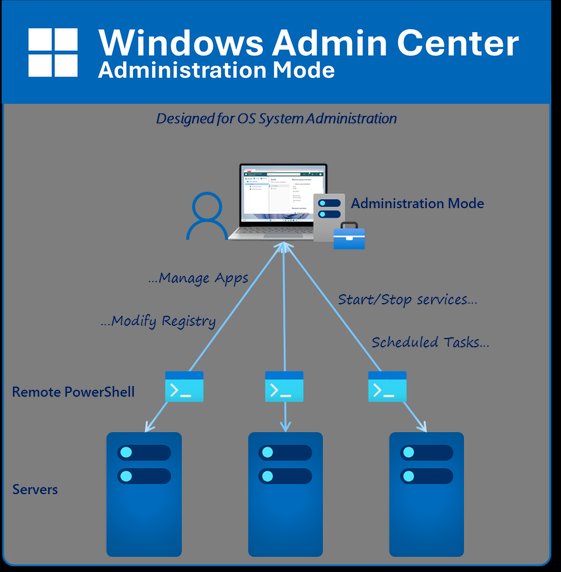
Administration Mode introduced a stateless architecture where the gateway service presents a web-based interface, uses PowerShell remoting to collect data from connected systems, and discards information when switching between tools or connections. This approach offers several advantages:
- Installation flexibility: Can be installed on Windows 11 or Windows Server
- Multi-gateway support: Connect to the same system from multiple gateways
- No data persistence: No backups required since no state is stored
- No high availability needed: Each administrator manages their own installation
- Task-oriented design: Perfect for single-server configuration tasks
The architecture works by caching connection lists locally and using PowerShell remoting to gather information on-demand. When you click a different tool or connect to a new host, the gateway discards previous data and collects new information, making it inherently stateless.
Virtualization Mode: A Stateful Revolution
Virtualization Mode represents a complete architectural departure, designed specifically for managing large-scale virtualization environments. The key innovation is the introduction of a PostgreSQL database and local agents that fundamentally change how the system operates.
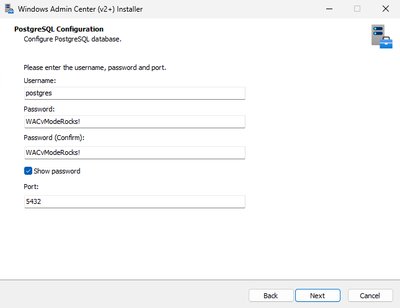
When installing vMode, administrators must provide credentials for a lightweight PostgreSQL database. This database stores information about managed servers, clusters, storage devices, and network configurations. Rather than using PowerShell remoting, vMode deploys agents to each managed system that:
- Perform regular heartbeats to track system availability
- Implement configuration changes submitted through the interface
- Collect and share information with the central database
- Provide resilient connectivity even during network disruptions
This stateful architecture enables capabilities that were impossible in the stateless model:
- Scalability: Manage up to 1,000 hosts and 25,000 virtual machines from a single gateway
- Centralized management: One location for all team configuration information
- Role-based Administration Control (RBAC): Implement security boundaries and delegation
- VM Templates: Store hardware configurations and VHDX locations in the database
- Enterprise features: Built-in disaster recovery and Azure Arc enablement
The stateful nature requires more infrastructure consideration - vMode should be installed on a dedicated server OS rather than a client system, regular database backups are essential, and high availability options are being developed for large environments.
Architectural Comparison
| Feature | Administration Mode | Virtualization Mode |
|---|---|---|
| Architecture | Stateless | Stateful |
| Primary Use Case | Server Administration | Virtualization Management |
| Metadata Acquisition | PowerShell remoting | Local agent |
| Configuration Implementation | PowerShell remoting | Local agent |
| Data Storage | None | PostgreSQL Database |
| Installation Model | Distributed (many installations) | Centralized (one installation) |
| High Availability | Not required | Optional (coming soon) |
| Backup Requirements | None | Required |
| Max Concurrent Connections | 1 | 1,000 |
| Scale | ~10 nodes | 1,000 nodes |
Key Implementation Changes
The architectural differences necessitate several operational changes when using vMode:
Hosting Model: vMode requires installation on a dedicated server OS since managed systems need regular communication with the gateway. Client systems like Windows 11 may be offline too frequently for reliable operation.
Backup Strategy: Regular database backups become critical to preserve navigation objects and configuration data. Without backups, accidental destruction of the vMode gateway could result in significant data loss. High Availability Considerations: Large environments with multiple users and teams may benefit from upcoming high availability options to ensure continuous access to the management interface.
Preserved Core Values
Despite the architectural evolution, Windows Admin Center maintains its fundamental principles:
- Minimal Requirements: Only one prerequisite (Visual C++ Redistributable) for vMode installation, with a single SMB firewall rule requirement for onboarded hosts
- Rapid Deployment: Both modes install in under 5 minutes, compared to hours for comparable products
- Self-Managed Updates: Online and offline update capabilities with browser refresh after installation
- Partner Ecosystem: Support for extensions that can add virtualization-specific capabilities like self-service portals, backup integration, and storage provisioning
Choosing the Right Mode
The architectural choice is determined by the installation mode selected, eliminating the need for administrators to make complex decisions. For general server administration tasks, Administration Mode's stateless architecture provides all necessary functionality without the overhead of backups or high availability. For virtualization administrators managing large environments, Virtualization Mode's stateful architecture delivers the scalability, centralization, and advanced features required for modern infrastructure management.
This dual-mode approach represents a thoughtful evolution that addresses the diverse needs of IT administrators while maintaining the platform's core promise of simplicity and ease of use. Whether managing individual servers or orchestrating complex virtualization environments, Windows Admin Center now provides the right architectural foundation for the job.
As the platform continues to evolve, the separation of concerns between these two modes ensures that each can be optimized for its specific use case without compromising the other's strengths. The result is a more capable, flexible, and purpose-built management solution that scales from small server environments to enterprise virtualization platforms.
The architectural evolution of Windows Admin Center demonstrates how thoughtful design can address diverse administrative needs while maintaining simplicity. By providing both stateless and stateful options, the platform ensures administrators have the right tools for their specific scenarios without unnecessary complexity.
The future of Windows Admin Center looks promising as it continues to bridge the gap between traditional server administration and modern virtualization management, all while keeping the user experience intuitive and accessible.
Comments
Please log in or register to join the discussion