1Password's new phishing alerts address a subtle but dangerous vulnerability in password managers. By warning users when they attempt to log into lookalike domains, the feature tackles the human factors that AI-powered attacks increasingly exploit.
The password manager 1Password has introduced a new security layer designed to catch phishing attempts that slip past traditional defenses. Starting this week, the company will display pop-up warnings when users attempt to enter credentials on suspicious websites, even if those sites don't trigger the manager's automatic form-filling block.
The Problem with Passive Protection
Traditional password managers protect against phishing by refusing to auto-fill credentials on sites that don't match the stored URL. If your vault has github.com saved but you land on githhub.com, the manager stays silent. This works well for obvious typos, but fails when users manually enter credentials on convincing fakes.
1Password's security team identified two critical failure modes:
- Typosquatting deception: Users might notice the manager didn't auto-fill and assume their vault is locked or glitched, then manually type their password into
facebok-login.com - AI-enhanced scams: Modern phishing pages clone legitimate sites pixel-perfectly, making visual inspection nearly impossible
The company's own research reveals why this matters: 61% of 2,000 surveyed U.S. users admitted being successfully phished, while 75% don't check URLs before clicking links. In corporate environments, the numbers are worse—nearly half of employees have fallen victim to phishing, and a third reuse passwords across work accounts.
How the New Protection Works
When enabled, the feature actively monitors URL patterns against your saved logins. If you attempt to enter credentials on a suspicious domain, 1Password triggers an interrupting pop-up that forces a pause:
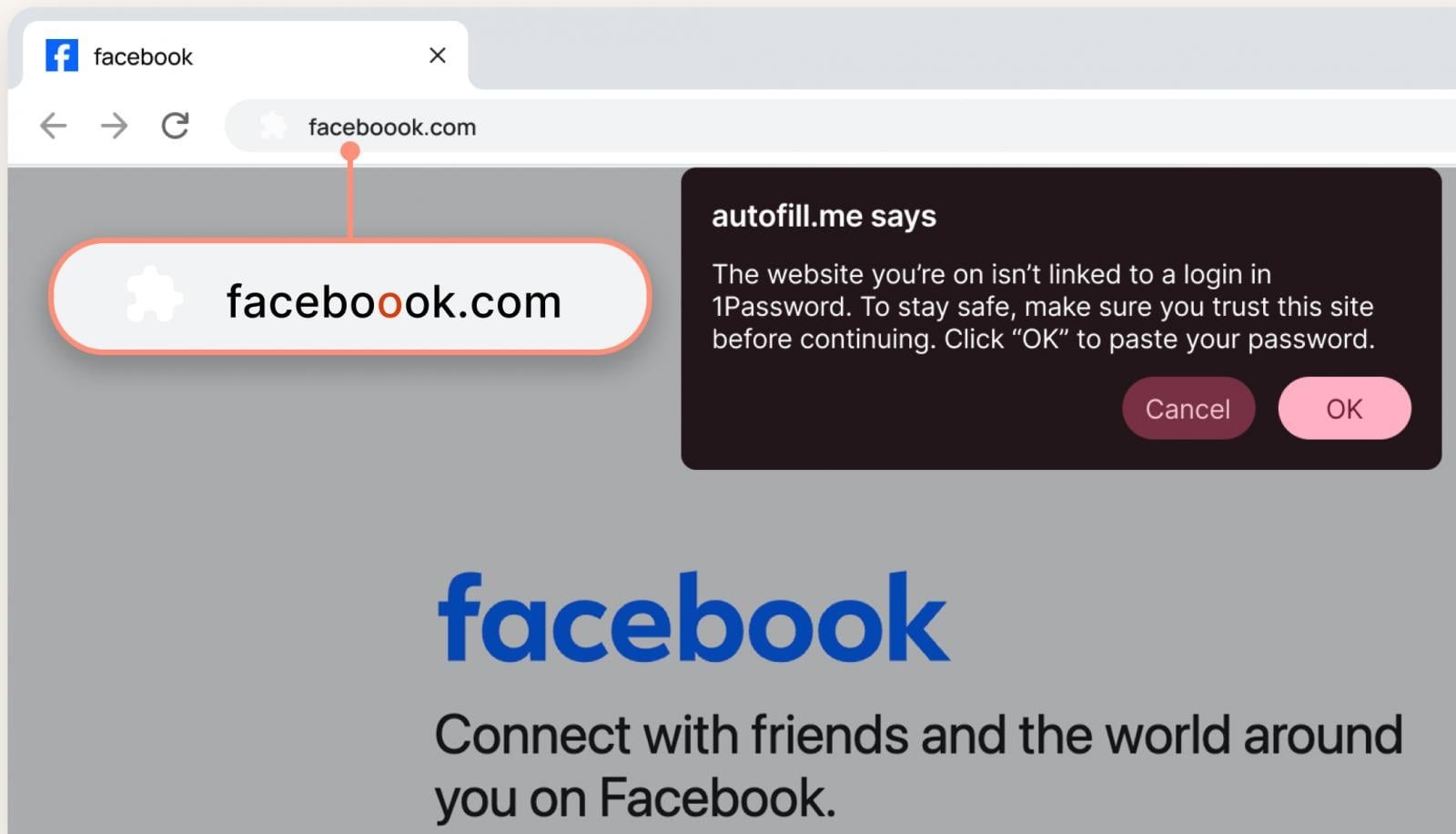
The alert specifically flags domains that are visually similar to your saved sites but fail cryptographic verification. For example, if you have facebook.com saved and visit facebok.com or facebook-login.net, the system warns you before any credentials are submitted.
"It's easy for a user to miss that extra 'o' in the URL, especially if the rest of the page looks convincing," 1Password explained in their announcement, using a Facebook typosquatting example. "The pop-up reminds users to slow down and look more closely before proceeding."
Deployment and Enterprise Controls
The feature activates automatically for individual and family plan subscribers. Enterprise administrators can enable it through the Authentication Policies section of the 1Password admin console, giving organizations control over rollout timing.
This granular approach matters for corporate environments where IT teams need to balance security with workflow disruption. Admins can test the feature with pilot groups before company-wide deployment, and adjust sensitivity settings based on their threat model.
The AI Phishing Arms Race
1Password's announcement explicitly links this update to the surge in AI-powered attacks. Modern phishing kits use large language models to craft convincing emails and clone legitimate sites with unprecedented speed. Attackers can now generate thousands of unique phishing variants, each tailored to specific targets.
This creates a volume problem: traditional security training can't keep pace with the flood of new scams. Automated protection becomes essential when humans are overwhelmed.
Beyond the Pop-Up: A Layered Approach
While the new warning system addresses a specific gap, security experts emphasize that no single solution prevents all phishing. Effective protection requires multiple layers:
- URL verification: 1Password's new active monitoring
- Multi-factor authentication: Even stolen credentials remain useless without the second factor
- Security keys: Hardware tokens like YubiKey that verify site authenticity cryptographically
- Email authentication: SPF, DKIM, and DMARC to block spoofed messages before they reach users
The 1Password update strengthens the first layer by making passive protection active. Users who previously ignored silent failures now receive explicit warnings.
Implementation Considerations
Organizations adopting this feature should:
- Communicate the change: Explain why the new pop-ups appear and how to respond
- Update training: Include the warnings in phishing awareness programs
- Monitor false positives: Track if legitimate sites trigger alerts and adjust policies
- Combine with other tools: Integrate with email security and endpoint protection
For individual users, the feature requires no action beyond updating to the latest 1Password version. The system uses your existing vault data to identify suspicious patterns, so no additional configuration is needed.
The Bottom Line
1Password's phishing alerts represent a pragmatic response to evolving threats. By acknowledging that users will make mistakes—especially when faced with AI-enhanced scams—the company adds a safety net that catches errors before they become breaches.
The feature doesn't eliminate phishing risk, but it shifts the balance back toward defenders. In an environment where attackers can automate deception at scale, giving users a moment of pause before credential submission is a meaningful security improvement.
Official Resources:
Related Articles:
- Konni hackers target blockchain engineers with AI-built malware
- Malicious AI extensions on VSCode Marketplace steal developer data
- New Android malware uses AI to click on hidden browser ads
- Okta SSO accounts targeted in vishing-based data theft attacks
- Microsoft updates Notepad and Paint with more AI features
Comments
Please log in or register to join the discussion