
A new web-based image editor, DPaint.js, faithfully recreates the legendary Deluxe Paint interface and tools while adding native support for reading and writing classic Amiga file formats like IFF ILBM and Amiga icon files, all running entirely in the browser without dependencies.
The nostalgia for 1980s and 1990s computer art is more than just a retro aesthetic; it's about the specific workflows and technical constraints that defined an era. Deluxe Paint, the iconic bitmap editor for the Commodore Amiga, was a cornerstone of that creative process. Its influence persists, but modern recreations often lack the authentic feel or, more critically, the ability to handle the native file formats that contained the artwork. DPaint.js aims to bridge this gap, offering a web-based image editor that is both a functional modern tool and a precise homage to its inspiration.
What's Claimed: A Modern Deluxe Paint in Your Browser
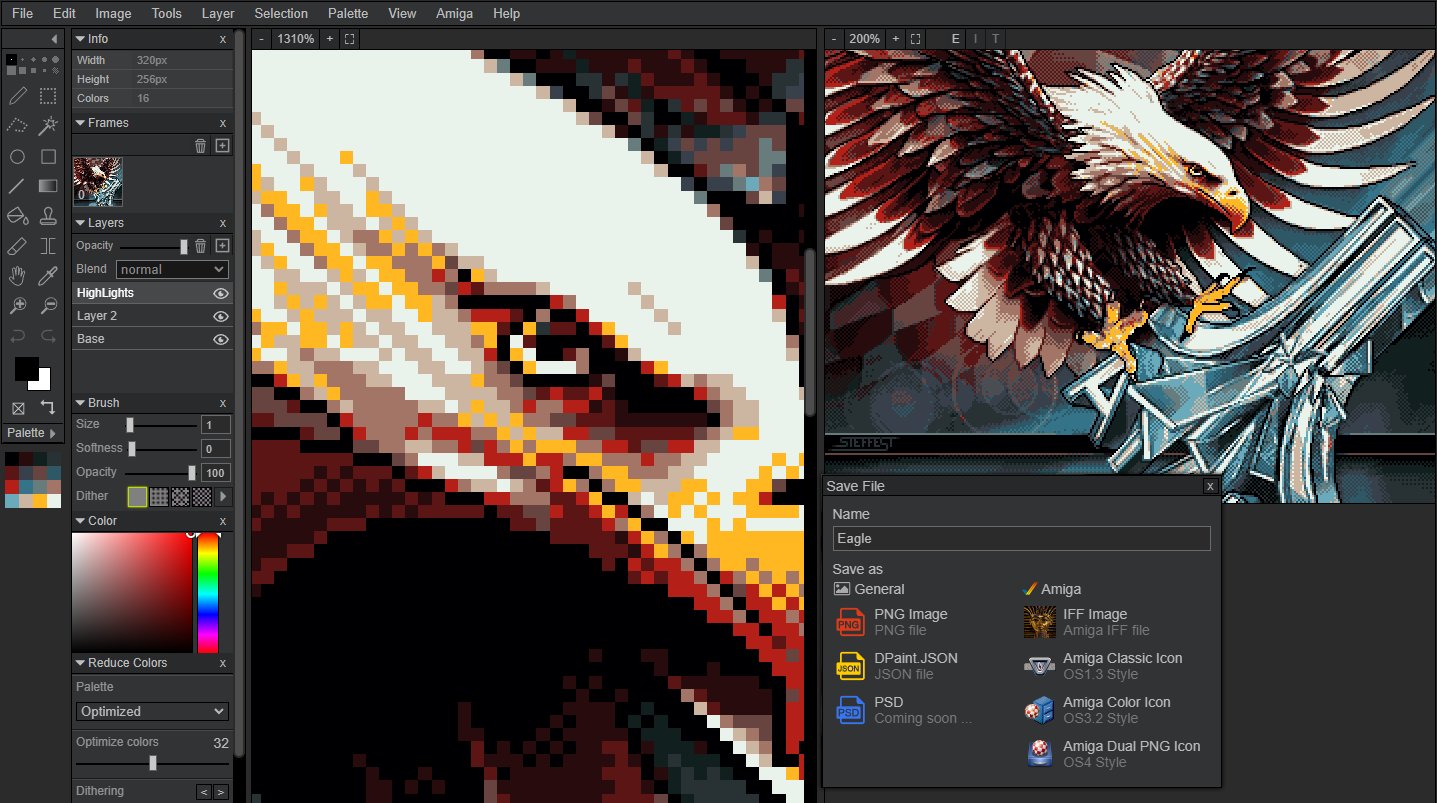
DPaint.js is presented as a "fully featured image editor" modeled after Deluxe Paint. The feature list is extensive and mirrors the core functionality that made the original so powerful: layers, selections, masking, transformation tools, effects, filters, and a robust undo/redo system. It supports copy/paste from any source, includes customizable dither tools, and emphasizes color reduction with fine-grained dithering options—a critical feature for working within the limited palettes of retro hardware.
The project's primary differentiator, however, is its deep focus on retro Amiga file formats. It doesn't just open them; it can read and write them natively. This includes:
- Amiga Icon Files: All formats.
- IFF ILBM Images: All formats, including the advanced HAM (Hold-and-Modify) and 24-bit modes.
- Direct Amiga Disk File (ADF) Access: The ability to read and write directly from and to Amiga disk images.
- Deluxe Paint Legacy Formats: Support for PBM files (used by the PC version of Deluxe Paint) and Deluxe Paint Atari ST compression modes.
An embedded Amiga emulator allows users to preview their work in the actual Deluxe Paint environment, a unique feature that validates the authenticity of the file handling.
What's Actually New: Authentic Retro Workflow in a Modern Context
While the Deluxe Paint interface has been recreated before, DPaint.js is notable for its technical implementation and commitment to preservation. It's not a simulation; it's a functional editor that understands the underlying data structures of Amiga graphics.
Technical Implementation: The application is written in 100% plain JavaScript with zero dependencies. It uses ES6 modules and runs directly in modern browsers. This approach ensures maximum compatibility and longevity. There's no need for compilation, though an optional build step using Parcel.js is available for creating a compact version. The entire processing happens client-side; no data is sent to a server, which is a significant privacy and offline capability advantage.
The Color Cycling Feature: One of the most distinctive features of the Amiga was its ability to perform "color cycling," where a portion of the color palette would rotate, creating the illusion of animation in a static image. This was a computationally cheap way to add motion. DPaint.js has implemented this feature, allowing users to create and preview color-cycling animations. The project provides an example video file (The_Vision_cycle.mp4) and the layered source file, which can be opened directly in the editor to see the technique in action.
Limitations and Practical Considerations
DPaint.js is currently in an alpha state, as noted by the developer. While the core functionality is robust, users should expect bugs and missing features. The project's GitHub repository lists planned features for future releases, including:
- Animation support for GIF and Amiga ANIM files (already marked as done in the project description).
- Shading/transparency tools that respect the palette.
- Support for non-square pixel modes (HiRes, Interlaced).
- PSD import/export.
- Sprite sheet support.
- Writing HAM, SHAM, and Dynamic HiRes images.
- Commodore 64 graphics modes.
A notable technical caveat involves browser quirks, specifically with the Brave browser. Brave's "farbling" feature, designed to protect privacy by adding random noise to certain data, can interfere with the application's canvas rendering, breaking functionality. The developer recommends lowering shields for the app or using a different browser for a reliable experience.
Running and Contributing
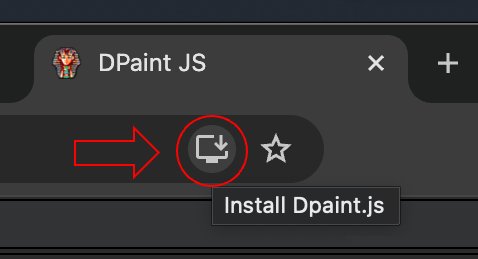
The application is designed to be easy to run. Since it's a web app, it requires a local web server to function correctly (simply opening index.html from the file system will not work due to browser security restrictions). The project suggests using a simple tool like Spark or Python's built-in HTTP server to serve the files locally. It can also be "installed" as a Chrome app for offline use.
For developers, the project is open source and welcomes contributions. The codebase is clean and dependency-free, making it accessible for inspection and modification. Given its alpha status, bug reports and pull requests are explicitly encouraged.
Conclusion
DPaint.js is more than a novelty; it's a functional preservation tool. It successfully translates the specific, constrained workflow of a 1980s bitmap editor into a modern, browser-based environment. Its value lies not just in its ability to edit images, but in its authentic handling of the file formats that carry the history of digital art from that era. For digital archivists, retro computing enthusiasts, and artists interested in the technical roots of computer graphics, DPaint.js offers a practical and deeply researched platform. It stands as a testament to the idea that understanding and preserving historical software workflows can be as important as creating new ones.
Relevant Links:
Comments
Please log in or register to join the discussion