
Instead of shrinking test suites for speed, use trend analysis and redundancy to catch subtle bugs that matter most.
CI regression test suites have grown large, and many teams consider reducing their size to improve speed and feedback times. However, this approach risks making subtle, high-impact bugs invisible. This article presents a better alternative: leveraging trend analysis and redundancy to effectively manage large test suites while catching the most dangerous bugs.
The False Promise of Reducing Test Suites
Many build servers and consultancy services promote strategies to significantly reduce the average number of tests run with each build. The primary benefits touted are faster turnaround for developers and improved CI lab capacity utilization.
While this sounds appealing, the reality is more complex. For unit tests, prioritization based on dependency tracking can work effectively. But when you move to higher-level integration and end-to-end tests, reducing the test set becomes problematic.
If you use lexical similarity to weed out apparently redundant end-to-end tests, you'll catch obvious bugs faster. However, by shrinking your test result sample size through strategic omission of many tests on most builds, you risk rendering the weak signals from subtle bugs invisible.
This is particularly concerning because not all bugs are equal in impact. The subtle bugs—those that are episodic, timing-related, or affected by environmental factors—are the ones most likely to escape into released software and cause the greatest damage.
Dealing Effectively with Large Test Suites
Rather than reducing test suite size, you should continually optimize your CI regression test suite to remove old or redundant tests. A large suite of relevant tests with high code coverage and functional coverage is an asset, not a disadvantage.
The two major problems with running large regression test sets—slow feedback and CI lab capacity overload—can be overcome through architectural improvements rather than test reduction.
Taming the "Pesticide Paradox"
As tests succeed at keeping out bugs, the power of your existing test suite to find new bugs diminishes. This "pesticide paradox" leaves behind a greater share of episodic, timing-related, less deterministic bugs that only appear under specific conditions like heavy network traffic, high CPU load, or elevated temperatures.
These subtle bugs are often the most dangerous because they're difficult to find and therefore have higher chances of escaping into released software. They're most often caught by higher-level integration and end-to-end tests that run less deterministically than unit tests.
The key to exploiting the potential in that variability is to stop looking at static test results from a single run and instead shift focus to time series of test results, seeing how trends develop over time.
A Stochastic Solution: Trend Analysis
The system I've built looks at the thirty-day trend for each test each time it receives a new result from our end-to-end tests. It uses a functional programming-inspired Python framework that identifies different types of significant trends (e.g., flaky, stabilize_failing, regression).
In addition to textual labels, it generates a thirty-day red-green trend band representing the pattern of passes and failures for each test. A special dashboard view displays both elements for every test that has a problematic trend:
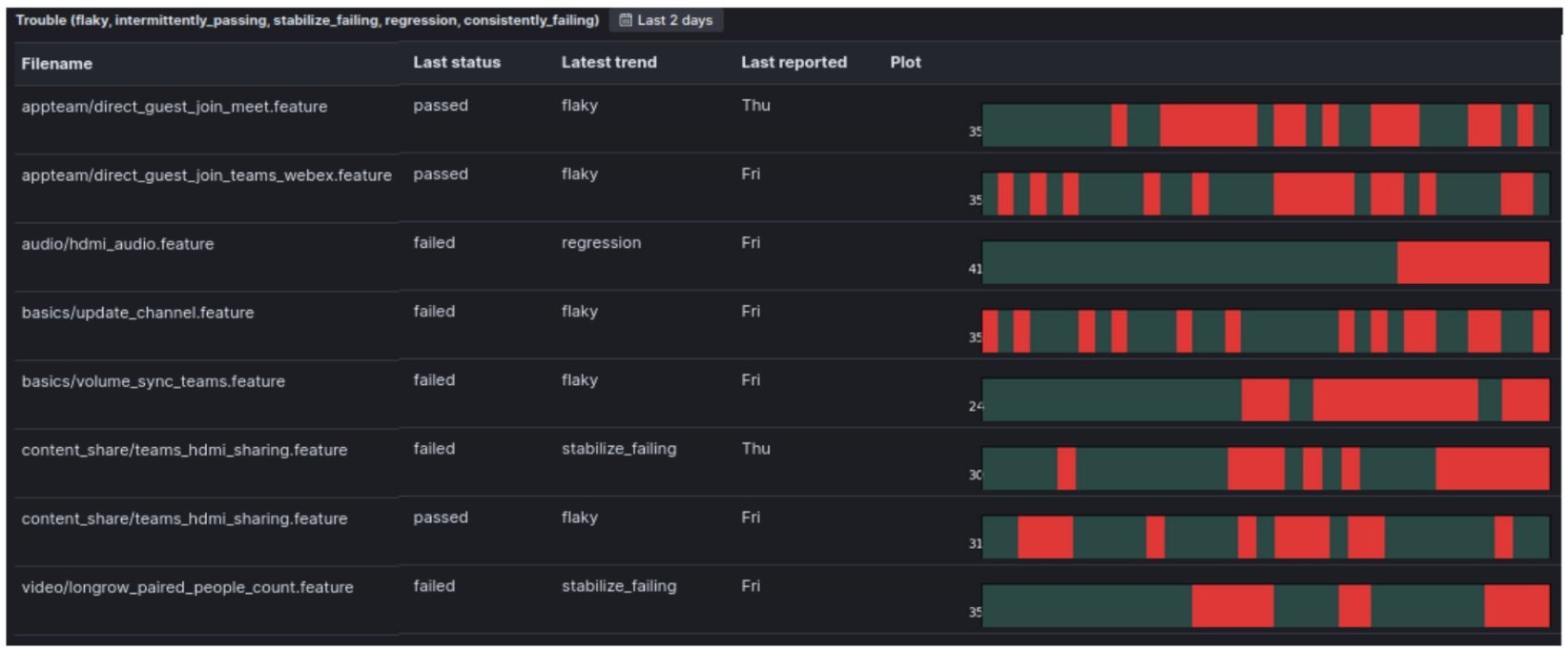
This "trouble view" filters in and focuses on tests with trends pointing towards potential regressions. The approach shifts focus from making tests pass to gathering information about software correctness.
Instead of investigating every failure from the previous night's test run, teams become much more effective by focusing on tests with bad trends that show up in the trouble view. This systematic approach helps prioritize the most impactful issues rather than getting lost in less important tasks.
The Power of Non-Gating Tests
Higher-level tests, especially end-to-end tests, are naturally flaky because they're impacted by many outside factors. Making such tests non-gating—so they don't break the build when they fail—works well with this trend-tracking approach.
The trend-tracking approach is sufficiently fine-tuned for identifying regressions that you don't need the hard stop of failing the builds to keep regressions out of software releases. Problems stay "in your face" in the trouble view visualization, giving multiple chances to see and address them.
Learning from Escaped Bugs
In a large organization with broad and deep test coverage, real issues are caught almost every day. A regression might look like this:
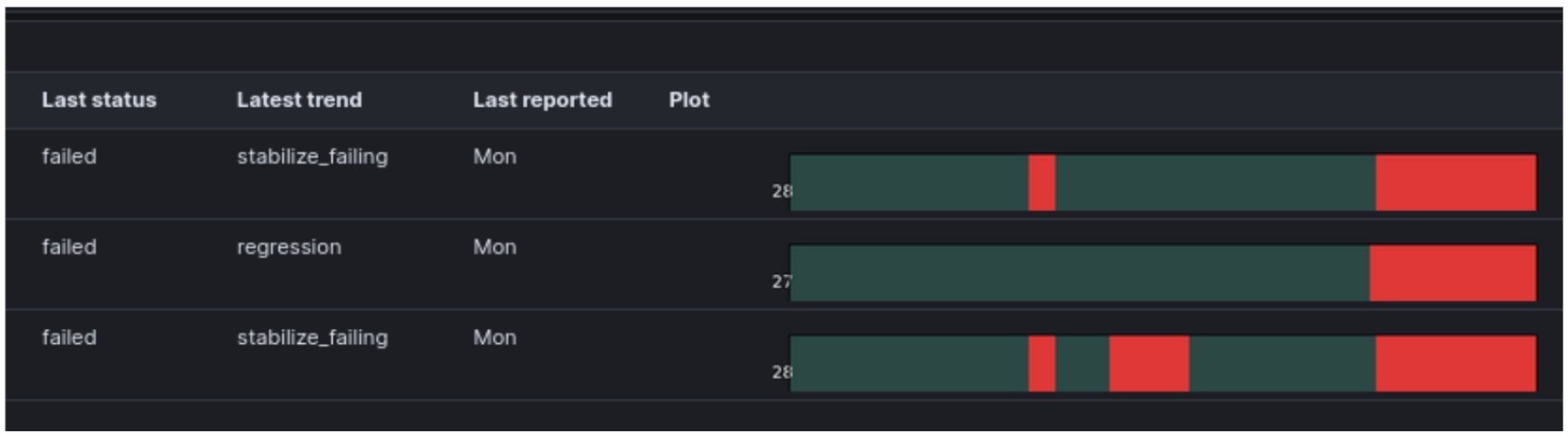
As you can see, regressions are unmissable when viewed through this lens. Since implementing this approach, only one instance occurred where a subtle bug developed a bad trend, was flagged in the trouble view, was looked at by multiple people, and still escaped as a customer bug.
The key advantage is that the full record of the evolution of "trouble" statuses is captured, making post-mortems fully auditable:

This provides all elements needed to learn from bugs that escape and improve processes and tooling to prevent future lapses.
Leveraging Redundancy: Multicontext Pattern Matching
If you're testing the same functionality in different contexts, from varying angles, or via different products using the same shared code, you can find patterns pointing to recurring problems in a single test run rather than waiting for trends to develop.
Using paired visualizations, you can compare tag clouds of top-level functional domain tags from failing tests between consecutive nights. The relative size of each tag represents the number of test failures in each functional domain:

This approach requires sufficient redundancy in your test set. If every functional domain were tested to the absolute minimum with zero overlap, one flaky test would skew results and waste time investigating false positives.
The pattern of test failures in one domain repeating across several different product lines using the same shared code gives much higher confidence that the pattern stems from a real regression or test infrastructure issue.
Architecting for Speed and Scale
You can mitigate slow turnaround times by working on test parallelization and ensuring results are reported continually rather than at the end of test runs. Even with many end-to-end tests running on real embedded targets, fast turnaround times are achievable by building a sufficiently large lab and structuring test jobs to run massively parallel on many different embedded devices.
Each job should report its test results continually. Posting results to Elasticsearch allows watching significant trends develop on dashboards nearly in real time.
For teams not working with embedded software, mocking away heavy dependencies like databases, file systems, and sensor data will speed up tests and help with CI lab capacity. This is particularly effective when testing complex recognition algorithms that would be impractical to test on actual embedded systems.
If testing embedded solutions on large machines that can't fit many in your lab due to space and expense constraints, a smart hardware-in-the-loop (HIL) approach works well. Do the bulk of testing on smaller subcomponents housed in racks, then use the big machines only for the highest-level integration tests.
Wrapping Up
The choice is yours: focus on getting through your test set as fast as possible, or invest reasonable time in an approach that gives you your best bet of preventing all defects your tests expose from making their way into released software.
The stochastic approach outlined here gives much better chances of catching bugs that pose the highest risk of escaping into released software. These subtle bugs, when multiplied by thousands of customers, can have a huge negative impact.
This approach also makes managing large CI regression sets viable for DevOps teams by continually highlighting the most important test failures to focus on and investigate. Rather than reducing test suite size and risking missed bugs, you can maintain comprehensive coverage while effectively managing the cognitive load of large test sets.
Comments
Please log in or register to join the discussion