
Microsoft's AI Toolkit for VS Code version 0.30.0 transforms agent development with a unified Tool Catalog, Agent Inspector debugging, and evaluation-as-tests integration, bringing production-ready workflows directly into the editor.
The February 2026 update to AI Toolkit for VS Code marks a significant evolution in how developers build, debug, and deploy AI agents directly within their development environment. Version 0.30.0 introduces three major capabilities that bridge the gap between experimental AI workflows and production-ready software development practices.
Tool Catalog: Centralized Agent Tool Management
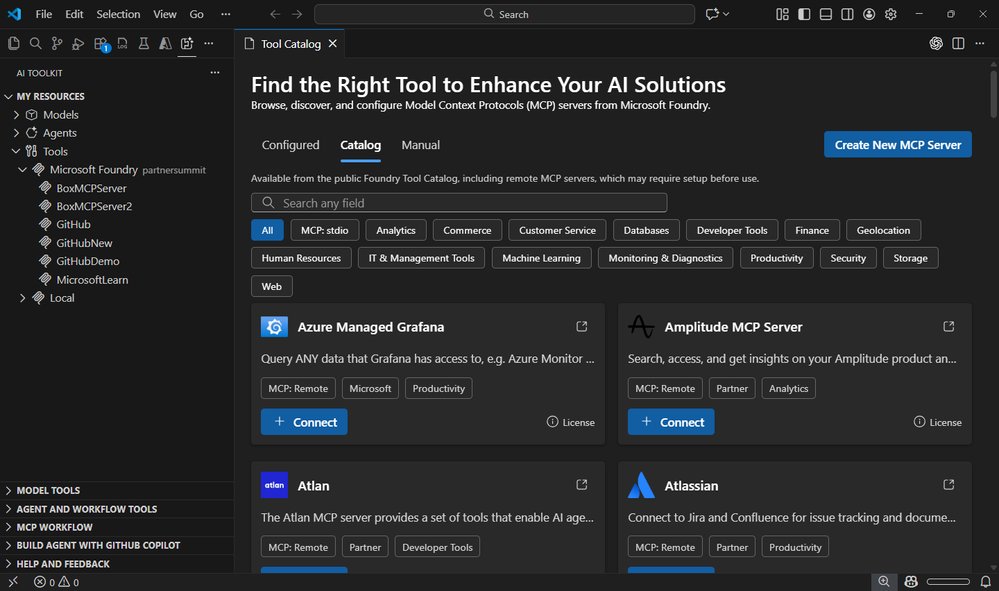
One of the most impactful additions is the new Tool Catalog, which addresses a common pain point in agent development: managing scattered tool configurations and definitions. This centralized hub provides a unified experience for discovering, configuring, and integrating tools into AI agents.

The Tool Catalog offers several key capabilities:
- Discovery and Search: Browse tools from the public Foundry catalog and local stdio MCP servers with filtering options
- Configuration Management: Set up connection settings for each tool directly within VS Code
- Seamless Integration: Add tools to agents through the Agent Builder interface
- Lifecycle Management: Add, update, or remove tools with confidence
This approach transforms tool management from a fragmented process into a streamlined workflow. Instead of juggling multiple configuration files and scattered definitions, developers can now manage their agent's capabilities in one place. The integration with both public Foundry tools and local MCP servers ensures flexibility for different deployment scenarios.
Agent Inspector: First-Class Debugging Experience
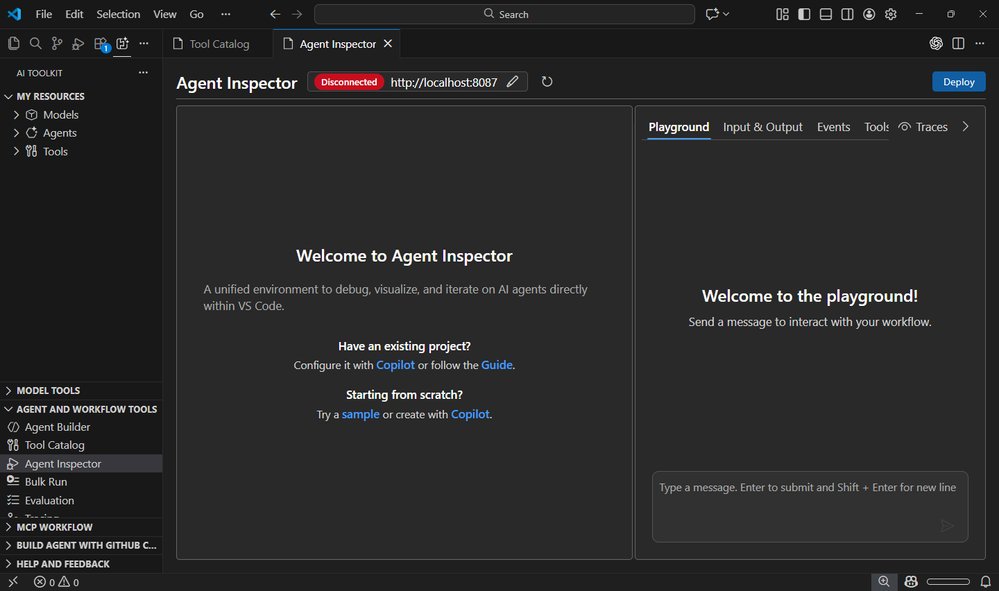
Perhaps the most revolutionary feature is the Agent Inspector, which brings traditional software debugging practices to AI agent development. For the first time, developers can debug AI agents with the same tools and workflows they use for conventional applications.
Key debugging capabilities include:
- One-Click F5 Debugging: Launch agents with full debugger support using familiar keyboard shortcuts
- Breakpoint Support: Set breakpoints, inspect variables, and step through execution
- Copilot Auto-Configuration: Automatic scaffolding of agent code, endpoints, and debugging setup
- Production-Ready Code Generation: Generate code using the Hosted Agent SDK, ready for Microsoft Foundry deployment
- Real-Time Visualization: Monitor streaming responses, tool calls, and multi-agent workflows as they happen
- Code Navigation: Double-click workflow nodes to jump directly to source code
- Unified Interface: Combine chat and workflow visualization in a single view
The Agent Inspector fundamentally changes how developers interact with AI agents. Rather than treating agents as black boxes that produce unpredictable outputs, developers can now observe exactly what's happening, when it's happening, and why. This transparency is crucial for building reliable, production-ready AI systems.
Evaluation as Tests: Quality as First-Class Citizen
The third major enhancement treats agent evaluation as a first-class testing concern, integrating quality assurance directly into the development workflow. This approach aligns AI agent development with established software engineering practices.
Evaluation-as-Tests features include:
- Pytest Integration: Define evaluations using familiar pytest syntax and Eval Runner SDK annotations
- VS Code Test Explorer: Run evaluations directly from the Test Explorer, mixing and matching test cases
- Tabular Analysis: Analyze results in a tabular view with Data Wrangler integration
- Scalable Execution: Submit evaluation definitions to run at scale in Microsoft Foundry
- Version Control: Evaluations become versioned, repeatable, and CI-friendly
This shift from ad-hoc scripts to structured tests represents a maturation of the AI development ecosystem. By treating evaluations like code, teams can ensure consistent quality, track changes over time, and integrate agent testing into their continuous integration pipelines.
Comprehensive Toolkit Improvements
Beyond these headline features, version 0.30.0 includes substantial improvements across the entire toolkit:
Agent Builder Enhancements:
- Redesigned layout for improved navigation and focus
- Quick switcher for moving between agents effortlessly
- Support for authoring, running, and saving Foundry prompt agents
- Direct tool addition from the Tool Catalog or built-in tools
- New "Inspire Me" feature for getting started with agent instructions
- Performance and stability improvements
Model Catalog Updates:
- Support for models using the OpenAI Response API, including gpt-5.2-codex
- General performance and reliability improvements
GitHub Copilot Integration:
- New Workflow entry point for generating multi-agent workflows
- Ability to orchestrate workflows by selecting prompt agents from Foundry
Conversion and Profiling Tools:
- Interactive playgrounds for history models
- Qualcomm GPU recipes support
- Resource usage display for Phi Silica in Model Playground
Production-Ready AI Development
The cumulative effect of these improvements is transformative. AI Toolkit for VS Code now provides a complete development environment that supports the entire agent lifecycle:
- Discovery: Find and configure tools through the Tool Catalog
- Development: Build agents with Agent Builder and GitHub Copilot integration
- Debugging: Use Agent Inspector to troubleshoot and optimize
- Testing: Validate quality with Evaluation as Tests
- Deployment: Generate production-ready code for Microsoft Foundry
This comprehensive approach brings AI agent development closer to traditional software development practices. The integration with Microsoft Foundry ensures that agents built in VS Code can be deployed and scaled effectively, while the debugging and testing capabilities provide the reliability needed for production systems.
Looking Forward
Version 0.30.0 represents a significant milestone in the evolution of AI development tools. By treating AI agents as first-class software components with proper debugging, testing, and deployment workflows, Microsoft is helping to establish best practices for the emerging field of agent development.
The focus on discoverability, debuggability, and structured evaluation addresses the core challenges that have historically made AI agent development difficult to scale and maintain. As these tools mature and become more widely adopted, we can expect to see more robust, reliable AI systems deployed in production environments.
For developers working with AI agents, this update provides the tooling needed to move from experimental prototypes to production-ready systems. The integration with familiar development workflows and the emphasis on software engineering practices make it easier than ever to build and maintain complex AI systems.
The AI Toolkit for VS Code continues to evolve rapidly, and version 0.30.0 sets a new standard for what developers can expect from AI development environments. With these capabilities, building sophisticated AI agents becomes not just possible, but practical and maintainable.
Comments
Please log in or register to join the discussion