
Apple's latest silicon generation introduces a display resolution limitation that creates market space for third-party solutions to address user experience issues with 4K external monitors.
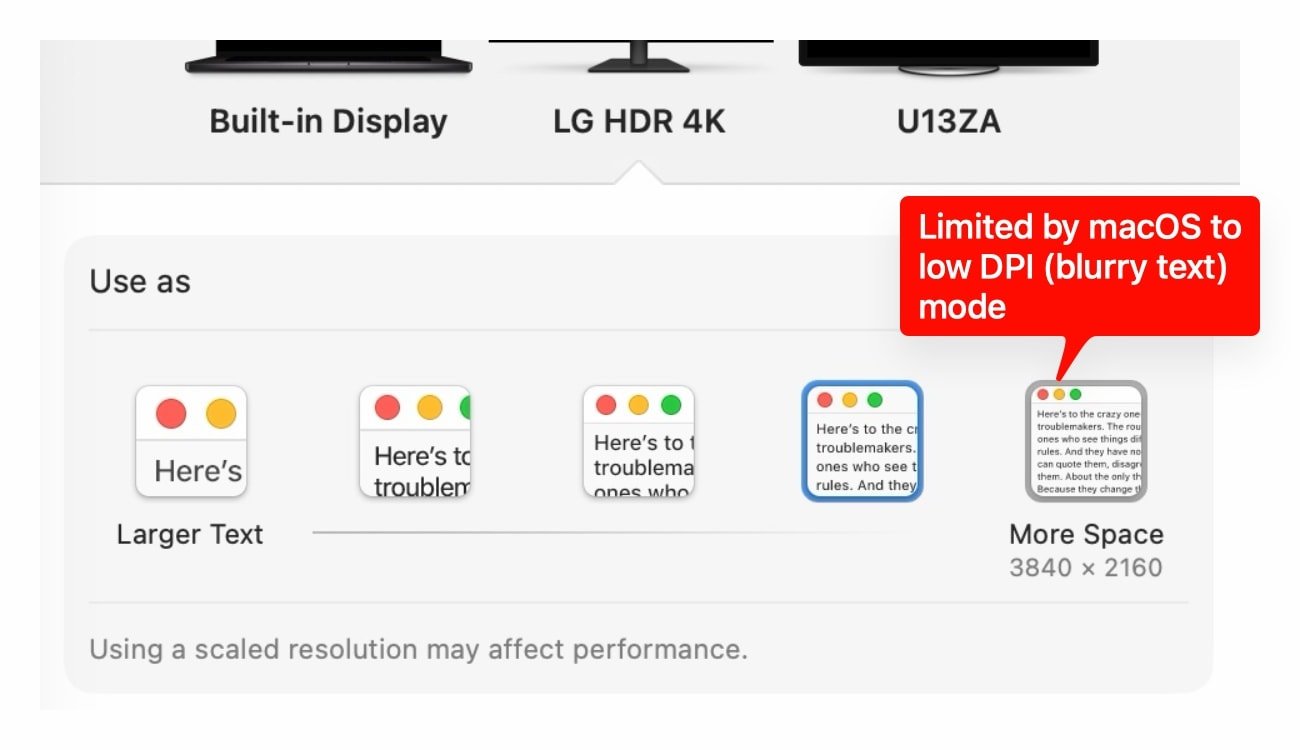
Apple's M4 and M5 chip generations have introduced a significant regression in macOS display handling, creating an opening for developers to address user experience issues with 4K external displays. The limitation forces users to choose between full screen real estate with blurry text or reduced workspace with sharp but oversized UI elements.
The technical issue centers on how newer Apple Silicon chips handle High DPI (HiDPI) modes for 4K displays. While M1, M2, and M3 machines supported full 3840x2160 HiDPI modes with 7680x4320 backing stores, M4 and M5 systems cap maximum HiDPI at 3360x1890 with a 6720x3780 backing store. This represents approximately 1.75x scaling rather than the ideal 2.0x scaling for crisp text rendering.
"The M5 Max officially supports 'one external display up to 8K (7680x4320) at 60Hz' per Apple's specifications," notes the technical analysis. "The hardware is unquestionably capable."
Investigation reveals this is not a hardware limitation. Display Coprocessor (DCP) capabilities are identical between M2 Max and M5 Max systems when connected to the same 4K display. The restriction exists in the GPU driver's display mode generation policy, specifically in the AppleDisplayCrossbar driver that sits between the DCP hardware interface and WindowServer.
"The M4/M5 DCP firmware implements a conservative framebuffer pre-allocation strategy that reads the display's native resolution from EDID, calculates the maximum framebuffer it will allocate based on a per-display-pipe budget, and reserves headroom for potential additional displays that might be connected later," explains the analysis. "This caps the HiDPI backing store to approximately 1.75x the native resolution, rather than the 2.0x needed for full HiDPI."
This limitation creates a market opportunity for display utility developers. Companies like BetterDisplay, which already provides display override capabilities, could expand their offerings to address this specific regression. The BetterDisplay developer has acknowledged this as an M4-generation limitation, indicating awareness within the developer community.
Users have attempted multiple workarounds without success, including display override plists, EDID patching, IOKit registry modifications, and even private API calls. The limitation operates at the kernel level within the AppleDisplayCrossbar driver, making it resistant to user-space modifications.
Potential solutions could include:
- Developing kernel extensions that modify the display allocation policy
- Creating hardware-based solutions that intercept and modify display signals
- Building applications that work within the constraints while optimizing the user experience
- Developing display profiles that compensate for the resolution loss
The technical community has responded with diagnostic tools to identify affected systems. Commands like ioreg -l -w0 | grep -o '"MaxActivePixelRate"=[0-9]*\|"MaxW"=[0-9]*\|"MaxH"=[0-9]*' can help users verify their system's capabilities.
Apple has been notified through the feedback system (FB22365722), but the company has not yet addressed the issue. The persistence of this limitation across macOS updates suggests it may be intentional behavior rather than a bug.
For users affected by this limitation, the immediate options remain limited to choosing between full resolution with blurry text or reduced resolution with sharp text. However, the technical constraints may inspire innovation in the display utility space, creating opportunities for developers to solve problems Apple has introduced with its latest hardware generations.
For those experiencing this issue, diagnostic commands and further technical details are available in the original analysis. The BetterDisplay discussion provides additional context from developers working on display solutions.
Comments
Please log in or register to join the discussion