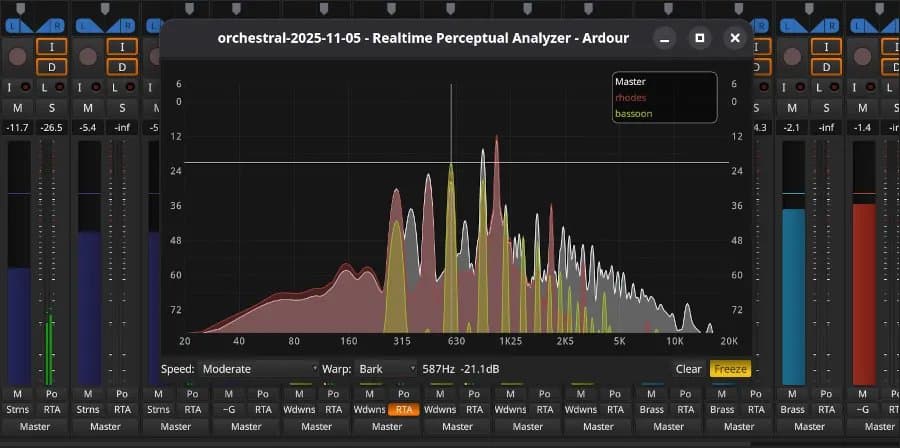
The popular open-source digital audio workstation Ardour 9.0 launches with multi-touch support, piano-roll editing, real-time perceptual analysis, and extensive workflow improvements for Linux, Windows, and macOS users.
The open-source digital audio workstation landscape just got a significant upgrade with the release of Ardour 9.0, bringing multi-touch support and a host of workflow enhancements to musicians, recording engineers, and audio professionals across Linux, Windows, and macOS platforms.
Multi-Touch Revolution for Desktop Audio Production
Perhaps the most notable addition in Ardour 9.0 is the introduction of multi-touch support for Windows and Linux users. This feature brings tablet-like interaction capabilities to desktop audio production, allowing users to manipulate faders, zoom timelines, and navigate complex projects with intuitive touch gestures. While macOS users have had some touch capabilities through trackpad gestures, this expansion to Windows and Linux significantly broadens the accessibility of touch-based audio editing.
Enhanced MIDI Editing with Piano Roll Integration
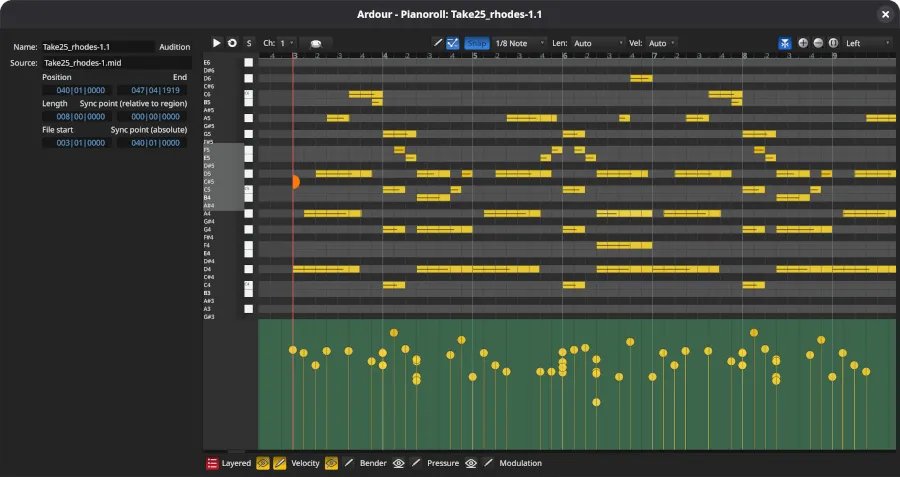
Ardour 9.0 introduces dedicated piano-roll windows that provide a more intuitive interface for MIDI editing. The new GUI editing capabilities for MIDI cues and clips allow users to directly manipulate note data within the timeline view, streamlining the composition and arrangement process. This visual approach to MIDI editing reduces the cognitive load when working with complex musical passages.
Direct Recording to Cue Slots
The ability to record directly into cue slots represents a significant workflow improvement for live performance and rapid prototyping. Musicians can now capture ideas instantly without the need to create tracks first, making Ardour more responsive to creative impulses and reducing the friction in the recording process.
Real-Time Perceptual Analysis
A dedicated real-time perceptual analyzer window gives audio engineers immediate visual feedback on how their mixes will be perceived by listeners. This tool goes beyond traditional spectrum analyzers by focusing on psychoacoustic principles, helping users make more informed decisions about frequency balancing and dynamic processing.
Keyboard-Driven Automation
Automation editing has been enhanced with keyboard-driven controls, allowing for more precise and efficient manipulation of parameter changes over time. This improvement is particularly valuable for complex automation tasks where mouse-based editing would be cumbersome or imprecise.
Plugin and Scripting Enhancements
The plugin ecosystem receives attention in this release with various enhancements that improve compatibility and performance. Additionally, new Lua scripting capabilities open up advanced customization options for power users who want to extend Ardour's functionality or automate repetitive tasks.
Cross-Platform Consistency
With support for Linux, Windows, and macOS, Ardour 9.0 maintains its position as one of the most versatile open-source DAW solutions available. The multi-touch support on Windows and Linux brings these platforms closer to feature parity with macOS, where touch interactions have been more established.
Download and Documentation
Ardour 9.0 is available for download from Ardour.org for all supported platforms. The release includes comprehensive documentation to help users navigate the new features and optimize their workflow with the updated interface.
The release of Ardour 9.0 demonstrates the continued maturation of open-source audio production tools. By incorporating modern interaction paradigms like multi-touch while maintaining the deep functionality expected from professional DAW software, Ardour strengthens its position as a viable alternative to proprietary solutions for audio professionals and enthusiasts alike.
Comments
Please log in or register to join the discussion