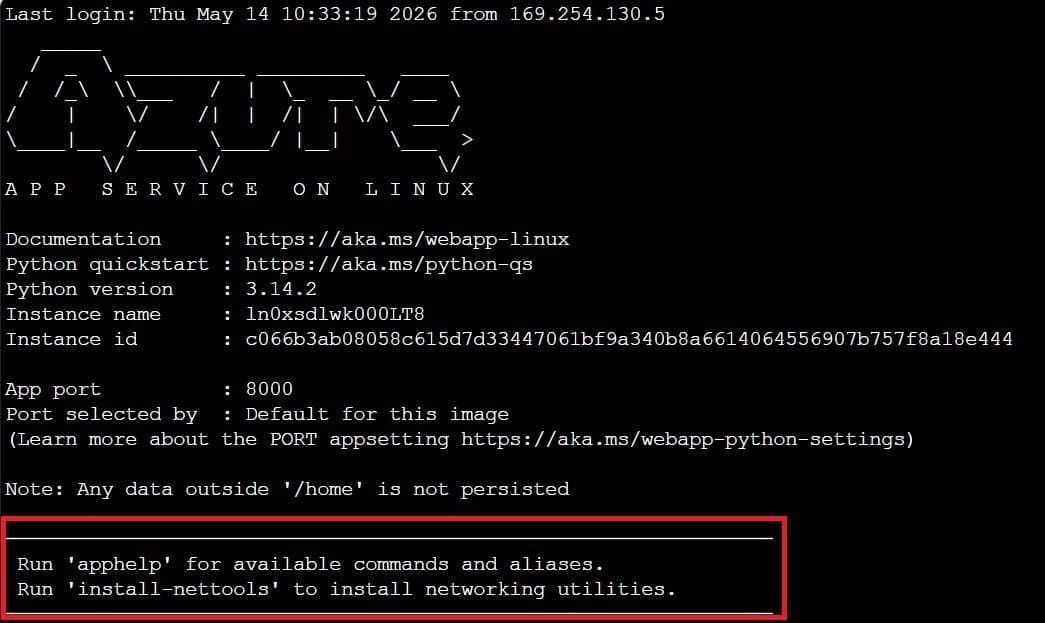
Microsoft has introduced new SSH helper aliases for Python applications on Azure App Service for Linux, streamlining troubleshooting workflows with specialized commands for app management, diagnostics, and Azure AI connectivity.
Azure App Service Enhances SSH Experience with Python Helper Aliases
Microsoft continues to refine its cloud development platform with the introduction of new SSH helper aliases specifically designed for Python applications running on Azure App Service for Linux. This enhancement represents a strategic improvement in developer experience, reducing friction during application troubleshooting and maintenance.
What Changed: Expanded SSH Capabilities
The new helper aliases introduce a structured approach to common debugging tasks directly within SSH sessions. Instead of requiring developers to manually navigate file systems, remember complex command sequences, or switch between diagnostic tools, Azure now provides purpose-built commands that consolidate these workflows.
When developers SSH into their Python applications, they now have access to two primary commands:
apphelp- View available SSH helpersapphelp- Execute the full list of available aliases (though this appears to be a duplication in the documentation)
These helpers are thoughtfully categorized by common development and operations tasks:
- App information and configuration
- Log management
- Diagnostics and testing
- Azure AI Foundry connectivity
- Network troubleshooting
Provider Comparison: Azure vs. Cloud Alternatives
While all major cloud providers offer SSH access to their compute services, Azure's approach with these helper aliases demonstrates a developer-centric philosophy that differentiates it from competitors:
- AWS Elastic Beanstalk: Provides SSH access but relies on standard Unix commands without specialized helpers
- Google Cloud Run: Offers SSH through Cloud Shell but requires manual navigation and command construction
- Azure App Service: Delivers purpose-built aliases that abstract complexity while maintaining flexibility
This enhancement positions Azure as particularly strong for Python development teams, as it reduces the cognitive load associated with remembering specific paths, commands, and diagnostic procedures. The focus on Python-specific tools also indicates Azure's commitment to supporting popular programming languages with tailored experiences.
Technical Deep Dive: Available Helper Aliases
The implementation of these helpers represents a thoughtful approach to common pain points in cloud application debugging. Let's examine the key categories in detail:
Application Management Helpers
These commands streamline basic application administration tasks:
applogs- Tails application logs directly from the SSH session, eliminating the need to navigate to specific log directoriesappcurl- Tests the application locally using localhost:$PORT, which is particularly valuable for verifying that the app is listening correctly within its containershowpkgs- Lists installed Python packages, helping diagnose dependency issuesappconfig- Displays common App Service settings, providing visibility into configurationdeploylogs- Shows recent deployment logs, facilitating quick rollback or deployment troubleshootingcheckport- Verifies the app is listening on the configured port, addressing a common connectivity concerngohome- Navigates to /home/site/wwwroot, the application root directorygosrc- Takes developers directly to the app source directory
Azure AI Foundry Integration
For applications leveraging Azure AI services, Microsoft has introduced specialized diagnostic commands:
ai-test- Performs a comprehensive end-to-end connectivity test with output like:✓ Connected | 3706ms | Model: gpt-4.1-mini | Auth: Managed Identityai-diagnose- Conducts broader diagnostic checks covering multiple aspects of AI connectivityai-dns- Specifically checks DNS resolution for the Foundry endpointai-access-check- Validates RBAC permissions for Azure AI service callsai-curl- Provides verbose HTTP debugging for Foundry endpointsai-latency- Benchmarks response times from Azure AI services
These AI-specific helpers address a critical need for developers building AI-powered applications, who often need to validate connectivity, permissions, and performance from within the application environment itself.
Network Troubleshooting Tools
Recognizing that network issues frequently complicate cloud deployments, Azure includes:
install-nettools- Installs commonly used networking utilities including tools for DNS resolution, TCP connectivity analysis, routing diagnostics, packet capture, listening port verification, and HTTP endpoint access
This comprehensive networking toolkit provides developers with professional-grade diagnostic capabilities without requiring additional configuration or external tool installation.
Business Impact: Efficiency and Developer Experience
The introduction of these SSH helper aliases delivers several tangible business benefits:
Reduced Mean Time to Resolution (MTTR)
By consolidating common troubleshooting commands into simple aliases, Azure significantly reduces the time developers spend diagnosing issues. Instead of constructing complex commands or navigating multiple directories, teams can execute focused diagnostic commands with a single word.
Lowered Barrier to Entry for Junior Developers
The helper system abstracts away much of the complexity of cloud debugging, making it easier for less experienced developers to effectively troubleshoot applications. This reduces dependency on senior team members for basic diagnostic tasks.
Improved Operational Consistency
When all team members use standardized helper commands, troubleshooting approaches become more consistent. This consistency reduces the risk of overlooked diagnostic steps and creates more reliable incident resolution processes.
Enhanced Productivity for Python Workloads
Python developers specifically benefit from these enhancements, as many commands are tailored to Python-specific concerns like package management and application behavior. This targeted approach acknowledges that different programming languages have distinct debugging requirements.
Implementation Considerations
Organizations adopting these helper aliases should consider several factors:
Onboarding and Documentation
While the commands are straightforward, teams should still document their usage within their internal knowledge bases. Creating cheat sheets or quick-reference guides can accelerate adoption.
Integration with Existing Workflows
These helpers complement but don't replace existing monitoring and observability solutions. Organizations should consider how these SSH-based tools fit into their broader observability strategy.
Security Considerations
As with any SSH access, proper access controls should be maintained. The helper commands themselves don't introduce new security risks, but they do make the SSH session more powerful, emphasizing the need for appropriate access management.
Future Directions
The introduction of these helper aliases suggests Azure's commitment to refining developer experiences for specific workloads. Future enhancements might include:
- Helper aliases for additional programming languages beyond Python
- Integration with Azure's monitoring and diagnostics services
- Customizable helper commands that organizations can define for their specific needs
- Enhanced AI diagnostic capabilities with predictive troubleshooting suggestions
For developers working with Python applications on Azure App Service for Linux, these SSH helper aliases represent a meaningful improvement in the debugging experience. By reducing friction and standardizing common troubleshooting workflows, Azure continues to demonstrate its focus on developer productivity and operational efficiency.
For more information about Azure App Service for Linux, visit the official documentation. To explore Python development on Azure, check the Azure for Python developers resource center.
Comments
Please log in or register to join the discussion