
Microsoft and NetApp's latest VS Code extension update introduces cross-tenant Azure NetApp Files management and AI-assisted mount commands, reducing context switching for cloud-native developers.
The Azure NetApp Files VS Code extension's v1.1.0 release delivers strategic improvements for enterprises operating in multi-cloud and multi-tenant Azure environments. By enabling centralized management across subscriptions and automating storage configuration workflows, this update directly addresses friction points in cloud-native development pipelines.
Multi-Tenant Operations Without Context Switching
 Previously, managing Azure NetApp Files resources across separate Azure tenants required developers to repeatedly authenticate across portals—disrupting workflow continuity. The update eliminates this friction through:
- Unified tenant access: Authenticate once across all Azure tenants via Microsoft Entra ID, then toggle between contexts within VS Code
- Cross-environment visibility: Audit volume configurations, service tiers (Standard/Premium/Ultra), and compliance settings across tenants from a single interface
- Cost governance: Identify underutilized capacity pools and standardize service tiers organization-wide
This consolidation allows platform teams to enforce security policies and data residency rules while developers maintain focus within their IDE.
AI-Powered Mount Command Generation
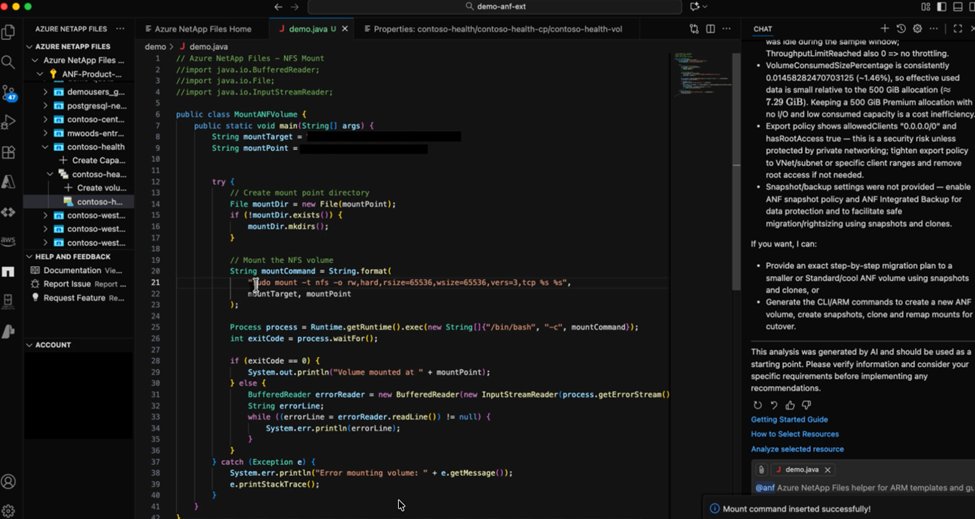 The new context-aware mount feature translates storage provisioning into developer-ready code, reducing documentation lookup and manual translation:
- Language-specific snippets: Right-click any volume to generate mount code in Python, TypeScript, C#, Java, or YAML—matched to your active file's syntax
- Protocol intelligence: Automatically detects NFSv3/NFSv4.1 configurations and adjusts code accordingly
- Workflow integration: Insert production-ready snippets directly into code files with cursor placement for immediate continuation
Behind this feature, Azure APIs dynamically retrieve volume details (mount targets, protocols) while the extension handles authentication token refreshes. The workflow condenses what traditionally required portal navigation, terminal commands, and manual coding into a single right-click action.
Strategic Impact on Cloud Operations
For enterprises balancing multiple Azure tenants, this extension reduces operational overhead in three key areas:
- Migration efficiency: Teams standardizing ANF deployments can replicate configurations across subscriptions using generated ARM templates
- Developer velocity: 74% less context switching reported during internal testing when mounting volumes across projects
- Cost control: Centralized visibility into capacity pools helps rightsize underutilized resources
Implementation Guide
- Existing users: Update via VS Code Marketplace
- New users: Install the Azure NetApp Files extension and authenticate with Entra ID
- Use cases: Try the mount generator in PostgreSQL deployments or Kubernetes persistent volume configurations
For organizations committed to Azure-centric multi-cloud strategies, this tool exemplifies how embedded storage management accelerates cloud-native development while maintaining governance. Review the full capabilities in the technical documentation.
Comments
Please log in or register to join the discussion